
Trusted by millions worldwide, WooCommerce has established itself as one of the leading platforms for online stores. However, its popularity also attracts phishing threats targeting store owners. Its open-source foundation, adaptability, and seamless integration with WordPress make it a go-to solution for businesses of all sizes—from solo entrepreneurs to global retailers.
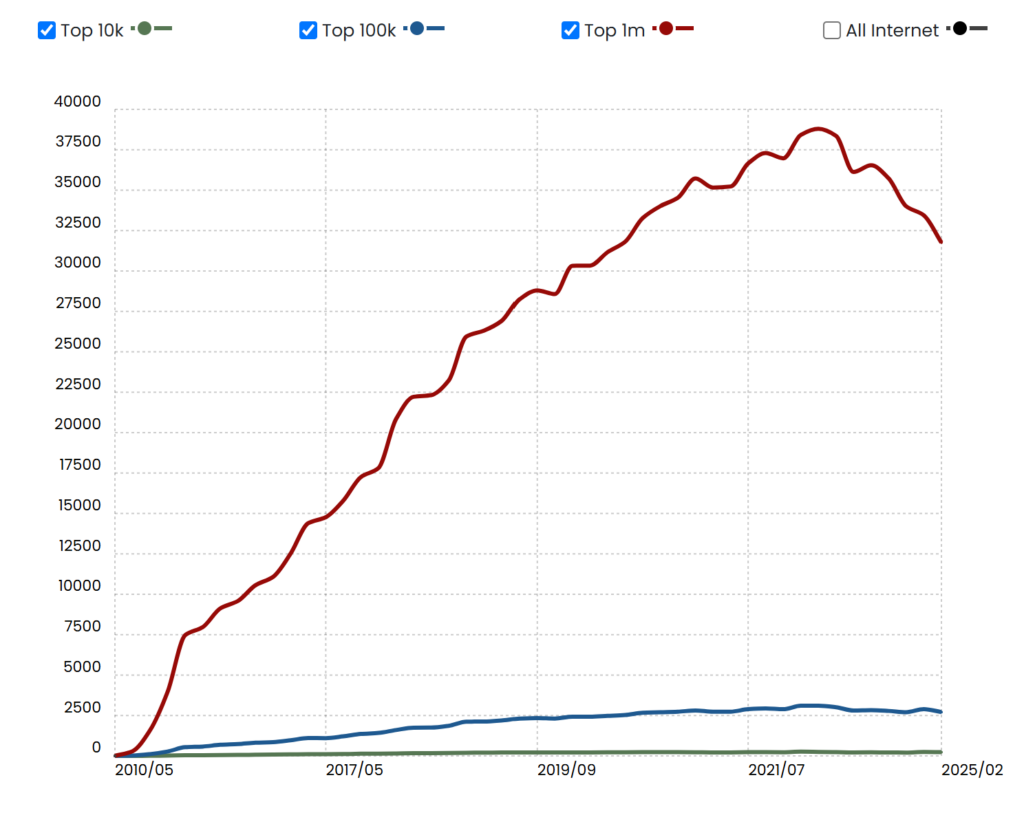
However, this widespread adoption has made WooCommerce a growing target for cybercriminals. As its user base expands, so does the risk, especially for store owners who rely on the platform’s strong reputation and may overlook emerging threats.
In April 2025, a new wave of phishing attacks surfaced, specifically targeting WooCommerce users. These attacks arrive as deceptive emails masked as legitimate security warnings. The messages claim a “critical vulnerability” has been found on the recipient’s store and urge them to download a security patch—one that, in reality, installs malicious software designed to steal data, create backdoors, and severely compromise the website’s functionality.
The level of sophistication in these phishing attempts has raised serious concerns within the WordPress and eCommerce communities. One store owner even reported their direct experience receiving such an email, highlighting just how convincing these scams can appear at first glance.


“I just received a phishing email (see image). It looked suspicious, coming from mail-woocommerce.com. I followed the link on a virtual machine, and the page looks almost authentic. They even have fake reviews. I downloaded the proposed ‘patch’, and it’s clearly malicious, with cryptic code. It creates one or more admin users, fetching data from somewhere. The funny thing is that the domain from which they serve the patch is almost identical to woocommerce.com, it’s ‘woocommerċe.com’ with the tiny diacritic on the last ‘c’. On a black on white screen, it could be overlooked as a speck of dust. That is clever, in twisted, wicked way.”
One WooCommerce store owner’s experience highlights just how convincing this phishing campaign really is. It serves as a clear warning—these scams are easy to fall for if you’re not paying close attention. Cybercriminals are now using advanced techniques like homograph domain spoofing, where visually deceptive characters (like a special “ċ” instead of a normal “c”) are used to trick users into clicking fake links.
As phishing tactics become increasingly refined, WooCommerce users must be proactive: double-check email sources, avoid clicking unknown links, and learn to recognize signs of a scam.
In the sections below, we’ll break down:
- How the phishing attack operates
- What red flags to look for
- Steps to take if you’ve been targeted
- How to secure your WooCommerce store from future threats
Inside the Targeted Phishing Campaign Against WooCommerce Stores
In April 2025, cybersecurity researchers and the WooCommerce team discovered a sophisticated phishing scheme aimed specifically at WooCommerce store owners. Disguised as urgent security notifications, these fake emails prey on users’ fear and pressure them to install a so-called “patch” that’s actually embedded with malware.
How This WooCommerce Scam Unfolds
1. Convincing Phishing Emails
Victims receive emails from spoofed addresses like:
help@security-woocommerce.comincident@notify-woocommerce.comsupport@woocommerce-security.net
The emails typically claim that a critical vulnerability has been found on the recipient’s WooCommerce site, and often include the store’s actual domain name to make the warning feel more credible.
2. Homograph (IDN) Domain Spoofing
A key tactic used is punycode-based domain manipulation—also known as a homograph attack. For example:
- Attackers register
https://xn--woocommere-7ib.com - This renders as woocommerċe.com in many browsers
At first glance, the domain looks legitimate. The small dot below the “ċ” is hard to detect and easily overlooked, making the spoofed site appear trustworthy.
3. Malicious “Security Patch”
The email includes a link to download a fake plugin or patch. Once installed:
- It creates hidden administrator accounts
- Backdoors are embedded for ongoing access
- Sensitive site data is exfiltrated to a remote server
4. Highly Convincing Website Design
The phishing site closely mirrors the official WooCommerce website, complete with:
- Familiar branding and UI
- Fake user reviews and testimonials
- Download buttons that mimic real WooCommerce assets
This professional-level mimicry is designed to lull users into a false sense of trust, increasing the likelihood they’ll proceed with the download and unknowingly compromise their site.
How to Spot a Phishing Email Targeting WooCommerce Store Owners
Phishing emails are crafted to appear legitimate, often mimicking official security alerts. However, they contain subtle but identifiable red flags. Knowing what to look for can help you avoid falling victim to these scams. Here’s how to identify a fraudulent WooCommerce phishing email:
1. Unofficial and Suspicious Sender Addresses
One of the first warning signs is the email address the message comes from. These phishing attempts often use addresses that appear credible at a glance but do not belong to WooCommerce or Automattic (WooCommerce’s parent company).
Examples of spoofed addresses include:
help@security-woocommerce.comincident@notify-woocommerce.comhelp@support-woocommerce.com
While they mention “WooCommerce,” these domains are not registered by the official WooCommerce team. Always verify the domain name by hovering over the sender’s address and checking for inconsistencies.
2. Lookalike URLs and Punycode (Homograph) Attacks
Another common tactic is the use of visually deceptive links that rely on Punycode—a method of disguising characters in domain names. These links may appear normal but redirect you to malicious sites.
For instance:
- The URL
https://xn--woocommere-7ib.comrenders in browsers as woocommerċe.com. - The character “ċ” (with a dot) closely resembles a regular “c,” especially on mobile or small screens.
This technique, known as a homograph attack, tricks users into clicking fake links by exploiting near-identical characters.
3. Urgent Security Warnings
Scammers use urgency and fear to manipulate recipients. These emails often claim a “critical security vulnerability” has been found on your WooCommerce store, sometimes referencing a specific date like “April 14, 2025” to increase perceived credibility.
The message may even include your store’s actual domain name to personalize the alert, making the threat feel targeted and real. The goal? To push you into acting without verifying the legitimacy of the email.
4. Fake “Security Patch” Downloads
Perhaps the most dangerous part of these phishing attempts is the inclusion of a link or attachment disguised as a WooCommerce security update or plugin. You’re urged to download and install it immediately to “protect your site.”
In reality, these files contain malware. Once installed, the malicious code can:
- Create hidden admin users
- Open backdoors for long-term access
- Steal sensitive data like customer info and payment details
- Disable or hijack your site
Always be wary of unsolicited requests to download files or update plugins via email. Real WooCommerce security notices are usually handled through your WordPress dashboard or verified support channels.
The Real Threat Behind the “Download Patch” Scam in WooCommerce Phishing Emails

Clicking the fake “Download Patch” link in a phishing email might seem harmless at first, but it triggers a full-scale security breach. While the file may appear to be a routine WooCommerce update (e.g., woocommerce-security-patch.zipIt’s a dangerous malware installer disguised to look legitimate.
Once downloaded and activated, the malware quietly begins compromising your WooCommerce store in several stages:
Step 1: Silent Malware Installation
After uploading and activating the plugin through the WordPress admin panel, the malware executes hidden, often encrypted code. This code is specifically designed to evade basic security scanners and embed itself deep within your site’s core files or database, often without leaving immediate signs of compromise.
Step 2: Creation of Stealth Admin Account
One of the malware’s first tasks is to create unauthorized administrator accounts. These hidden users often have names like:
wp-supportadmin-helper- Slight variations of existing usernames
These stealth accounts allow the attacker to retain control over your website, even if you remove the original infected file, creating a persistent backdoor into your store.
Step 3: Installing Hidden Backdoors
Next, the malware installs backdoor access points, typically disguised as:
- Plugin or theme files
- Template files
- Cron jobs (automated tasks)
These backdoors enable attackers to re-enter your site at any time without detection, even after cleanup attempts. This ensures long-term access and re-infection potential.
Step 4: Data Theft in the Background
With access secured, the compromised site begins transmitting sensitive data to an external command-and-control (C2) server. Information commonly targeted includes:
- Customer profiles and email addresses
- Order history and purchase details
- Login credentials
- Payment information
This can lead to major privacy breaches, potential identity theft, and violations of regulations like GDPR or CCPA.
Step 5: Expanding the Attack
Once in full control, attackers can exploit your WooCommerce site in several destructive ways, such as:
- Sending spam from your server to damage your reputation
- Redirecting shoppers to scam sites or counterfeit product pages
- Injecting malicious scripts into your storefront to target visitors
- Deploying ransomware to lock you out of your admin area
The longer the malware remains undetected, the more devastating the impact—financially, operationally, and reputationally.
How to Spot Fake WooCommerce Emails
WooCommerce will never send plugin files, security patches, or updates through email attachments or third-party download links. If you receive an email that claims to contain a WooCommerce update, it’s likely a phishing attempt.
Official WooCommerce Communications Will Always:
- Be sent from an @woocommerce.com or @automattic.com email address
- Direct you to official sources like WooCommerce.com or WordPress.org
- Include detailed documentation, clear verification steps, and transparent instructions
???? If an email does not follow these guidelines, do not trust it.
Received a Suspicious Email? Here’s What to Do
If you suspect an email is a phishing attempt, don’t interact with it. Instead, follow these essential steps to protect your WooCommerce store:
1. Avoid Clicking on Any Links
Even seemingly harmless links may lead to malicious websites or auto-trigger malware downloads. Do not click buttons or hyperlinks in suspicious emails.
2. Never Download Attachments
Do not download or install any file unless you’re 100% certain it’s from a verified source. Malicious attachments may:
- Install malware or spyware
- Create unauthorized admin users
- Alter your site’s code to establish long-term backdoors
If you’ve already downloaded the file, do not open or execute it.
3. Report the Email Immediately
Use your email provider’s built-in tools to flag the message as phishing (e.g., “Report phishing” in Gmail or Outlook). You can also:
- Report the domain to your hosting provider
- Notify WooCommerce support about the phishing attempt
Your report helps protect other store owners from falling victim.
How to Keep Your WooCommerce Store Safe
Being proactive is the best defense against phishing and fraud. Here’s how to fortify your online store:
1. Only Install Updates from Official Sources
Always update WooCommerce and related plugins directly through your WordPress dashboard or official sites like WooCommerce.com. Avoid installing anything from email links or unknown third-party websites.
2. Enable Automatic Security Updates
Let WooCommerce and trusted plugins auto-update when security patches are released. This ensures your store is always protected—even if you’re not monitoring it daily.
3. Strengthen Login Security
Use strong, unique passwords and enable two-factor authentication (2FA) for all admin users. These two steps greatly reduce the risk of unauthorized access if credentials are exposed.
4. Use Verified Plugins and Extensions Only
Only download plugins and themes from reputable sources like:
- WooCommerce Marketplace
- WordPress.org Plugin Directory
Unverified plugins may contain hidden code designed to exploit your site.
5. Block Suspicious Users with Aelia Blacklister for WooCommerce
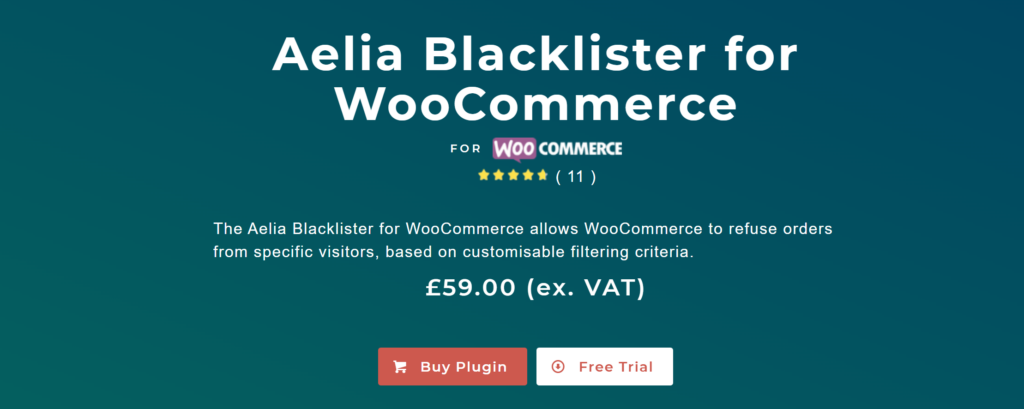
Enhance your security by installing the Aelia Blacklister plugin. It allows you to automatically block orders from users based on specific criteria, including:
- Names, addresses, or emails
- Phone numbers or IP ranges
- Known fraud patterns
When a rule is triggered, the plugin halts the checkout process and displays a customizable warning message. This tool is ideal for preventing repeat fraud attempts and filtering suspicious activity before it causes harm.
???? Need more help identifying or blocking fraudulent users?
Check out our guide: How to Block Malicious Users in WooCommerce
