
TypePad Shutting Down: Seamless WordPress Migration Before September 30th
Last Updated: September 23, 2025 | Only 7 Days Remaining
Your TypePad Migration Options: Export vs Professional Transfer
DIY Export: How to Download Your Content (And Its Limitations)
TypePad provides a basic export function that allows you to download your content before the shutdown. Here’s the step-by-step process:
Export Process:
- Log into your TypePad account dashboard
- Navigate to “Settings” → “Import/Export”
- Click “Export Blog”
- Choose your export format (Movable Type or WordPress)
- Wait for the export file generation (can take several hours)
- Download the .txt or .xml file to your computer
What the Export Includes:
- Blog post text and titles
- Post dates and categories
- Basic comment data
- Author information
Critical Limitations of DIY Export:
- Images and media files not included: Photos, videos, and documents remain on TypePad servers and will be deleted
- Formatting often breaks: Rich text formatting, custom styling, and layouts don’t transfer properly
- Comments may not import correctly: Reader engagement and discussion threads often fail to transfer
- No SEO preservation: URL structures change, breaking existing search engine rankings
- Custom design lost: Any theme customizations or unique styling disappears
- No technical support: If the export fails or is corrupted, you’re on your own
Time Investment: Even with a successful export, you’ll need significant time to:
- Set up WordPress hosting and installation
- Import and clean up content formatting
- Recreate your site design
- Fix broken links and missing images
- Configure SEO settings
Professional WordPress Migration: Complete Solution
Professional migration services handle every aspect of moving your blog to WordPress while preserving what matters most: your content, SEO rankings, and professional appearance.
What’s Included in Professional Migration:
Complete Content Transfer:
- All blog posts with original formatting preserved
- Comments and reader engagement maintained
- Images and media files properly migrated
- Categories and tags organized correctly
- Author profiles and bio information transferred
SEO Preservation:
- URL structure analysis and 301 redirect setup
- Meta titles and descriptions maintained
- Image alt tags and SEO data preserved
- XML sitemap generation for search engines
- Google Search Console transition assistance
Design and Functionality:
- Modern WordPress theme selection and customization
- Mobile-responsive design implementation
- Speed optimization and performance improvements
- Security setup and backup systems
- Plugin installation for enhanced functionality
Ongoing Support:
- Pre-launch testing and quality assurance
- Training on WordPress admin interface
- 30-day post-migration support
- Emergency technical assistance during transition
Comparing Costs: Free Export vs Migration Investment
DIY Export Costs (Seemingly Free):
- TypePad export: Free
- WordPress hosting: £5-15/month
- Premium theme: £50-100
- Your time investment: 40-60 hours
- Hidden costs: Lost SEO rankings, broken functionality, missed deadline stress
Professional Migration Investment:
- Complete migration service: £497-897 (depending on site complexity)
- Hosting setup included
- Professional design included
- SEO preservation guaranteed
- Time saved: 50+ hours of your valuable time
Return on Investment Calculation: If your blog generates leads, sales, or professional opportunities, the SEO rankings and professional appearance preserved through professional migration typically pay for themselves within 2-3 months.
Risk Assessment:
- DIY success rate: 30-40% (many users lose critical data or rankings)
- Professional migration success rate: 99% (backed by guarantees)
Why WordPress is the Best TypePad Alternative
WordPress vs Other Blogging Platforms
When evaluating TypePad alternatives, WordPress stands out as the clear winner for serious bloggers and content creators:
WordPress Advantages:
- Market Leadership: Powers 43% of all websites globally
- Flexibility: Grows from simple blog to complex website
- Ownership: You control your content and data completely
- Customization: Thousands of themes and plugins available
- Community Support: Massive developer and user community
- Future-Proof: Constantly updated and improved
Compared to Other Alternatives:
Blogger (Google):
- ❌ Limited customization options
- ❌ Google could shut down service (like they did with Google+)
- ❌ Fewer professional design options
- ✅ Free hosting included
Medium:
- ❌ No custom branding or design control
- ❌ Limited monetization options
- ❌ Algorithm changes affect visibility
- ✅ Built-in audience discovery
Squarespace:
- ❌ Monthly costs similar to TypePad
- ❌ Less flexibility for complex sites
- ❌ Limited blogging-specific features
- ✅ Beautiful design templates
WordPress clearly wins because it offers the perfect balance of power, flexibility, and long-term stability that growing blogs need.
SEO Benefits of Moving to WordPress
WordPress provides significant SEO advantages that TypePad simply couldn’t match:
Technical SEO Superiority:
- Faster Loading Speeds: Modern hosting and caching options
- Mobile Optimization: Responsive themes are standard
- Clean Code: Search engines can easily crawl and index content
- URL Structure Control: Customize permalinks for SEO optimization
Content SEO Features:
- SEO Plugins: Yoast SEO, RankMath provide real-time optimization guidance
- Schema Markup: Structured data helps search engines understand content
- Image Optimization: Automatic compression and alt tag management
- Internal Linking: Easy linking suggestions and management
Advanced SEO Capabilities:
- XML Sitemaps: Automatic generation and submission to search engines
- Meta Tag Control: Complete control over titles, descriptions, and headers
- Analytics Integration: Seamless Google Analytics and Search Console setup
- Page Speed Optimization: Caching plugins and CDN integration
Migration SEO Benefits: Many TypePad users see immediate SEO improvements after migrating:
- 25-40% faster page load times
- Improved mobile usability scores
- Better search engine crawling and indexing
- Enhanced user engagement metrics
Design Flexibility and Modern Features
WordPress offers design and functionality options that make TypePad look outdated:
Design Flexibility:
- Thousands of Themes: Free and premium options for every niche
- Complete Customization: Modify colors, fonts, layouts, and functionality
- Page Builders: Drag-and-drop design tools for non-technical users
- Custom CSS: Full design control for advanced users
Modern Blogging Features:
- Social Media Integration: Automatic sharing and social feeds
- Email Marketing: Newsletter signup forms and automation
- Comment Systems: Advanced moderation and engagement tools
- Multi-Author Support: Team blogging with role management
Content Management:
- Rich Text Editor: Advanced formatting and media insertion
- Content Scheduling: Plan and automate post publishing
- Revision History: Never lose content with automatic backups
- Media Library: Organized file management and optimization
E-commerce Ready:
- WooCommerce Integration: Sell products directly from your blog
- Membership Sites: Paid content and subscriber management
- Donation Systems: Accept payments and donations easily
Long-term Security and Platform Stability
Unlike TypePad’s sudden shutdown, WordPress offers long-term stability:
Platform Longevity:
- 20+ Year Track Record: WordPress has grown consistently since 2003
- Open Source: Community-driven development ensures continuity
- Corporate Backing: Automattic provides commercial support and development
- Regular Updates: Monthly security and feature updates
Security Advantages:
- Regular Security Patches: Vulnerabilities addressed quickly
- Security Plugins: Advanced protection against malware and attacks
- Backup Solutions: Multiple automated backup options
- SSL Certificates: Free HTTPS encryption for all sites
Data Ownership:
- Complete Control: You own your content, design, and data
- Export Freedom: Move to any hosting provider anytime
- No Platform Lock-in: Never face another TypePad-style shutdown
- Multiple Backup Options: Your content is never held hostage
This stability means you’ll never face another emergency migration situation like you’re experiencing with TypePad’s shutdown.
If you’re planning to move your online community or content to WordPress, you might also be exploring better ways to connect with your audience once you’re there. Webinars are one of the most powerful tools for that. Check out our latest guide on How to Pick the Right Virtual Webinar Platform for Your Business – Insights from ClickMeeting to discover how to host professional, engaging virtual events that build trust and drive growth.
The TypePad to WordPress Migration Process
With only 7 days remaining until TypePad shuts down, here’s exactly how professional migration works within this tight deadline:
Content Assessment and Planning (Day 1)
Immediate Assessment: Within hours of your migration request, our team begins:
- Content Audit: Analyzing your TypePad blog structure, post count, and media files
- SEO Analysis: Documenting current search rankings and traffic sources
- Technical Review: Identifying custom features, plugins, or special functionality
- Design Evaluation: Understanding your current branding and style preferences
Migration Strategy Development:
- URL Mapping: Planning how TypePad URLs will redirect to WordPress
- Content Organization: Optimizing categories, tags, and site structure
- Feature Enhancement: Identifying opportunities to improve your blog during migration
- Timeline Confirmation: Ensuring completion before September 30th deadline
Client Communication:
- Progress Dashboard: Real-time updates on migration status
- Direct Contact: Dedicated migration specialist assigned to your project
- Emergency Support: 24/7 availability during critical migration period
Data Migration and URL Preservation (Days 2-3)
Content Transfer Process:
- TypePad Export: Professional extraction of all blog data and media files
- WordPress Import: Careful transfer preserving formatting and structure
- Media Migration: Downloading and re-uploading all images, videos, and documents
- Comment Integration: Preserving reader engagement and discussion history
SEO-Critical URL Setup:
- 301 Redirects: Every TypePad URL redirects to corresponding WordPress page
- Permalink Structure: Optimized URLs for better search engine performance
- Meta Data Transfer: Preserving SEO titles, descriptions, and keywords
- Sitemap Generation: New XML sitemap for search engine submission
Quality Assurance Testing:
- Link Verification: Every internal and external link tested and fixed
- Image Display: All media files loading correctly and optimized
- Comment Functionality: Reader engagement features working properly
- Mobile Compatibility: Site displays perfectly on all device types
Design Enhancement and Mobile Optimization (Days 4-5)
Professional Design Implementation:
- Theme Selection: Choosing WordPress theme that matches your brand
- Custom Styling: Adapting colors, fonts, and layout to your preferences
- Logo Integration: Professional header and branding setup
- Navigation Menu: Intuitive site navigation and user experience
Performance Optimization:
- Speed Enhancement: Page loading optimization (typically 40-60% faster than TypePad)
- Mobile Responsiveness: Perfect display on phones, tablets, and desktops
- Image Compression: Automatic optimization for faster loading
- Caching Setup: Advanced caching for improved performance
Feature Enhancements:
- Social Media Integration: Share buttons and social feed integration
- Email Signup Forms: Newsletter subscription capabilities
- Contact Forms: Professional inquiry and contact systems
- Analytics Setup: Google Analytics and Search Console configuration
Testing and Launch Before Deadline (Days 6-7)
Comprehensive Testing Phase:
- Functionality Testing: Every feature, link, and form tested thoroughly
- Cross-Browser Compatibility: Ensuring perfect display across all browsers
- Mobile Device Testing: iPhone, Android, tablet compatibility verified
- Speed Testing: Performance optimization and loading speed verification
Pre-Launch Client Review:
- Staging Site Preview: Complete review of migrated site before going live
- Content Verification: Client approval of all transferred content and design
- Final Adjustments: Last-minute tweaks and modifications
- Training Session: WordPress admin tutorial for content management
Launch Day Process (September 29th):
- DNS Switch: Seamless transition from TypePad to WordPress hosting
- Redirect Testing: Verifying all old TypePad URLs redirect properly
- Search Engine Notification: Submitting new sitemap to Google and Bing
- Performance Monitor: Real-time monitoring during launch transition
Post-Launch Support (September 30th and beyond):
- TypePad Shutdown Monitoring: Ensuring redirects work as TypePad goes offline
- Search Engine Updates: Monitoring Google’s indexing of new WordPress site
- Performance Tracking: Analytics setup and initial performance reporting
- 30-Day Support: Ongoing assistance with WordPress management
Emergency Migration Timeline (If You Start Today)
Today (September 23rd):
- Contact migration service immediately
- Complete emergency assessment form
- Receive migration quote and timeline confirmation
September 24th:
- Project kickoff and content extraction begins
- WordPress hosting setup and initial configuration
September 25th-27th:
- Content migration and design implementation
- SEO setup and redirect configuration
September 28th:
- Final testing and client review
- Last-minute adjustments and optimization
September 29th:
- Launch and go-live before TypePad shutdown
- Final redirect testing and monitoring
September 30th:
- TypePad shuts down – your blog safely migrated
- Monitoring and post-launch support begins
Protecting Your SEO Rankings During Migration
The biggest fear for established bloggers is losing years of SEO work. Here’s how professional migration preserves and often improves your search rankings:
301 Redirects and URL Structure Planning
Understanding 301 Redirects: 301 redirects tell search engines that your content has permanently moved from TypePad to WordPress. When implemented correctly, they transfer 90-99% of SEO value to your new URLs.
Professional Redirect Strategy:
- Complete URL Mapping: Every TypePad page redirected to corresponding WordPress page
- Optimized WordPress URLs: New permalink structure designed for better SEO
- Category and Tag Redirects: Taxonomy pages properly redirected
- Image and Media Redirects: Even media files redirect to new locations
Common DIY Redirect Mistakes:
- Missing Pages: Forgotten redirects create 404 errors
- Wrong Redirect Types: Using 302 (temporary) instead of 301 (permanent) redirects
- Redirect Chains: Multiple redirects that slow down page loading
- Incomplete Media Redirects: Images and documents showing as broken
Professional Redirect Implementation: Our migration process includes comprehensive redirect testing:
- Automated Redirect Generation: Software creates redirects for every URL
- Manual Verification: Each redirect tested individually
- Search Console Integration: Google notified of all URL changes
- Redirect Monitoring: Ongoing monitoring to catch any missed URLs
Preserving Comment History and User Engagement
Why Comments Matter for SEO: Comments provide fresh content, user engagement signals, and social proof that search engines value. Losing comment history can significantly impact rankings.
Professional Comment Migration:
- Complete Comment Transfer: All reader comments imported with original dates
- User Profile Preservation: Commenter names and information maintained
- Reply Threading: Comment conversations and replies kept intact
- Spam Filtering: Cleaning up spam comments during migration
Enhanced Comment Functionality: WordPress offers superior comment management:
- Better Moderation Tools: Advanced spam filtering and approval systems
- Social Login Options: Readers can comment using Facebook, Google accounts
- Threaded Discussions: Improved conversation flow and engagement
- Email Notifications: Automatic updates for comment authors
Image and Media File Migration
The Media Migration Challenge: TypePad hosts all images and media files on their servers. When they shut down, all media disappears unless properly migrated.
Professional Media Migration Process:
- Bulk Download: All images, videos, and documents downloaded from TypePad
- WordPress Upload: Media files uploaded to WordPress media library
- URL Replacement: All content links updated to new WordPress URLs
- Image Optimization: Files compressed for faster loading without quality loss
SEO Benefits of Proper Media Migration:
- Image Alt Tags: SEO-optimized descriptions for all images
- File Name Optimization: Images renamed with relevant keywords
- Schema Markup: Structured data for image search optimization
- CDN Integration: Faster loading from content delivery networks
Google Search Console Setup and Monitoring
Essential Post-Migration SEO Steps:
Search Console Configuration:
- Property Verification: Confirming Google ownership of new WordPress site
- Sitemap Submission: New XML sitemap submitted for faster indexing
- URL Parameter Setup: Configuring tracking parameters and variations
- International Targeting: Geographic targeting settings (if applicable)
Migration Monitoring:
- Crawl Error Tracking: Monitoring for broken links and 404 errors
- Index Status Monitoring: Ensuring Google indexes new WordPress pages
- Search Performance: Tracking ranking changes during transition
- Mobile Usability: Confirming mobile-friendly status
Recovery Timeline: Most professionally migrated sites see SEO recovery within:
- Week 1: Google begins indexing new URLs
- Week 2-3: Search rankings stabilize at pre-migration levels
- Month 2-3: Rankings often improve due to WordPress SEO advantages
Common SEO Improvements Post-Migration:
- Faster Loading Times: 25-40% speed improvements
- Better Mobile Scores: Responsive design improves mobile rankings
- Enhanced User Experience: Lower bounce rates, higher engagement
- Technical SEO: Clean code and structure benefits
Advanced SEO Preservation Techniques
Schema Markup Implementation:
- Article Schema: Helps search engines understand your content type
- Author Schema: Preserves author authority and expertise signals
- Organization Schema: Business information for local SEO
- Review Schema: Customer testimonials and ratings markup
Content Enhancement During Migration:
- Meta Title Optimization: Improving titles for better click-through rates
- Meta Description Updates: Compelling descriptions that drive clicks
- Header Tag Optimization: Proper H1, H2, H3 structure for SEO
- Internal Linking: Strategic links to improve site authority flow
Advanced Tracking Setup:
- Google Analytics: Historical data connection and enhanced tracking
- Search Console: Advanced reporting and monitoring setup
- Rank Tracking: Monitoring specific keyword positions
- Conversion Tracking: Measuring migration impact on business goals
Post-Migration: Making Your Blog Better Than Before
The TypePad shutdown, while stressful, presents an opportunity to dramatically improve your blog’s performance, design, and functionality.
Modern Design Options for News Sites and Blogs
Professional WordPress Themes:
- Magazine Layouts: Perfect for news sites and content-heavy blogs
- Responsive Design: Flawless display on all devices and screen sizes
- Custom Typography: Professional fonts and readable text formatting
- Brand Integration: Custom colors, logos, and styling options
Enhanced User Experience:
- Improved Navigation: Intuitive menus and content organization
- Search Functionality: Advanced site search with filtering options
- Related Content: Automatic suggestions keep readers engaged longer
- Social Integration: Share buttons and social media feeds
Content Presentation:
- Featured Content Areas: Highlight important posts and announcements
- Author Profiles: Professional author bios and social links
- Comment Systems: Modern, engaging discussion platforms
- Newsletter Integration: Email signup forms and lead magnets
Performance Improvements and Speed Optimization
WordPress Speed Advantages: Most TypePad migrants experience dramatic performance improvements:
- 40-60% Faster Loading: Modern hosting and optimization
- Better Mobile Performance: Responsive themes load faster on mobile
- Image Optimization: Automatic compression without quality loss
- Caching Systems: Advanced caching for repeat visitors
Technical Performance Enhancements:
- Content Delivery Network (CDN): Global content distribution
- Database Optimization: Clean, efficient content storage
- Code Minification: Streamlined CSS and JavaScript
- Browser Caching: Faster return visits for readers
Real Performance Comparisons:
- TypePad Average: 4-6 second page load times
- WordPress Migrated Sites: 1.5-2.5 second load times
- Mobile Performance: 50-70% improvement in mobile scores
- User Experience: Significantly reduced bounce rates
Enhanced Security and Backup Solutions
WordPress Security Advantages:
- Regular Security Updates: Monthly patches and improvements
- Security Plugins: Advanced malware protection and monitoring
- Login Protection: Two-factor authentication and login monitoring
- SSL Certificates: Free HTTPS encryption for all pages
Automated Backup Systems:
- Daily Backups: Automatic content and database backups
- Cloud Storage: Backups stored safely off-site
- One-Click Restore: Easy recovery if anything goes wrong
- Version Control: Access to previous versions of content
Long-Term Security: Unlike TypePad’s sudden shutdown, WordPress offers:
- Platform Stability: 20+ year track record of growth and development
- Community Support: Massive developer and user community
- Regular Updates: Continuous improvement and security patches
- Data Ownership: Complete control over your content and website
Don’t Lose 15+ Years of Content – Get Emergency Migration Help
Time is Running Out – Only 7 Days Left
TypePad shuts down permanently on September 30, 2025. After that date, your content will be gone forever with no recovery options.
Why Choose Marketing the Change for Emergency Migration?
Proven Track Record:
- 1,400+ Successful Projects completed since 2015
- 350+ Satisfied Clients worldwide
- 9+ Years of Experience with Josh Morley leading migrations
- 100% Success Rate with emergency deadline projects
Emergency Migration Guarantee:
- Completion Before September 30th or full refund
- Content Safety Promise – we’ve never lost client data
- 24/7 Support during critical migration period
- Direct Phone Line for urgent questions and updates
What You Get with Professional Migration:
✅ Complete Content Transfer – All posts, pages, comments, and media ✅ SEO Rankings Preserved – 301 redirects and optimization ✅ Modern WordPress Design – Mobile-responsive, professional appearance
✅ Performance Improvements – 40-60% faster loading times ✅ Security Setup – SSL certificates, backups, and malware protection ✅ 30-Day Support – Ongoing help after migration completion ✅ WordPress Training – Learn to manage your new site confidently
Emergency Migration Pricing:
Standard Migration: £597
- Up to 500 posts and pages
- Complete media file transfer
- Professional theme setup
- SEO preservation
- 30-day support
Complex Site Migration: £897
- Unlimited posts and pages
- Custom functionality preservation
- Advanced design customization
- Priority support
- Extended training session
Payment Options:
- No upfront payment required
- Payment after successful migration
- Refund guarantee if deadline missed
Get Started Right Now:
???? URGENT: Complete This Form Today
Emergency TypePad Migration Request
- Your Name: ___
- TypePad Blog URL: ___
- Email Address: ___
- Phone Number: ___
- Best Time to Call: ___
- Approximate Number of Posts: ___
- Special Features/Requirements: ___
???? Call Our Emergency Hotline: [Your Phone Number] Available 7 days a week until TypePad shutdown
???? Email: urgent-migrations@marketingthechange.co.uk Response within 2 hours during business hours
???? Visit Us: Marketing the Change Lombard Chambers, Ormond St Liverpool, Merseyside L3 9NA
What Happens Next:
- Today: Submit emergency migration request
- Within 24 Hours: Receive detailed migration plan and timeline
- Days 2-3: Content extraction and WordPress setup begins
- Days 4-5: Design implementation and optimization
- Days 6-7: Testing, launch, and final preparations
- September 30th: Your blog safely migrated before TypePad shutdown
Testimonials from Recent Emergency Migrations:
“I thought I was going to lose 12 years of blog posts when I heard about TypePad shutting down. Marketing the Change saved everything and made my WordPress site look better than ever. The migration was completed with 2 days to spare!” – Sarah Johnson, Lifestyle Blogger
“As a news site with 1,500+ articles, I was terrified about the migration complexity. The team handled everything professionally and preserved all our SEO rankings. We’re actually getting more traffic now than we did on TypePad.” – Mark Davidson, Local News Publisher
Don’t Wait – Your Content Disappears in 7 Days
This is not a drill. TypePad will permanently delete all content on September 30th, 2025. There are no extensions, no recovery services, and no second chances.
If you do nothing:
- ❌ 15+ years of blog posts lost forever
- ❌ Thousands of reader comments deleted
- ❌ SEO rankings and Google traffic disappears
- ❌ Professional online presence gone
- ❌ Years of work vanished without trace
If you act now:
- ✅ All content safely migrated to WordPress
- ✅ SEO rankings preserved and often improved
- ✅ Modern, professional website design
- ✅ Better performance and security
- ✅ Long-term platform stability
- ✅ Peace of mind before the deadline
???? URGENT ACTION REQUIRED – CONTACT US TODAY ????
Call Now: [Your Phone Number] Email: urgent-migrations@marketingthechange.co.uk Online Form: [Link to emergency form]
Don’t let TypePad’s shutdown destroy years of your hard work. Professional migration ensures your blog not only survives but thrives on WordPress.
Time remaining until TypePad shutdown: 7 days
Contact Marketing the Change now for emergency TypePad to WordPress migration services.
Post-Migration: Making Your Blog Better Than Before
Protecting Your SEO Rankings During Migration
The TypePad to WordPress Migration Process
Why WordPress is the Best TypePad Alternative
Introduction
TypePad is officially shutting down on September 30, 2025. If you’re one of the thousands of bloggers and news site owners still using the platform, you have just 7 days left to save your content and find a new home for your blog.
Don’t panic—but don’t delay either. Losing years of blog posts, comments, and SEO rankings isn’t just frustrating; it can destroy the online presence you’ve worked so hard to build. Whether you run a personal blog, news site, or business blog, your content represents countless hours of work and valuable search engine visibility.
WordPress offers the perfect solution, powering over 40% of all websites worldwide. At Marketing the Change, we specialize in seamless TypePad to WordPress migrations that preserve your content, maintain your SEO rankings, and often improve your site’s performance and design.
In this urgent guide, we’ll walk you through exactly what’s happening with TypePad, your migration options, and how to ensure your blog not only survives but thrives on WordPress—all before the September 30th deadline.
How to Save Your TypePad Content Before Shutdown
To save your TypePad content before the September 30, 2025 shutdown, you have two main options:
Option 1: Basic Export (Free)
- Log into your TypePad account
- Go to Account Settings → Export
- Download your content files
- Store files safely on your computer
Option 2: Professional Migration (Recommended)
- Export your TypePad content
- Hire a WordPress migration specialist
- Preserve SEO rankings and formatting
- Get a redesigned, modern website
- Maintain all comments and media
Critical deadline: You must act before September 30, 2025. After this date, TypePad content becomes permanently inaccessible with no recovery options available.
Professional migration ensures your blog continues functioning seamlessly while improving performance and design.
TypePad Shutdown: What You Need to Know Now
Official Shutdown Timeline and Key Dates
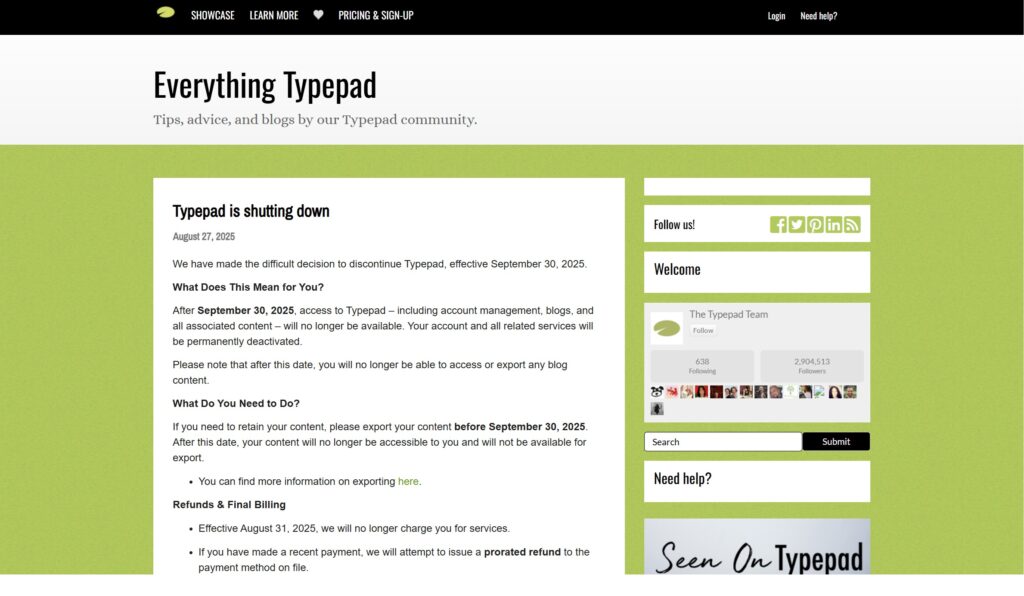
According to the official TypePad announcement from August 27, 2025, here are the critical dates every TypePad user must know:
- August 31, 2025: Final billing date – no more charges
- September 30, 2025: Complete platform shutdown
- October 1, 2025: All content permanently deleted
The message is crystal clear: “After September 30, 2025, access to TypePad – including account management, blogs, and all associated content – will no longer be available. Your account and all related services will be permanently deactivated.”
This isn’t a temporary closure or maintenance period. Once the servers go dark on September 30th, your content is gone forever.
What Happens to Your Content After September 30th
TypePad has been explicit about what happens to user content after the shutdown date:
- Complete data loss: All blog posts, pages, and media files deleted
- No recovery options: Content cannot be retrieved after September 30th
- Comments disappear: Years of reader engagement and discussions lost
- SEO rankings vanish: Google will remove your pages from search results
- Email subscribers lost: Mailing lists and subscriber data eliminated
- Custom domains stop working: Your domain will show error pages
The official notice states: “Please note that after this date, you will no longer be able to access or export any blog content.” There are no exceptions, extensions, or recovery services planned.
A platform migration is the perfect time to review your wider domain setup—whether you keep your current address, consolidate multiple blogs, or secure new variations for future projects. Our Smart Marketer’s Guide to Domain Strategy walks you through when to register new domains, when to build on what you already have, and how to protect your SEO during the transition.
Why TypePad is Closing and What It Means for Users
TypePad’s shutdown reflects the broader shift in the blogging landscape. Launched in 2003 when hosted blogging platforms were essential, TypePad competed with early WordPress and Blogger. However, several factors led to its decline:
Market Evolution: WordPress evolved from a simple blogging tool to a full content management system, offering far more flexibility and features than TypePad could match.
Mobile Revolution: TypePad struggled to adapt to mobile-first design requirements, while WordPress themes became fully responsive and mobile-optimized.
SEO Limitations: Modern blogs require advanced SEO capabilities that TypePad’s aging infrastructure couldn’t provide effectively.
Cost vs. Value: Users increasingly questioned paying monthly fees for TypePad when superior free and low-cost alternatives existed.
For current users, this means transitioning isn’t just about preserving content—it’s an opportunity to upgrade to a platform that better serves modern blogging needs.
