
Running a WooCommerce store involves a range of challenges, and one of the most crucial is protecting your business from fraudulent activity. From chargebacks and scam orders to abusive behavior and unwanted users, these issues can seriously affect your store’s performance and reputation. That’s why knowing the top ways to block and blacklist fraudulent users in WooCommerce is essential. With the right tools and criteria in place, you can control who has access to your store, reduce risks, and ensure a safer experience for both you and your customers.
While WooCommerce doesn’t provide a built-in feature for blacklisting, you can use the Aelia Blacklister for WooCommerce plugin, which offers a comprehensive solution to prevent fraudulent users and problematic orders. For stores operating internationally, the Aelia Prices by Country for WooCommerce plugin can also be a valuable addition, allowing you to customize pricing based on a user’s location and even fine-tune regional access if needed.
For better performance and reliability of your store, consider implementing the WooCommerce Cache Handler. This tool helps optimize your store’s loading speed and ensures that blacklisting actions, along with other site functions, run smoothly—especially during periods of high traffic.
Together, these tools provide a seamless, secure, and efficient shopping experience for both store owners and customers.
Why You Should Block or Blacklist Fraudulent Users in WooCommerce
Managing a WooCommerce store means staying vigilant against threats that could harm your business. One of the most effective ways to protect your store is by blocking or blacklisting users who engage in malicious or disruptive behavior. Here are the key reasons why this practice is essential:
- Prevent Fraud: Online fraud remains a serious threat to e-commerce businesses. Blocking users associated with suspicious transactions or stolen credit card use can help protect your store from financial loss.
- Avoid Chargebacks: Repeated chargebacks not only impact your bottom line but can also hurt your payment processor relationship. By blacklisting users who frequently file chargebacks, you can minimize these costly disputes.
- Stop Abusive Behavior: If a user consistently harasses your support team or violates your store’s policies, blocking them can preserve your team’s well-being and maintain a respectful shopping environment.
- Enforce Store Policies: Some users may repeatedly breach your terms and conditions. Blacklisting ensures they can no longer disrupt your operations or take advantage of your store.
- Enhance Store Security: Users or IP addresses showing unusual or harmful behavior may pose a security risk. Blocking access can help prevent data breaches or unauthorized activity.
Additionally, if you’re customizing your WooCommerce setup to enhance user experience or security, check out this useful guide on how to easily rename country codes in WooCommerce. This can help tailor your settings and streamline your store’s checkout process based on specific regional requirements.
How to Block or Blacklist Fraud Users in WooCommerce
The plugin provides a simple and efficient way to block problematic Users based on various criteria. Let’s go through the steps to configure this plugin.
Step 1: Install the Aelia Blacklister for WooCommerce Plugin
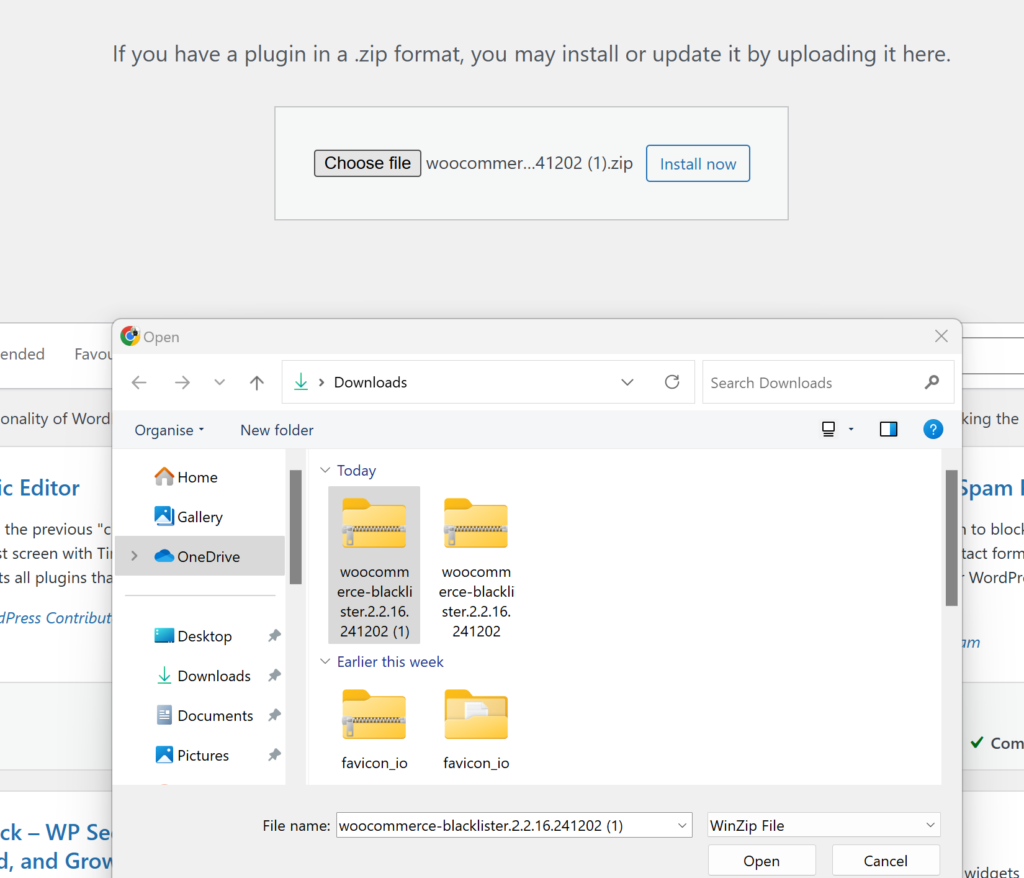
- Download and Install the Plugin: Go to the Blacklister for WooCommerce plugin and purchase the plugin. Once downloaded, you can upload the plugin through your WordPress admin panel by navigating to Plugins > Add New and then selecting Upload Plugin.
- Activate the Plugin: After installation, activate the plugin to start configuring the blacklisting rules.
Step 2: Configure Blacklisting Rules
Once activated, the plugin adds a new menu in the WooCommerce settings where you can specify the criteria to block users. The plugin allows you to block Users based on the following details:

- Customer’s Name and Surname: Block User using their full name or just a part of it.
- Customer’s Address: Block based on the User’s street, postcode, city, province/state, or country.
- Customer’s Email Address: Block User using specific email addresses or partial matches.
- Customer’s Phone Number: Block based on the full or partial phone number.
- Customer’s IP Address: You can block specific IP addresses or even entire IP ranges.
You can also configure whether the matching should be an exact match or a partial match. The plugin supports regular expressions for all fields except IP addresses. For IP addresses, you can apply IP address masks or IP address ranges.
Step 3: How the Blacklisting Process Works
Once the rules are set, the plugin automatically compares the information provided by the User at checkout with the configured blacklisting rules. If there is a match, the plugin will block the order and stop the checkout process.
A customizable error message will then be displayed to the User, explaining why their order was blocked. This ensures that the User knows the reason for the denial, providing a professional and transparent experience.
Step 4: Customizing Messages
One of the plugin’s most valuable features is the ability to customize the error messages shown to blocked users. Whether you want to explain the reason behind the block or provide user support contact details, you can create a personalized message to keep the interaction courteous and professional.
Why Use the Aelia Blacklister Plugin for WooCommerce?

If you’re looking for an effective way to secure your WooCommerce store from unwanted users and fraudulent activity, the Aelia Blacklister Plugin is a powerful and flexible solution. This plugin gives you full control over who can complete a purchase, boosting both security and peace of mind.
Key Features That Make Aelia Blacklister a Smart Choice:
- Versatile User Filtering: Block users based on multiple criteria such as name, email, phone number, IP address, or shipping/billing address—giving you the power to prevent high-risk transactions.
- Regex Support for Advanced Matching: Use regular expressions (regex) to define specific patterns for blacklisting. This allows more granular control when targeting recurring fraud behaviors or suspicious data entries.
- Simple Setup: With a user-friendly interface and straightforward configuration, even non-technical store owners can implement blacklisting with ease.
- Custom Error Messages: Deliver clear, branded messages to blocked users so your communication remains professional and consistent.
- IP Address Masking: Block specific IP addresses or entire ranges, enabling you to prevent known threats or malicious bots from accessing your checkout.
- Set-and-Forget Automation: Once your blacklist rules are defined, the plugin enforces them automatically—no ongoing manual effort required.
Want more functionality from the same ecosystem? You can also enhance your global eCommerce setup with tools like the Aelia Currency Switcher for WooCommerce, which allows your customers to shop in their local currency.
Together, these plugins make your WooCommerce store smarter, more secure, and truly optimized for global reach and fraud prevention.
