What Is LLMS.txt and Why Should You Care?

Think of LLMS.txt as a digital instruction manual for your learning management system — one that tells crawlers, platforms, and automation tools how to interact with your LMS content.

Just as robots.txt gives search engines guidelines about which parts of your website to index or ignore, LLMS.txt allows LMS-specific tools to:

  • Understand which courses and lessons are publicly available
  • Identify which content is gated or restricted
  • Locate metadata like course structure, categories, or instructor info
  • Connect with API endpoints or webhooks
  • Respect privacy and licensing rules for LMS data

By creating and maintaining an LLMS.txt file, you’re building a bridge between your content and the external tools or services that may use it. This is especially useful if you:

  • Syndicate course content to aggregators or partners
  • Use third-party reporting tools
  • Want to prevent certain course modules from being indexed
  • Need to communicate structured metadata to platforms like Google, Shopify, or internal tools

If you’re running an online course platform or managing learning content on your WordPress site, you’ve likely heard about the importance of robots.txt for search engines. But what about a similar control system specifically for your LMS?

Enter LLMS.txt — a plain-text file designed to provide clear, structured directives to search engines, third-party LMS tools, and integration services about how your course content should be handled. Whether you’re offering free public lessons, managing paid subscriptions, or running a corporate training hub, LLMS.txt can help you define what’s visible, what’s restricted, and how different tools should interact with your learning platform.

In this post, we’ll explore what LLMS.txt is, why you might need it, what to include in it, and how different types of businesses — from local educators to national brands and eCommerce platforms — can tailor it to their needs.

Questions to Ask Before Creating Your LLMS.txt

Before you jump into writing your LLMS.txt file, consider these important questions to guide its structure and purpose:

???? Content Visibility

  • Should all courses and lessons be publicly visible?
  • Are there any drafts, archived, or premium-only courses to hide?
  • Do you want quizzes, downloads, or bonus material excluded from LMS indexing?

????️ Tool Integrations

  • Will any third-party tools (e.g., CRMs, analytics platforms, SCORM players) need access to LMS data?
  • Do you want to expose API endpoints or webhook URLs in the file?

???? User Access & Gating

  • Should some content be available only to logged-in users?
  • Are different membership levels tied to different course access levels?

???? SEO Considerations

  • Are you trying to rank your courses in search results?
  • Are you concerned about duplicate content from your LMS pages?
  • Do you want to promote or hide certain course categories?

???? Compliance & Structure

  • Do you need to reference course licensing, GDPR compliance, or regional access rules?
  • Is your LMS organized in a way that benefits from exposing structured metadata?

By clarifying these aspects up front, you’ll be better positioned to create a smart, effective LLMS.txt file that aligns with your business goals, protects sensitive content, and enhances integration with other platforms.

Ai search llms

Advanced LLMS.txt Features

Once you’ve covered the basics—like access rules and content visibility—your LLMS.txt file can evolve into a powerful tool for automation, integrations, and governance. Below are some advanced features and ideas to take your file to the next level:


???? 4.1. Last-Updated Timestamp

Adding a Last-Updated line is useful for external systems or partners that regularly sync your course catalog. It helps prevent unnecessary re-indexing and can flag when major updates occur.

Last-Updated: 2025-06-20

This is especially useful if:

  • You push updates via API or integrations.
  • You syndicate LMS content to other platforms.
  • You’re subject to regulatory audits that require version tracking.

???? 4.2. Change Logs

Think of this like a simplified changelog or release notes within the LLMS.txt. It allows collaborators or automated systems to understand what changed and when.

ChangeLog:
  - 2025-06-10: Added new course "Google Ads Fundamentals"
  - 2025-06-18: Archived "2022 SEO Bootcamp"

Benefits:

  • Keeps internal teams aligned
  • Enables API partners or scrapers to detect changes
  • Offers a simple audit trail

???? 4.3. Language & Region Tags

If you serve a multilingual or international audience, use tags to identify content regions and supported languages.

Language: en-US
Region: United States, Canada

This can guide:

  • Localization tools
  • Regional access control systems
  • Geo-targeted content delivery platforms

???? 4.4. API & Webhook Instructions

If your LMS connects to external platforms—like a CRM, reporting dashboard, or marketing automation tool—include clear endpoints for those services.

txtCopyEditAPI-Endpoint: https://example.com/wp-json/llms/v1/courses
Webhook-Trigger: https://example.com/hooks/course-complete/

Why it matters:

  • Enables real-time data flow between systems
  • Supports automated actions like emailing certificates or adding users to email lists
  • Makes your LMS platform more extensible and integration-friendly

???? 4.5. Plugin & Platform Metadata

You can optionally include technical data about your LMS or plugin environment, especially useful for support, collaboration, or third-party tools.

txtCopyEditLMS-Platform: LifterLMS
WP-Version: 6.5.2
Plugin-Version: 3.2.9

This helps identify compatibility issues and ensures that automated tools work with your site’s configuration.


???? 4.6. Enrollment & Access Notes

Provide context for automation tools or partners about access models, such as membership levels, drip schedules, or trial content.

txtCopyEditAccess: Membership Only
Drip-Schedule: 1 lesson per week
Trial: First module free

By embracing these advanced features, your LLMS.txt file becomes more than just a permissions list—it becomes a central hub of LMS intelligence, helping internal teams, external tools, and partner platforms better understand and engage with your courses.

How Different Types of Businesses Can Use LLMS.txt

The beauty of LLMS.txt is that it’s not one-size-fits-all. Just like your business, your Learning Management System has unique goals—whether that’s generating leads, retaining customers, training employees, or selling premium content. Below are practical examples of how different types of businesses can structure their LLMS.txt files to match their operations, visibility needs, and content strategy.


5.1 ???? Local Business with Online Courses

If you’re a local business offering in-person workshops, first aid training, fitness classes, or even community education courses, your LLMS.txt can help define your geographic relevance, protect exclusive material, and improve local SEO.

Suggestions:

txtCopyEditRegion: Liverpool, UK
Disallow: /courses/national-partners/
Access: In-Person Booking Required
Local-Priority: Yes
Last-Updated: 2025-06-15

???? Why it matters: Local search engines, aggregators, or education portals can recognize your content as region-specific and prioritize it accordingly.


5.2 ???? National Training Company

National companies managing corporate training, compliance courses, or government contracts often need stricter visibility controls, metadata about departments, and accreditation.

Suggestions:

txtCopyEditCompany: Acme Safety Solutions
Accreditation: IOSH, NEBOSH, CPD
Departments: HR, Safety, Onboarding
Disallow: /courses/internal-use/
Access: Staff Only

???? Why it matters: Clearly separates internal vs public-facing material while preserving trust and transparency with external tools or audits.


5.3 ????️ eCommerce Store with Learning Content

Running an online store with LMS integration? Your LLMS.txt can link training to products, manage upsells, and help affiliate partners or support bots better understand your offerings.

Suggestions:

txtCopyEditProduct-Training: Enabled
Related-Product: /products/3d-printer/
Trial: First module free
Upsell: Show after Lesson 2
Affiliate-Access: Yes

???? Why it matters: Bridges your learning content with your store funnel, improving product adoption and post-sale experience.


5.4 ????‍⚕️ Healthcare, Education, and Regulated Industries

Hospitals, schools, universities, or compliance-heavy sectors can use LLMS.txt to indicate privacy restrictions, certifications, and internal protocols.

Suggestions:

txtCopyEditCompliance: HIPAA, GDPR
Training-Type: Internal
Instructor: Dr. Rachel Li
Disallow: /quizzes/
Notes: Not for public distribution

⚠️ Why it matters: Reduces legal risks by clearly flagging protected or sensitive learning content.


5.5 ???? SaaS Platforms & Tech Startups

If you’re offering software training, onboarding content, or API education, you’ll benefit from surfacing API docs, version info, and interactive lessons.

Suggestions:

txtCopyEditLMS-Version: 4.0.2
Product: SaaS CRM Platform
API-Guide: /developers/api-onboarding/
Changelog-Feed: /api/updates/feed/
Webhook-Available: Yes

???? Why it matters: Supports integration with developer tools and improves the developer learning experience.


5.6 ???? Coaches, Creators & Consultants

From personal development to yoga to branding strategy, individual creators can use LLMS.txt to reinforce personal branding and build funnel logic into course delivery.

Suggestions:

txtCopyEditInstructor: Sarah Blake
Free-Intro: /courses/self-care-basics/
Lead-Magnet: Yes
Course-Tier: Bronze, Silver, Gold
Promote: /ebooks/mindful-living/

???? Why it matters: Aligns learning content with marketing funnels and makes course structure clearer to content crawlers or affiliate platforms.

By tailoring your LLMS.txt to your business type, you can turn a simple text file into a powerful layer of control and communication — helping you manage privacy, enhance discoverability, and support smoother integrations.

Yoast SEO Now Supports llms.txt — A Major Step Toward AI-Optimized Websites

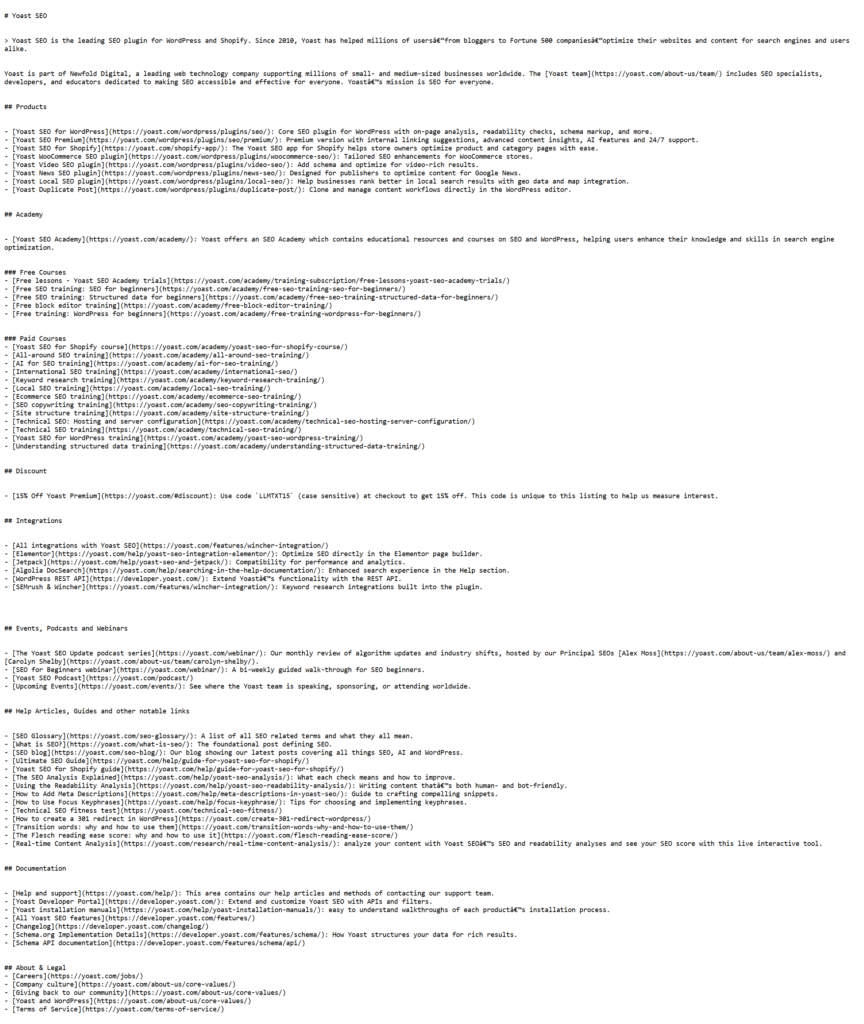
In June 2025, Yoast — the most widely used SEO plugin for WordPress — introduced a new feature that automatically generates an llms.txt file for your website. This move signals a broader shift in how we think about SEO in the age of AI.

???? Why This Matters

Large Language Models (LLMs) like ChatGPT, Claude, and Gemini don’t crawl the web like traditional search engines. They gather information in real time when responding to questions. That means if your content isn’t clearly visible or prioritized, these models might surface outdated or irrelevant pages — or skip your site entirely.

Yoast’s new llms.txt feature creates a dynamic file that guides these AI systems to:

  • Your most recently updated and relevant content
  • Key pages and structured site summaries
  • Context pulled from sitemaps and SEO settings
screencapture yoast llms txt 2025 06 20 22 06 43

✅ What Makes It Different from robots.txt?

robots.txtllms.txt
Tells crawlers what not to indexSuggests what AI should read
Designed for search enginesDesigned for AI models
Focuses on permissionFocuses on guidance & clarity

It’s automatic, requires no code, and updates weekly. Yoast users can preview their file and opt in when they’re ready. You can even take full manual control via developer tools if desired.

This change is huge — especially for content-heavy sites like publishers, eCommerce brands, and course creators aiming to influence what AI surfaces in conversational results.

Introducing Our LLMS.txt Manager Plugin for Multisite

Until Yoast or other major SEO plugins add official support, we’ve built a solution ourselves.

At Marketing the Change, we’ve developed a lightweight, flexible plugin called LLMS.txt Manager — designed specifically for WordPress multisite installations.

???? What It Does:

  • Adds a simple admin interface under Tools on every subsite.
  • Lets each site administrator enter their own custom LLMS.txt content.
  • No need for physical file creation — it uses virtual endpoints like /llms.txt so content is always served dynamically.
  • Works independently of themes or page builders.
  • Fully compatible with multisite networks and content isolation.

???? Why We Built It:

We work with local training providers, charities, and eLearning businesses that need granular control over what content is visible or discoverable on a per-site basis — without interfering with the global settings or requiring developer support.

This tool empowers educators and LMS administrators to manage visibility, compliance, and integrations with minimal effort.

???? Use Cases:

  • A school trust where each school manages its own LMS
  • A nationwide training company with location-specific course pages
  • Franchise networks offering localized eLearning
  • Online coaches using WordPress multisite to separate course funnels

???? Want to try it? – The plugin is currently in BETA for access please contact us

Bring Clarity, Control & Intelligence to Your LMS Content

Your LLMS.txt file might seem like a small piece of text, but it has big potential to shape how your learning content is discovered, protected, and integrated across the web.

Whether you’re a solo creator offering a handful of online tutorials, a national training company managing compliance, or an eCommerce store bundling product education with sales — LLMS.txt gives you a flexible way to manage how your LMS communicates with the world.

By thoughtfully crafting this file, you:

  • Empower integrations with clarity
  • Improve search visibility where needed
  • Lock down premium or private learning materials
  • Create a framework for scaling your LMS more efficiently

Don’t treat LLMS.txt as an afterthought — treat it as a strategic tool in your digital learning stack.

llms txt

???? Need Help with LLMS.txt or LMS-Friendly AI Tools?

If you’re a local business, training company, non-profit, or eLearning platform looking to:

  • Implement or improve your LLMS.txt strategy
  • Automate your learning content delivery
  • Make your LMS searchable via custom AI-powered search
  • Or integrate your LMS with your CRM, analytics, or membership tools

???? We can help.

At Marketing the Change, we specialize in helping mission-driven businesses and educators implement smart digital systems — from WordPress plugins to SEO, automation, and AI integration.

???? Get in touch to book a free consultation or learn how we can support your LMS goals:
marketingthechange.com/contact

Together, we can make your learning content smarter, safer, and more searchable.

Josh Morley

I have been designing & marketing websites since 2013. I specialize not just in WordPress web design but also in online marketing. SEO, PPC, keyword research, link-building and most recently on lead acquisition for local businesses.

image 3

Overview Of InVideo

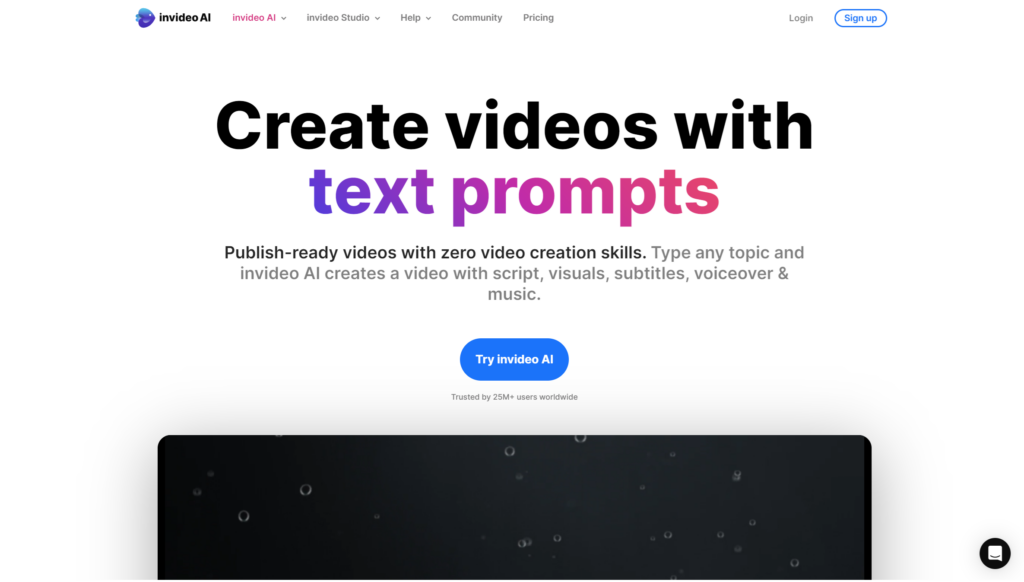
InVideo is a cloud-based video editing tool designed for content creators, marketers, and businesses. The platform provides several features to streamline and enhance video creation for users at all levels of expertise.

User-friendly Interface

InVideo boasts an intuitive drag-and-drop editor. This design means users can start creating videos without prior experience. The interface is straightforward, making it accessible for both beginners and seasoned creators.

Customisable Templates

The platform offers a multitude of customisable templates, music, and sound effects. Users can quickly craft unique videos tailored to their brand’s needs. With multi-lingual support, it’s easier to create content for diverse audiences.

Social Media Integration

InVideo integrates seamlessly with social media platforms. Users can produce videos optimised for various social media channels and share them instantly. This feature is crucial for marketers aiming to enhance their social media presence efficiently.

invideo review e1723812506438

AI Video Generation

InVideo AI stands out with its ability to convert articles, scripts, and prompts into engaging videos. By leveraging generative AI technology, users can automate part of the video creation process, saving time and effort.

Drag-and-Drop Video Editing

InVideo Studio offers professional-grade drag-and-drop editing capabilities. This enables users to fine-tune their videos with precision. The flexibility of InVideo Studio caters to those who need detailed and polished edits in their projects.

Key Features And Capabilities

We at Marketing the Change know the importance of a powerful yet user-friendly video creation tool. InVideo offers a comprehensive suite of features that simplify video production for businesses, making it an essential tool for business owners managing WordPress and WooCommerce sites.

Media Editing Capabilities

InVideo equips users with advanced media editing capabilities. Our clients can easily modify video content using a conversational approach. InVideo allows precise edits by pinpointing specific timestamps. This functionality is invaluable for business owners looking to enhance their website videos swiftly without extensive editing knowledge.

Script Generation

InVideo’s AI-driven script generation can instantly transform user prompts into detailed video scripts. For business owners in Liverpool, this feature saves enormous time by automating the scripting phase, ensuring high-quality content tailored to their audience. InVideo’s AI models can adapt to various industries, making it a versatile tool for different types of content.

Collaboration Tools

InVideo supports real-time collaboration with multiplayer editing. Teams can work together seamlessly, adjusting and refining video content simultaneously. Our agency finds this feature particularly useful for businesses with remote teams or for projects requiring multiple contributors, ensuring smooth and efficient workflows.

Template Library

InVideo’s rich template library offers an array of customisable options for creating engaging videos. Business owners struggling with WordPress and WooCommerce can leverage these templates to produce professional-grade videos without starting from scratch. The inclusion of royalty-free music enhances the overall quality, providing a polished final product tailored to marketing and promotional needs.

Pricing Plans

image

InVideo offers a range of pricing plans suitable for various user needs and budgets. Each plan provides distinct features, making it easy for users to choose one that fits their requirements.

Free Plan

Our Free Plan is ideal for users exploring video creation and looking to understand InVideo’s capabilities. This plan includes access to all templates, watermark inclusion in videos, and export limits of 60 videos per month. It’s perfect for beginners and those periodically creating video content.

Business Plan

The Business Plan is designed for professional content creators and businesses managing platforms like WordPress and WooCommerce. At £15 per month, users get several advanced features, including watermark removal, exports up to 120 videos per month, and 10 iStock media per month. This plan also includes priority support, extensive editing tools, and access to premium templates, making it an excellent choice for growing businesses aiming to enhance their video marketing efforts.

Unlimited Plan

Our Unlimited Plan, priced at £30 per month, caters to heavy users needing extensive video creation and no export limits. This plan includes all features from the Business Plan plus unlimited video exports, unlimited iStock media, and 120 Shutterstock images per month. It’s tailored for large enterprises and agencies needing robust video editing solutions and constant content production.

User Experience

InVideo offers a highly intuitive user experience, ideal for businesses using WordPress and WooCommerce. It simplifies video creation and helps streamline workflows for content creators of all skill levels.

Ease Of Use

InVideo excels in ease of use. The platform features an intuitive interface and a comprehensive suite of editing tools. The drag-and-drop functionality makes video editing straightforward. Users easily transform their ideas into visual content without spending much time on learning curve.

Mobile Interface

InVideo’s mobile interface is highly accessible. Users can edit videos on-the-go, maintaining productivity even outside the office. Mobile capabilities ensure that content creation continues seamlessly, which can be extremely beneficial for business owners who need to make quick edits or updates.

Desktop Interface

The desktop interface of InVideo provides a robust set of features. It supports advanced editing options and collaboration tools. Teams work together on projects in real-time, simplifying the video production process. This functionality is especially beneficial for agencies managing numerous clients and campaigns, like ours.

Pros And Cons

image 1

As part of Marketing the Change, we aim to highlight the strengths and weaknesses of InVideo, helping business owners using WordPress and WooCommerce make informed decisions.

Pros

  • Access to a Library: InVideo provides over 1 million videos and photos from Storyblock and Shutterstock, allowing for diverse and high-quality content.
  • Simple to Use Interface: Designed for non-techies, the platform ensures ease of use.
  • Multilingual Capability: Users can create videos in any language, broadening reach.
  • Pre-made Templates: Tailored for various platforms and purposes, these templates expedite the video creation process.
  • Automated Text-to-Speech: Ease content creation with automated narration.
  • 24/7 Support: World-class support available around the clock, including free access to a Facebook Community.
  • Customisation Control: Users have complete control over the appearance of their projects and can upload their media.
  • Screen-Size Selection: Simplifies choosing the right screen size for any video.
  • Business-Specific Templates: Solid templates suitable for various business types.
  • Smooth Performance: Reliable performance with good chat support for technical issues.
  • Template Switch Limitation: Users cannot switch between templates once selected.
  • Lengthy Exporting Process: Exporting videos is time-consuming.
  • Internet Reliance: A stable Internet connection is essential for smooth operation.
  • Download Quota Issues: The download quota does not refresh automatically, causing potential difficulties.
  • Poor Search Functionality: Finding specific content within the platform can be challenging.
  • Limited Exports: Monthly video export and duration limits, inconvenient for frequent content creators.

Comparing InVideo To Other Tools

When evaluating video editing tools, we find that InVideo stands out in several areas compared to its competitors.

Alternatives

Many video creation platforms are available, but let’s compare InVideo with Movavi and Powtoon to understand the distinctions:

Cost-effective

InVideo provides a more affordable solution compared to Movavi and Powtoon. Users highlight its competitive pricing as a significant advantage. For businesses, especially those with budget constraints, this cost-effective nature doesn’t mean a compromise in quality.

Branded Designs

InVideo includes branded designs at no extra cost, a feature missing in both Movavi and Powtoon. This allows businesses to maintain consistent branding without incurring additional expenses, ensuring a professional appearance across all video content.

Custom Workflows

Custom workflows in InVideo are designed to enhance productivity and streamline video creation processes. Movavi and Powtoon lack this feature. For agencies like us, custom workflows are invaluable for saving time and maintaining a smooth operational flow.

CMS and Video Integrations

InVideo integrates seamlessly with content management systems (CMS) and video platforms, unlike Movavi and Powtoon. This integration is crucial for those using WordPress and WooCommerce, as it allows for easy embedding and distribution of videos across various platforms.

By focusing on these aspects, InVideo emerges as a robust tool for businesses looking to enhance audience engagement through video content.

Customer Reviews And Feedback

We’re sharing insights on InVideo’s effectiveness to help WordPress and WooCommerce users make informed decisions. These reviews collate various experiences to give a balanced perspective.

Positive Reviews

Ease of Use

InVideo receives high praise for its simplicity and accessibility. Beginners and experts alike find it easy to navigate. The extensive library of templates, coupled with the AI-powered video generator, significantly streamlines the process of video creation.

Customer Support

Many users report positive interactions with InVideo’s customer support. The team is noted for being helpful and responsive, efficiently resolving issues.

Templates and Resources

The platform offers a vast collection of templates, stickers, text, and effects. Users find it straightforward to create high-quality videos using these resources.

Scalability

InVideo’s pricing structure caters to various user levels, from hobbyists to professionals. This makes the tool versatile and suitable for different needs.

image 2

Negative Reviews

Despite its many benefits, InVideo has some drawbacks that users have highlighted. Constraints include restrictions on switching templates, the time-consuming process of exporting videos, and a limited quota for downloads.

We acknowledge these concerns and emphasise the importance of understanding both the strengths and limitations when selecting a video editing tool for WordPress and WooCommerce projects.

Conclusion

InVideo offers a robust solution for those seeking a versatile and user-friendly video editing tool. Its extensive template library and AI-driven features make it an attractive option for creating professional videos. While it has some limitations like template switching restrictions and slow exporting times, the overall benefits outweigh these drawbacks.

Customer feedback praises its ease of use and efficient support, making it suitable for both beginners and advanced users. When considering a video editing tool for WordPress and WooCommerce projects, InVideo’s cost-effectiveness and custom workflows stand out. It’s crucial to weigh its strengths and limitations to determine if it meets our specific needs.

Frequently Asked Questions

Is InVideo completely free?

InVideo offers a free plan with limited features. You can create and export videos with a watermark at no cost. To access premium stock media, remove watermarks, and unlock additional functionalities, you’ll need to upgrade to a paid plan.

Is InVideo AI worth the money?

Yes, InVideo AI is worth the investment. It provides robust functionality with a user-friendly interface, making it easy for both beginners and experienced users to create professional-quality videos.

What is the best AI video creator?

The best AI video creator depends on your specific needs. InVideo is highly recommended for its user-friendly design, extensive template library, and advanced AI-driven features, making it a top choice for many users.

Is InVideo the same as InVideo AI?

No, InVideo and InVideo AI are separate products with distinct pricing plans. Users who purchased InVideo Studio before August 15, 2023, are eligible for free InVideo AI credits, but the two services function independently.

Is there a free alternative to InVideo AI?

Yes, Pictory is a free alternative to InVideo AI. It uses AI to turn text into high-quality videos, including voiceovers, music, and stock footage. Pictory offers templates, editing tools, and video guides to meet various needs.

Josh Morley

I have been designing & marketing websites since 2013. I specialize not just in WordPress web design but also in online marketing. SEO, PPC, keyword research, link-building and most recently on lead acquisition for local businesses.

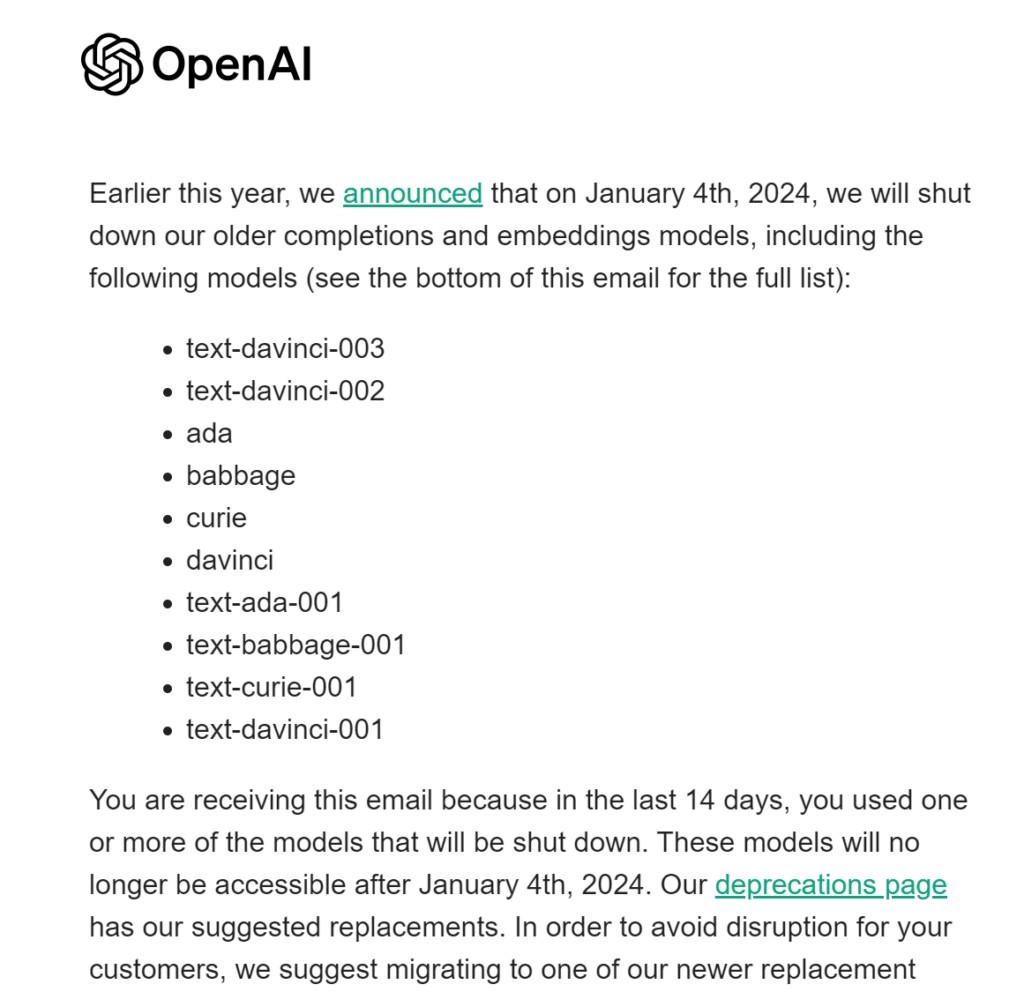
Did you get an email with the subject “Older OpenAI models will be shut down on January 4” from Open AI? If you did it’s because you used one or more of the models that will be shut down. First lets look at these models and then we can offer help with what to do next.

image

Certainly! Here’s a breakdown of each OpenAI model listed, along with their applications:

text-davinci-003

  • Description: An advanced version in the Davinci series, known for its exceptional understanding and generation of natural language. It’s more refined in understanding context and generating human-like text.
  • Applications: Ideal for complex language tasks like creative writing, summarizing information, translating languages, and answering open-ended questions.

text-davinci-002

  • Description: The predecessor to text-davinci-003, this model offers robust language understanding and generation capabilities, though not as advanced as its successor.
  • Applications: Useful for a range of language tasks such as content creation, customer service automation, and general Q&A.

ada

  • Description: A simpler, faster model that’s more efficient in tasks requiring less nuanced understanding. It’s known for its speed and cost-effectiveness.
  • Applications: Best suited for tasks that require a basic understanding of text, like keyword extraction and basic data parsing.

babbage

  • Description: A step up from Ada, Babbage offers a balance between performance and computational efficiency.
  • Applications: Good for moderate-level language tasks like straightforward language classification, text formatting, and simple language generation.

curie

  • Description: Known for its ability to understand and generate more nuanced and complex language compared to Ada and Babbage.
  • Applications: Effective in tasks like content creation with specific style requirements, answering complex questions, and language translation with more context.

davinci

  • Description: The most capable model in the series before the introduction of text-davinci-003. It excels in understanding and generating complex, nuanced language.
  • Applications: Ideal for a wide range of advanced language tasks, including sophisticated content creation, complex data interpretation, and simulating human-like conversation.

text-ada-001

  • Description: An earlier version in the Ada series, focusing on basic language processing tasks with high efficiency.
  • Applications: Suitable for simple text classification, sorting tasks, and other basic language processing needs.

text-babbage-001

  • Description: The first iteration in the Babbage series, offering a balance between language understanding and computational efficiency.
  • Applications: Appropriate for text-based tasks that are slightly more complex than those handled by Ada, like basic content generation and data categorization.

text-curie-001

  • Description: An initial version in the Curie series, known for its more advanced language processing abilities compared to Ada and Babbage.
  • Applications: Useful for more nuanced content generation, detailed data analysis, and handling moderately complex language tasks.

text-davinci-001

  • Description: The first version in the Davinci series, setting the foundation for advanced language understanding and generation.
  • Applications: Effective for a broad spectrum of language tasks, particularly where nuanced understanding and detailed content generation are required.

Each of these models has unique strengths, making them suitable for different applications depending on the complexity and nature of the language processing task at hand. As technology evolves, newer versions typically offer enhanced capabilities, reflecting the continuous advancements in the field of AI and machine learning.

So Whats Next?

Identify Affected Services: Determine which parts of your business or digital presence rely on the models that are being shut down. This could include anything from automated customer service responses to content generation.

  • Action: Audit your current applications and services to identify where and how you are using the deprecated models.
  • Practical Tip: Check for API calls in your codebase that reference the old models. Pay special attention to automated systems like chatbots, content generation tools, or data analysis scripts.

Review Suggested Replacements: Visit the OpenAI deprecations page mentioned in the email. This page will likely list newer models that are intended to replace the older ones. These newer models are typically more advanced and efficient.

  • Action: Visit the OpenAI deprecations page to find the recommended newer models.
  • Practical Tip: Make a list of the suggested models and compare their features and limitations against your current usage to determine the best fit.

Understand the New Models: Familiarize yourself with the capabilities and limitations of the suggested replacement models. Compare them with the ones you are currently using to understand the changes or improvements you can expect.

  • Action: Read documentation and research the capabilities of the new models.
  • Practical Tip: Look for case studies or examples of how others are using these models. This can provide insights into potential use cases and performance expectations.

Plan the Migration: Develop a plan for transitioning to the new models. This may involve updating your code, retraining your team, or making adjustments to how you use AI in your business processes.

  • Action: Develop a detailed plan for transitioning, including timelines and resources needed.
  • Practical Tip: Break down the migration into phases, such as assessment, development, testing, and deployment. Assign clear responsibilities to team members.

Test Before Full Implementation: Implement the new models in a test environment first. This will allow you to identify and address any issues without disrupting your existing operations.

  • Action: Implement the new models in a controlled, non-production environment.
  • Practical Tip: Run parallel tests comparing the output of old and new models on the same inputs. This helps in understanding the differences and adjusting parameters for optimal performance.

Update Documentation and Training Materials: If you have documentation or training materials that reference the old models, update them to reflect the new models and any changes in how they are used.

  • Action: Revise any internal and external documentation, guides, or training materials.
  • Practical Tip: Ensure that all references to the old models are replaced with updated information. Include any new procedures or usage tips for the new models.

Communicate with Stakeholders: Inform any relevant stakeholders, including team members, customers, or clients, about the change and how it might affect them.

  • Action: Inform your team, customers, and other stakeholders about the change.
  • Practical Tip: Use clear and concise communication, highlighting the reasons for the change and its benefits. Offer support and resources to help them adapt.

Seek Support if Needed: If you encounter any challenges during the migration, don’t hesitate to use the resources provided by OpenAI, such as the OpenAI Developer Forum. Getting help from the community can ease the transition.

  • Action: Use available resources like forums, support channels, or community groups for assistance.
  • Practical Tip: Prepare specific questions or issues to discuss. Engaging with the community can provide practical solutions and shared experiences.

Monitor Performance Post-Migration: After you have migrated to the new models, closely monitor their performance to ensure they meet your needs and expectations.

  • Action: Continuously assess the performance of the new models in real-world scenarios.
  • Practical Tip: Set up monitoring tools to track performance metrics. Be prepared to make adjustments based on feedback and data.

Stay Informed About Future Updates: AI technology is rapidly evolving. Stay informed about future updates from OpenAI to avoid similar situations in the future and to leverage new opportunities as they arise.

  • Action: Regularly check for updates from OpenAI and related AI news.
  • Practical Tip: Subscribe to newsletters, follow relevant social media channels, or join AI and tech communities to stay updated on the latest developments.

Expert Support Available at Marketing the Change

Adapting to new AI models can be challenging. At Marketing the Change, our skilled developers are ready to guide you through this transition, ensuring your digital operations remain efficient and effective. Whether it’s understanding the intricacies of AI model migration or tailoring solutions to fit your unique business needs, we’re here to help.

For personalized assistance and to ensure a smooth transition, book a consultation call with us. Visit our website to schedule a time that suits you. Let’s work together to harness the power of AI and keep your digital presence at the forefront of innovation.

Josh Morley

I have been designing & marketing websites since 2013. I specialize not just in WordPress web design but also in online marketing. SEO, PPC, keyword research, link-building and most recently on lead acquisition for local businesses.