
In the world of e-commerce, fraudulent activities have become a growing concern, putting online store owners at risk. Fake accounts, fraudulent orders, spam, and the use of fraudulent IP addresses and email addresses can tarnish your store’s reputation and lead to significant financial setbacks. For WooCommerce store owners, protecting your platform from these threats is crucial. One of the most effective strategies for safeguarding your store is blocking suspicious IP addresses and email addresses. This helps prevent scammers from placing fraudulent orders or interacting with your site, ensuring a secure and reliable shopping experience for your customers.
In addition to blocking suspicious users, implementing tools like the Tax Display by Country for WooCommerce can further enhance your store’s security. This feature ensures that tax information is correctly displayed based on the customer’s location, helping to minimize chargebacks and unauthorized transactions. By combining these security measures with the blocking of fraudulent IPs and emails, you can strengthen your store’s defenses and provide a safe, smooth shopping environment for legitimate buyers.
When you’re securing your store, it’s also important to optimize your WooCommerce international shipping settings to handle a broader range of customers while minimizing the risk of fraud. Learn more about setting up WooCommerce international shipping to ensure a seamless experience for customers across the globe.
By integrating these strategies into your store’s security system, you’ll be well-equipped to prevent malicious activity and create a trustworthy shopping environment.
Why Blocking IPs and Emails is Crucial for WooCommerce Store Security
As the e-commerce industry grows, so does the risk of fraudulent activities. Fraudulent orders, fake accounts, and spam can damage the integrity of your WooCommerce store, leading to financial losses and a tarnished reputation. One of the best ways to protect your online store from these threats is by blocking suspicious IP addresses and email addresses. Let’s explore why these measures are essential and how they can significantly enhance the security of your store.
The Role of IP Address Blocking in WooCommerce Security
An IP address is a unique identifier assigned to every device connected to the internet. Fraudsters often use fake or disposable IPs to carry out malicious activities such as submitting fake reviews, making fraudulent orders, and initiating chargebacks. Blocking suspicious IP addresses can help prevent these activities, offering your store robust protection against scammers.
How Blocking IP Addresses Safeguards Your WooCommerce Store:
- Prevents Fraudulent Orders: Scammers tend to use the same IP addresses to place fake orders repeatedly. By blocking these addresses, you can stop fraudulent transactions from being completed.
- Preserves Your Store’s Reputation: Chargebacks and other malicious activities can damage your store’s reputation. Blocking high-risk IPs helps maintain a positive brand image by minimizing these issues.
- Target High-Risk Regions: Some regions are more prone to fraudulent activities. By blocking access from high-risk countries, you can mitigate the risk of scams.
- Reduces Chargebacks: Blocking fraud-prone IP addresses reduces the likelihood of chargebacks by preventing fraudulent purchases from being processed in the first place.
How to Block IP Addresses in WooCommerce:
You can manually block suspicious IPs or use automated security plugins like Aelia Blacklister for WooCommerce to simplify the process. These plugins scan for fraudulent activities and block malicious IP addresses with ease.
The Importance of Blocking Emails for Enhanced WooCommerce Security
Emails are a significant source of fraud in the online store space. Scammers often use disposable email addresses to create multiple fake accounts, exploit promotions, or even engage in refund abuse. Blocking these fraudulent email addresses is vital for preventing unauthorized access to your store.
How Blocking Emails Enhances WooCommerce Store Protection:
- Prevents Fake Account Creations: Fraudsters create fake accounts to take advantage of promotions, discounts, and loyalty rewards. Blocking suspicious email addresses helps prevent this.
- Protects Your Store from Spam: Spammers often flood stores with fake inquiries, reviews, or comments. Blocking their email addresses ensures your store remains spam-free and professional.
- Stop Discount and Promotion Abuse: Scammers may create multiple accounts to exploit discount codes and offers. Blocking problematic emails prevents this abuse.
- Prevents Refund Exploitation: Fraudsters may use different email addresses for fraudulent orders and refunds. Blocking them helps reduce the risk of financial losses due to refund abuse.
How to Block Emails in WooCommerce:
Blocking emails can be done manually or by using custom rules and regular expressions to filter out suspicious email addresses. Plugins such as Blacklister for WooCommerce provide an easy solution to block emails by setting specific criteria.
Combining IP and Email Blocking for Maximum Protection
By combining both IP and email blocking strategies, you create a comprehensive defense mechanism for your WooCommerce store. These measures work together to identify and prevent fraudulent activities from different angles, ensuring that your store remains safe, secure, and trustworthy for legitimate customers.
Key Benefits:
- Improved Security: Blocking suspicious IPs and emails prevents a wide range of fraudulent activities, including fake orders, spam, and account exploitation.
- Better Customer Experience: By reducing the presence of fraudsters, you improve the overall experience for genuine customers, enhancing their trust in your store.
- Cost Efficiency: Preventing chargebacks and fraud-related issues helps reduce unnecessary costs, allowing you to allocate resources towards growing your business.
By regularly monitoring and updating your blocking strategies, you can stay ahead of fraudsters and maintain a seamless shopping experience for your customers.
Introducing Aelia Blacklister for WooCommerce
Aelia Blacklister plugin is a powerful tool designed to help you protect your online store from suspicious users, including those attempting fraudulent activity using fake IP addresses and emails. This plugin offers a seamless way to boost your store’s security by automatically blocking malicious users during the checkout process, ensuring a smoother and safer shopping experience for your genuine customers.
Why Choose Aelia Blacklister:
- Easy to Use: The plugin integrates seamlessly with your WooCommerce store and doesn’t require advanced technical skills.
- Real-Time Blocking: It provides real-time blocking, preventing malicious users from completing orders before any damage occurs.
- Prevents Fraud at Checkout: By analyzing customer details during checkout, it ensures that no fraudulent orders are processed.
How to Set Up Aelia Blacklister for WooCommerce
Setting up Aelia Blacklister is a straightforward process, ensuring that even store owners with minimal technical knowledge can enhance their store’s security.
Step 1: Install the Plugin
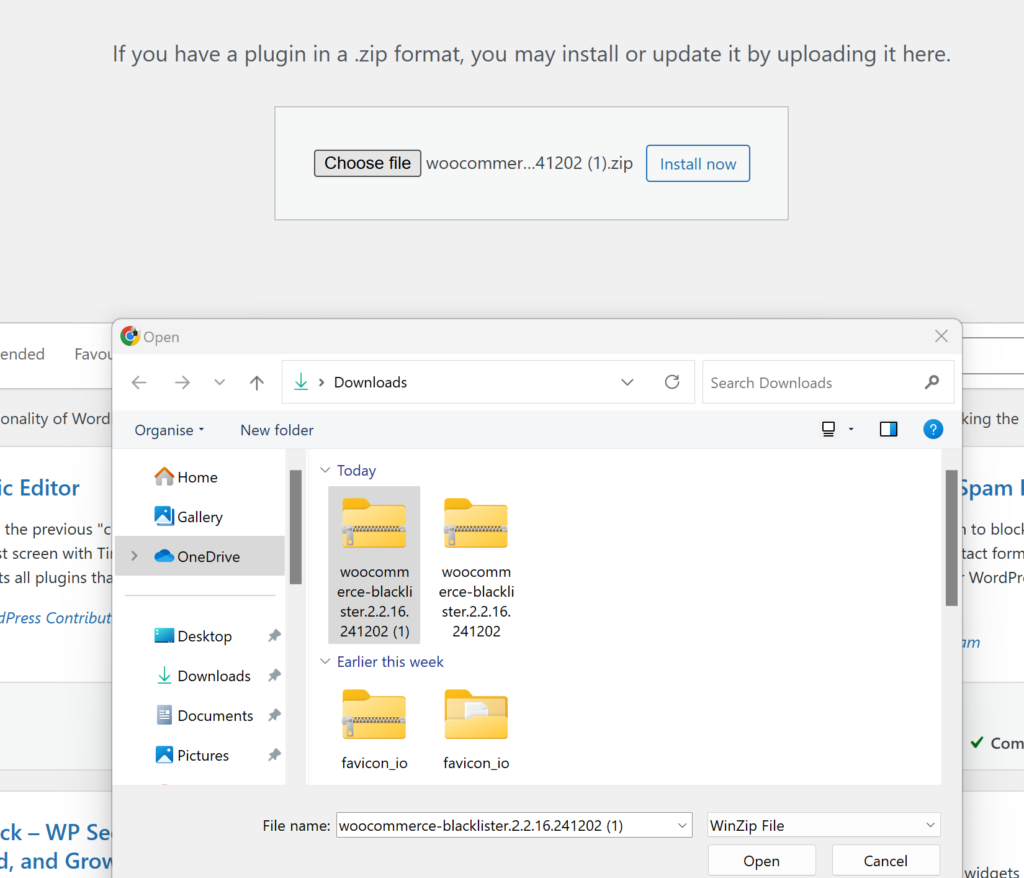
- Download the Aelia Blacklister plugin from the Aelia.
- Go to your WordPress admin dashboard, navigate to the “Plugins” section, and click “Add New.”
- Upload the plugin ZIP file and click “Install Now.”
- After installation, click “Activate.”
Step 2: Configure the Blocking Rules
Once you’ve located the Aelia Blacklister settings within WooCommerce, you’ll see an interface where you can set your blocking rules. The plugin gives you several options for blacklisting based on customer information, helping you target specific fraudsters. Here’s how to set each of them up:
Block by IP Address:
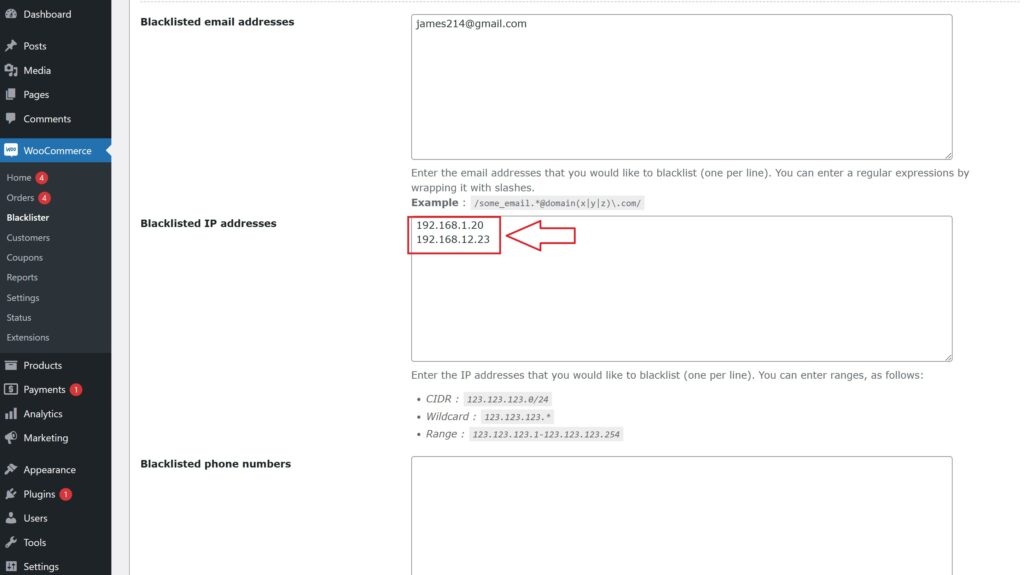
- Add Suspicious IPs: In the settings panel, you’ll find an option to add IP addresses to the blacklist. Simply input the IP addresses you want to block. These could be associated with known fraudsters or users who have been flagged for suspicious behavior.
- How to Block: Click on the option to add a new IP address. You can add multiple IPs if necessary. Once added, these users will not be able to complete the checkout process on your store.
- Why It’s Important: Fraudulent users often use specific IP addresses repeatedly to place fake orders. Blocking these IPs proactively reduces the risk of further fraudulent activity.
Block by Email Address:
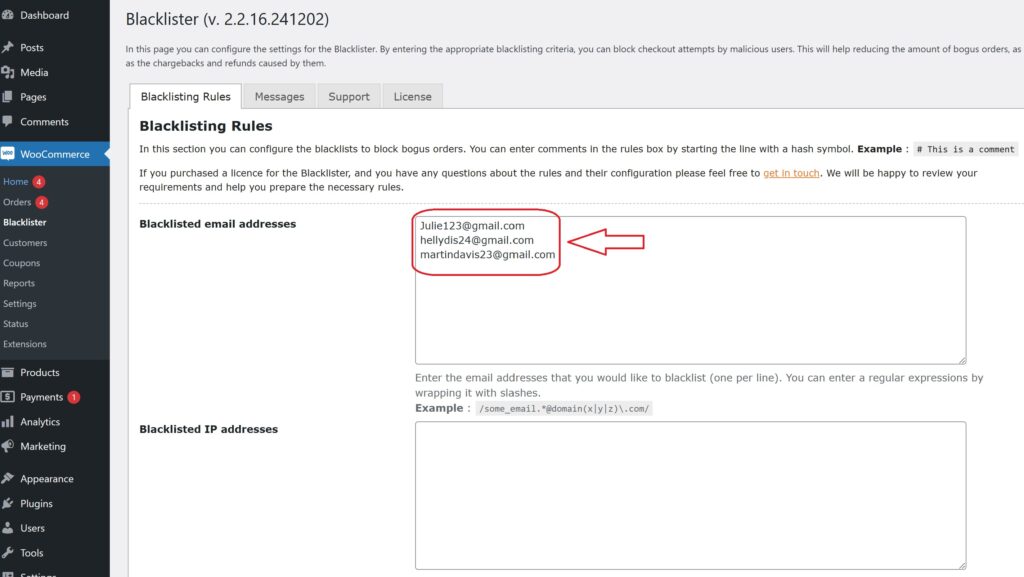
- Add Email Addresses to Block: You can add email addresses that are linked to fake accounts or suspicious activities. This can be especially useful for preventing scammers from creating multiple accounts to exploit your store’s promotions or loyalty programs.
- How to Block: Simply add the email addresses (or domains) in the designated field within the settings. You can block individual addresses or even an entire domain (e.g., block all @fakedomain.com addresses).
- Why It’s Important: Scammers often use disposable email services to create fake accounts. By blocking these addresses, you can stop them from using the same emails for repeated fraudulent purchases.
Block by Phone Number:

-
- Add Phone Numbers to Block: In addition to IPs and emails, Aelia Blacklister allows you to block phone numbers that are often used for fraudulent activities. If a particular phone number is known to be linked to scams, you can block it from completing any transactions.
- How to Block: Simply enter the phone numbers you want to blacklist in the provided field. It’s easy to block a specific phone number or even certain area codes if you suspect fraud from a particular region.
- Why It’s Important: Fraudsters might use fake or stolen phone numbers to bypass identification processes. Blocking them ensures they can’t complete purchases.
Block by Customer Name:

- Add Customer Names to Block: In cases where you notice repeated fraudulent behavior from certain customer names (even if the emails, IPs, or phone numbers differ), you can choose to block certain customer names.
- How to Block: Simply input the specific names in the provided box. This will prevent customers with those names from completing checkout, even if they use different contact details (email, phone number, etc.).
- Why It’s Important: Fraudulent users may try to change their contact details but keep their names the same. Blocking names ensures that they can’t trick your system.
Step 3: Customize the Error Message
Under the plugin settings, you can customize the error messages that will be shown to blocked users. This ensures that customers understand why their order was rejected.
Step 4: Monitor and Update the Blacklist
After initial setup, you should regularly monitor blocked users and update your blacklist as necessary. Aelia Blacklister allows you to add new entries as fraudsters attempt to breach your store.
Key Benefits of Aelia Blacklister for WooCommerce
- Enhanced Security
Block fraudulent users before they can make harmful transactions, protecting your store from financial losses and reputational damage. - Fraud Prevention
Automatically prevent scammers from completing purchases, reducing chargebacks, refunds, and disputes. - Time-Saving Automation
Let Aelia Blacklister handle the blocking of suspicious users, so you can focus on running your business. - Customizable & Flexible
Set rules to block users based on various details like emails, IPs, and phone numbers, with the flexibility to apply custom filters. - Fewer Fraudulent Orders
Reduce fraudulent purchases by blocking high-risk users at checkout, saving your store from inventory losses and chargebacks. - Improved Trust
A secure shopping experience builds trust with genuine customers, encouraging repeat business.
To optimize your WooCommerce store, consider integrating the Prices by Country for WooCommerce plugin. This tool allows you to set different prices based on the customer’s country, ensuring that you can tailor your pricing strategy for international customers. It simplifies managing different taxes, currencies, and pricing, providing a seamless experience for customers worldwide while optimizing your store’s performance.
