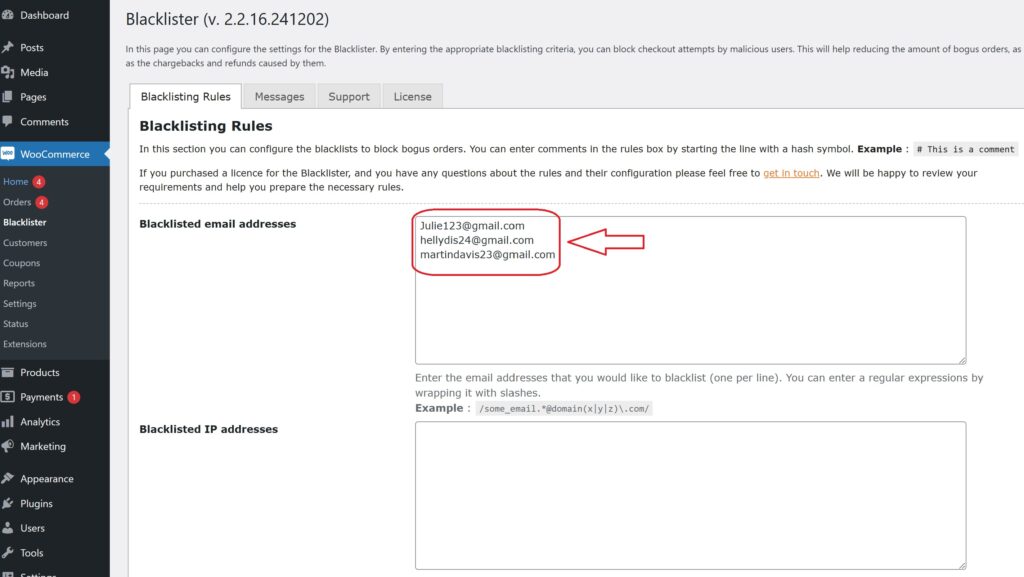
In today’s competitive e-commerce landscape, WooCommerce store owners are increasingly targeted by fraudulent activities, ranging from fake orders and spam to malicious bot traffic. These threats not only disrupt operations but can also damage your brand’s reputation and lead to financial loss. One of the most effective security strategies is to block IP address WooCommerce. By restricting access from suspicious or high-risk IP addresses, you can stop bad actors before they cause harm, reduce spam, and create a safer shopping experience for your genuine customers

Pairing IP blocking with additional tools—like Tax Display by Country for WooCommerce—adds another layer of protection by ensuring accurate tax calculations based on customer location. This comprehensive security strategy not only safeguards your revenue but also enhances the overall shopping experience.

What Is an IP Address?

An IP address Internet Protocol address, is a unique string of numbers assigned to every device connected to the Internet. Think of it as a digital street address—it tells websites where to send and receive data, just like your home address directs mail to your door.

There are two main types of IP addresses:

  • IPv4: The most common format, consisting of four number sets separated by periods (e.g., 192.168.0.1).
  • IPv6: A newer version designed to support the growing number of internet-connected devices, offering a vastly larger address range.

For WooCommerce store owners, IP addresses play a key role in tracking user behavior and identifying potential threats. Monitoring visitor IPs allows you to spot suspicious activity and block malicious users before they can harm your store, as explained in this detailed guide on blocking fraudulent users in WooCommerce.

Why Blocking IP Addresses Is Crucial for Your WooCommerce Store

Every device that connects to your store leaves a digital fingerprint—its IP address. Unfortunately, cybercriminals often exploit fake or temporary IPs to commit fraud, spam your site with fake reviews, or place bogus orders that lead to costly chargebacks.

Blocking these IP addresses helps you take control of your store’s safety. It’s a simple yet powerful way to stop fraud at the source, long before it affects your business operations or customer trust.

For even tighter security, combine IP blocking with other WooCommerce protection strategies—like using a plugin to block suspicious activity, as outlined in this step-by-step guide— Plugin to Block Suspicious Activity to stay ahead of evolving threats.

How IP Blocking Protects Your WooCommerce Store

Here’s how blocking harmful IP addresses can help secure your e-commerce site:

  • Prevents Fraudulent Orders: Many scammers use the same IPs repeatedly. Blocking them cuts off their access instantly.
  • Protects Your Brand Reputation: Avoiding fraud means fewer chargebacks and disputes, keeping your store’s credibility intact.
  • Mitigates Geographic Risk: If fraud is common from certain regions, IP blocking lets you restrict traffic from those locations.
  • Reduces Chargebacks: By blocking known bad actors, you reduce the risk of unauthorized transactions and related costs.

How to Block IP Addresses in WooCommerce

There are two primary ways to block IPs in WooCommerce:

  1. Manual Blocking: Add suspicious IPs to your server or security plugin settings.
  2. Plugin-Based Blocking: Use dedicated tools like the Aelia Blacklister Plugin. These plugins automate detection and blocking, giving you full control over blacklisted IPs, emails, and more.

For even greater protection, learn how to block email addresses in WooCommerce. Combining both strategies helps you defend against repeat offenders and bots, making your store a harder target for fraud.

Securing your WooCommerce store starts with smarter tools and proactive strategies. IP blocking is one of the simplest yet most effective ways to keep malicious users out, giving you peace of mind and your customers a safer shopping experience.

Introducing the Aelia Tools for WooCommerce: Effortlessly Block Suspicious Users and IP Addresses

The Aelia Blacklister for WooCommerce plugin is a powerful, intuitive tool designed to help store owners block unwanted users and safeguard their business. Whether it’s fraudulent IP addresses, suspicious emails, or flagged customer details, this plugin empowers you to stop malicious activity before it reaches your checkout.

With real-time protection and customizable rules, Aelia Blacklister enhances your WooCommerce store’s security while ensuring a seamless experience for legitimate customers.

Key Features of Aelia Blacklister

Customizable Blocking Rules
Easily create rules to block users based on:

  • IP addresses
  • Email addresses
  • Phone numbers
  • Customer names
  • Shipping or billing addresses

Use exact matches or regular expressions (regex) for flexible partial matching.

Multiple Blocking Methods
Choose the right method for your needs:

  • Exact Match – Block specific IPs, emails, or phone numbers.
  • Partial Match (Regex) – Identify patterns like disposable email domains or phone number prefixes.

Multi-Layered Protection
Block across several identifiers at once—IP, email, phone number, and location—creating a robust defense against all forms of fraudulent activity.

Customizable Denial Messages
Display tailored error messages when blocking users, offering clarity without compromising security.

Geolocation-Based Blocking
Restrict orders from high-risk regions or countries using geolocation data to minimize your exposure to international fraud.

Chargeback Prevention
By automatically blocking known fraudsters and repeat offenders, the plugin helps reduce the risk of chargebacks and unauthorized refund claims.

Why Choose Aelia Blacklister?

User-Friendly Interface
Designed to integrate seamlessly with WooCommerce, no technical background is required for setup and management.

Real-Time Blocking at Checkout
Malicious users are stopped instantly—before they can place an order—ensuring your store processes only legitimate transactions.

Proven Fraud Protection
Aelia Blacklister actively scans customer input in real time, making it an essential tool for maintaining a secure and trustworthy online store.

How to Install the Aelia Blacklister Plugin for WooCommerce

Getting started with Aelia Blacklister is simple. Before you can start blocking suspicious users and securing your WooCommerce store, you’ll need to install the plugin. Follow these quick steps to set it up:

Step 1: Purchase and Download the Plugin

  • Visit the Aelia product page and purchase the Blacklister plugin.
  • Once your purchase is complete, you’ll receive a downloadable ZIP file containing the plugin.

Step 2: Log into Your WordPress Dashboard
Block IP Address WooCommerce
  • Open your web browser and go to your WordPress login page (typically www.yoursite.com/wp-admin).
  • Enter your login credentials and click Log In to access your admin panel.

Step 3: Navigate to Plugins → Add New

Block IP Address WooCommerce
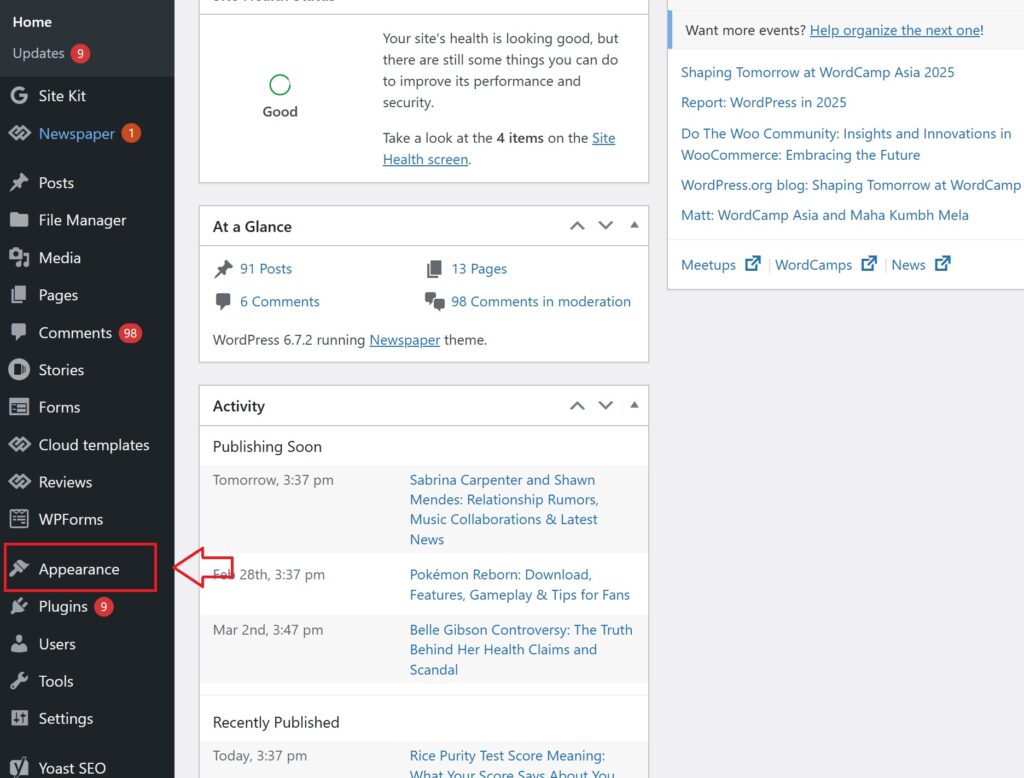
  • In the WordPress admin sidebar, hover over Plugins.
  • Click on Add New from the dropdown menu to access the plugin installation page.

Step 4: Upload the Plugin ZIP File
Block IP Address WooCommerce
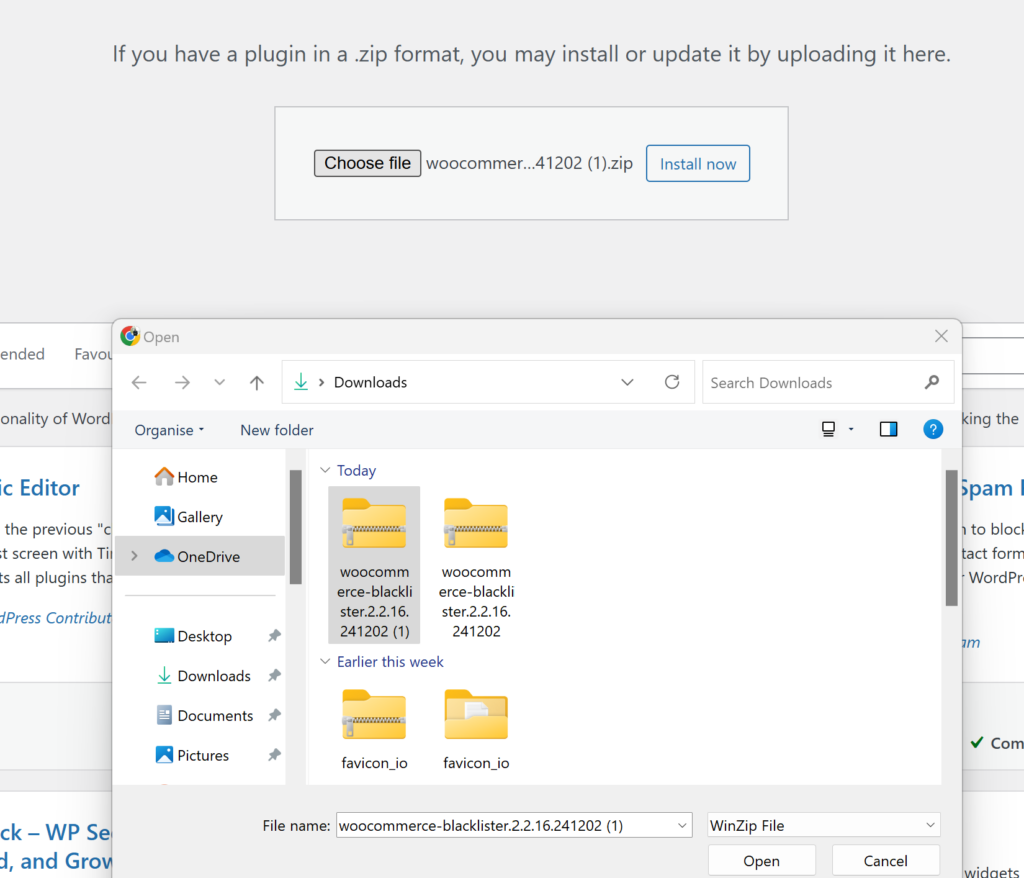
  • At the top of the page, click the Upload Plugin button.
  • Click Choose File, then locate and select the Aelia Blacklister ZIP file from your computer.

Step 5: Install the Plugin

  • After selecting the file, click Install Now.
  • WordPress will begin installing the plugin. This may take a few moments.

Step 6: Activate the Plugin

  • Once installation is complete, click the Activate button to enable the plugin on your WooCommerce store.

Setting Up IP Blocking with Aelia Blacklister

With the plugin activated, you can now configure your blacklisting rules to block unwanted or suspicious users.

Blocking by IP Address
Blocking list of IP address 1
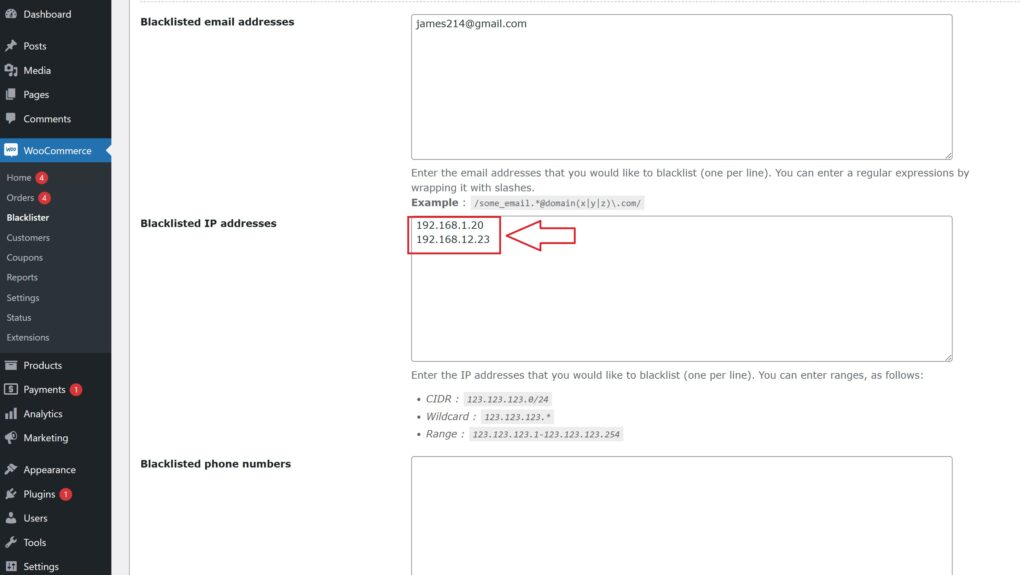
  • Go to the Aelia Blacklister settings within your WooCommerce admin panel.
  • Locate the IP Address Blocking section.
  • Enter any known suspicious or fraudulent IP addresses you wish to block.
  • You can add multiple IPs. These users will automatically be prevented from completing purchases.

Why This Matters:
Fraudsters often use the same IP addresses repeatedly. Blocking them early helps stop chargebacks, fake orders, and other forms of abuse.

 Additional Blocking Options with Aelia Blacklister

Aelia Blacklister goes beyond simple IP blocking. It allows you to create custom rules that target a wide range of user data, giving you full control over who can access your store.

You can block users based on:

  • Email Addresses – Stop spam accounts and known fraudulent emails.
  • Usernames – Block problematic or abusive users by their login names.
  • Phone Numbers – Filter out suspicious or repeat offenders using the same number.
  • Billing & Shipping Addresses – Prevent fraudulent orders linked to flagged locations.
  • Regions or Countries (via Geolocation) – Automatically block high-risk areas from placing orders.

This comprehensive, multi-layered defense helps protect your WooCommerce store from fraud, abuse, and unwanted activity, ensuring a smoother and safer shopping experience for your real customers.

Josh Morley

I have been designing & marketing websites since 2013. I specialize not just in WordPress web design but also in online marketing. SEO, PPC, keyword research, link-building and most recently on lead acquisition for local businesses.

In today’s fast-paced e-commerce environment, safeguarding your WooCommerce store is more critical than ever. Cyber threats and fraudulent transactions can cause severe financial damage and erode customer trust.

That’s where the Aelia Blacklister plugin comes in. This powerful tool enhances your store’s security by blocking suspicious users based on customizable filters like IP addresses and email domains. By proactively filtering out high-risk traffic, you reduce the likelihood of fraud while ensuring a seamless shopping experience for genuine customers.

Designed to integrate effortlessly with WooCommerce, the plugin offers detailed logging and reporting features, giving you full visibility and control. The result? Smarter order management, effective traffic monitoring, and optimal store performance without compromising usability.

Why WooCommerce Security Matters

Ensuring the security of our WooCommerce store is essential for protecting sensitive customer information and preserving brand trust. With over 2,000 cyberattacks targeting e-commerce sites every day in 2024, it’s more important than ever to implement strong security protocols to prevent data breaches that could lead to financial loss and reputational harm [R].

One effective way to boost our defenses is by using the Aelia Blacklister For WoCommerce. This powerful tool helps identify and block malicious users in real-time by filtering specific IP addresses, phone numbers, locations, and email domains. By doing so, it reduces the likelihood of fraudulent activities and unauthorized access, supporting a smooth and secure shopping experience for genuine customers.

Geographic restrictions offer another layer of protection. For businesses focused on domestic markets, limiting purchases to a single country helps block irrelevant and potentially harmful international traffic. This strategy not only mitigates regional cyber risks but also keeps our sales efforts aligned with target audiences.

Strengthening WooCommerce security with solutions like the Aelia Blacklister plugin is a smart move to defend your online store against modern cyber threats. This tool helps maintain your website as a safe and reliable space for customers, ultimately supporting long-term success and business growth. You can download the plugin directly from the official Aelia website. Want to understand why blocking email addresses and IPs is so important for your store? Check out this simple method for blocking email addresses in WooCommerce.

Enhance Your WooCommerce Store Security with Aelia Blacklister

WooCommerce Security

The Aelia Blacklister plugin is a powerful WooCommerce security tool designed to help store owners proactively block unwanted or suspicious orders. It enables precise control over who can place orders, using a range of customizable filters to identify and restrict access from high-risk users.

???? What Makes Aelia Blacklister Stand Out?

1. Block Customer Data with Precision

  • Name & Surname: Prevent specific individuals from placing orders by filtering based on full or partial names.
  • Address Details: Blacklist users by street name, postal code, city, region, or even entire countries.
  • Email Filtering: Use full or partial email matches (including regex support) to stop known fraudulent addresses.
  • Phone Numbers: Restrict access by exact or pattern-matching phone numbers.

2. IP-Based Blocking
Safeguard your store by blocking individual IP addresses or entire ranges. Use IP masks to target broader segments, making it harder for repeat offenders to bypass restrictions.

3. Flexible Match Rules with Regex
All filters (aside from IP addresses) support regular expressions, allowing advanced users to define powerful and specific rules tailored to their unique needs.

4. Custom Error Messaging
If a shopper is blocked during checkout, they’ll receive a tailored message explaining why their order couldn’t be processed. You can customize this notification from the settings panel to match your brand tone.

????️ How It Works

Once installed, the plugin integrates seamlessly into your WooCommerce dashboard. You’ll gain access to a dedicated settings area where you can manage blacklisted entries, including names, addresses, email addresses, phone numbers, and IPs.

Whenever a customer attempts to place an order, the plugin scans their details against your blacklist. If a match is found, the checkout process is halted and the customer is notified immediately.

This streamlined yet robust system offers a practical solution for reducing fraud and maintaining control over your WooCommerce orders.

Pair It with Country-Based Pricing for Even More Control

Looking to further tailor your customer experience? Combine the Aelia Blacklister with the Aelia Prices by Country plugin, allowing you to display different prices based on customer location while still blocking unwanted regions. This duo enhances both security and sales strategy.

Setting Up Aelia Blacklister

Installation

Download the Aelia Blacklister plugin from the official Aelia website. Install the plugin through the WordPress dashboard by navigating to Plugins > Add New > Upload Plugin and uploading the plugin file. Activate the plugin after installation.

Adding Blacklist Rules

A new menu item for Aelia Blacklister appears in the WooCommerce backend. Navigate to this menu to specify blacklist entries.

Blacklisting Rules Configuration

This section allows you to define specific criteria for blocking fraudulent or unwanted orders by blacklisting certain types of customer data. Here’s an overview of the rules and how you can configure them:

Blacklisted Email Addresses

Enter the email addresses you wish to block, one per line. You can also use regular expressions (regex) to block a group of email addresses. Simply wrap the regex in slashes.

WooCommerce Security

Example:

  • james214@gmail.com
  • /some_email.*@domain(x|y|z)\.com/ – Blocks any email from the domains “x.com”, “y.com”, or “z.com”.

Blacklisted IP Addresses

Enter the IP addresses or ranges you want to block, one per line. You can use the following formats for precise control:

WooCommerce Security
  • CIDR Notation: 123.123.123.0/24 – Blocks the entire range of IPs from 123.123.123.0 to 123.123.123.255.
  • Wildcard Format: 123.123.123.* – Blocks all IPs starting with 123.123.123.
  • IP Range: 123.123.123.1-123.123.123.254 – Blocks IPs in the specific range.

Blacklisted Phone Numbers

You can blacklist specific phone numbers or ranges using exact matches or regular expressions.

Example:

  • 0123456789 – Blocks this exact phone number.
  • /012345(101|102|103)/ – Blocks phone numbers that start with 012345 and end with 101, 102, or 103.

Blacklisted Customer Names

This field allows you to block orders from customers with certain names. Separate the first name and surname with a double pipe (||). You can also use regular expressions for flexibility.

WooCommerce Security

Example:

  • /John|Jonathan|Johnny/||Smith – Blocks any customer named John, Jonathan, or Johnny Smith.
  • /John|Jonathan|Johnny/||/Smith.*/ – Blocks any customer named John, Jonathan, or Johnny whose surname starts with “Smith”.
  • /John|Jonathan|Johnny/||/Smith|Doe/ – Blocks customers named John, Jonathan, or Johnny, with a surname of either Smith or Doe.

Blacklisted Addresses

You can block orders based on specific address components (address line 1, address line 2, city, state, country, and postcode). Use regular expressions for more specific targeting.

black listing address

Example:

  • /10[0-9] Windsor Road/ – Blocks addresses on Windsor Road numbered from 101 to 109 anywhere in the world.
  • /10[0-9] Windsor Road/||/.*/||London/ – Blocks addresses on Windsor Road numbered from 101 to 109 in London (the second address part can match any value).
  • /10[0-9] Windsor Road/||/Sussex.*/||London||GB/ – Blocks addresses on Windsor Road numbered from 101 to 109 in Sussex Borough, London, UK. The country code GB is used for the UK.

Comments in Rules
You can add comments to any line of the blacklist rules by starting the line with a hash symbol (#). This helps you document your rules for easier reference.

Example:

  • # Blocking fraudulent email domains
  • # Block all IPs from region X

Customizing Error Messages

Display custom error messages when a blacklisted user attempts to checkout. Inform them why their order is blocked, enhancing transparency and user experience.

Logging and Reporting

Enable detailed logging to track blacklisted attempts. Monitor these logs to analyze patterns and adjust security measures accordingly.

Integration with Other Security Plugins

Integrate Aelia Blacklister with existing security plugins to enhance your store’s safety. Combine multiple security measures for a robust protection system.

Other Powerful Aelia Plugins for WooCommerce

1. Prices by Country for WooCommerce

This plugin allows you to set product prices based on the customer’s billing country. It’s perfect for international stores that need to adjust pricing strategies due to regional taxes, currency differences, or market demands. When paired with a currency switcher, it automatically detects the customer’s location and displays the correct price.

Key Features:

  • Set custom prices per country or region.
  • Automatically detects customer location.
  • Seamlessly integrates with Aelia Currency Switcher.
  • Supports tax-inclusive or exclusive pricing.

2. Currency Switcher for WooCommerce

This is one of Aelia’s flagship plugins and a must-have for global WooCommerce stores. It allows customers to shop and check out in their preferred currency. The plugin detects the visitor’s location and switches currencies automatically, or allows them to select it manually.

Key Features:

  • Real-time currency conversion via open exchange rate APIs.
  • Automatic currency selection based on geolocation.
  • Manual switcher widget for user convenience.
  • Full support for multi-currency checkout.

3. Tax Display by Country for WooCommerce

This plugin dynamically shows product prices with or without tax, depending on the customer’s location. It’s ideal for stores selling to both B2C and B2B customers across different regions with varying tax laws.

Key Features:

  • Automatically adjusts tax display based on country.
  • Shows both tax-inclusive and tax-exclusive prices if needed.
  • Works smoothly with the Prices by Country plugin.

Josh Morley

I have been designing & marketing websites since 2013. I specialize not just in WordPress web design but also in online marketing. SEO, PPC, keyword research, link-building and most recently on lead acquisition for local businesses.