TLDR

A WordPress major release changed a hook callback identifier from a string to an integer. A caching plugin passed that value straight into substr() inside a file that declares strict_types=1, so PHP threw a TypeError instead of quietly converting it. The call sat on the init hook, which runs on every single request, so the front end, the admin and AJAX all died at the same moment.

Restoring service took one WP-CLI command. The permanent fix was casting one value to a string. The real problem was that a major version update installed itself, unattended, at 3:27 in the morning.

At 3:27 in the morning, a site we look after updated itself to a new major version of WordPress. At 3:28, the uptime monitor went down. Nobody had touched anything. No one had logged in, deployed, or installed a thing.

By the time anyone was awake there was a dead front end, a dead admin area, and an inbox full of automated alarms. The site owner had also noticed the security plugin reporting far more blocked requests than usual, which made the whole thing look a great deal like an attack. Their first message asked whether someone had broken in.

Nobody had broken in. The entire outage came down to one value changing from one data type to another, and the fix was a single word added to a single line. This is the full story, with the actual stack trace, the commands that brought it back, and the checks worth running on your own site before the same thing happens to you.

What a WordPress critical error actually looks like

If you have never met one, a WordPress critical error is the polite white page that says There has been a critical error on this website. Underneath the politeness, the server is returning a 500 status code, which means the page never finished building.

The quickest way to confirm what you are dealing with is to ask the server directly rather than trusting what the browser shows you:

$ curl -s -o /dev/null -w "HTTP %{http_code}  %{time_total}s\n" \
    https://example.com/

HTTP 500  0.820232s

What makes this particular failure frightening, rather than merely annoying, is that it usually takes the admin area with it. You cannot log in to deactivate the thing that broke, because the login page is broken too. That is the moment most people start guessing, and guessing on a live site is how a bad morning becomes a bad week.

For the avoidance of doubt, this was not a hack, and a critical error almost never is. If your own checks point at a compromise rather than an update, that is a different job, and it is covered on our WordPress malware removal page.

The email WordPress sends that almost everyone ignores

Since version 5.2, WordPress has shipped a fatal error handler. When a plugin or theme kills the site, WordPress catches it, works out which plugin was executing at the time, and emails the site admin address. That email is the single fastest route to a diagnosis, and it goes unread constantly because it looks like yet another automated notice.

Here is what arrived that morning, with the identifying details removed. Read the last four lines first:

WordPress has a built-in feature that detects when a plugin
or theme causes a fatal error on your site.

In this case, WordPress caught an error with your plugin,
WP Rocket.

WordPress version 7.1
Active theme: [redacted] Child
Current plugin: WP Rocket (version 3.23.1.1)
PHP version 8.4.10

Four facts, handed over without any investigation at all: the core version, the theme, the exact plugin and its version, and the PHP version. Before touching a server, we already knew which plugin to look at.

The same email contains a recovery mode link. That link lets you log in to a site whose admin is otherwise dead, with the offending plugin held back. If you take one thing from this post: when a site dies, check the admin inbox before you check anything else.

Reading the stack trace

Below the summary, the same email carries the actual error. This is the part people scroll past, and it contains the whole answer:

An error of type E_ERROR was caused in line 562 of the file
/www/example_123/public/wp-content/plugins/wp-rocket/inc/
ThirdParty/Plugins/CDN/Cloudflare.php

Error message: Uncaught TypeError: substr():
Argument #1 ($string) must be of type string, int given

Stack trace:
#0 .../CDN/Cloudflare.php(562): substr(22256, -24)
#1 .../CDN/Cloudflare.php(535):
    Cloudflare->unregister_callback('deleted_post', 'purgeCache...')
#2 .../wp-includes/class-wp-hook.php(353):
    Cloudflare->unregister_cloudflare_clean_on_post('')
#3 .../wp-includes/class-wp-hook.php(377):
    WP_Hook->apply_filters(NULL, Array)
#4 .../wp-includes/plugin.php(523): WP_Hook->do_action(Array)
#5 .../wp-settings.php(779): do_action('init')
#6 .../wp-config.php(74): require_once('...')
#7 .../wp-load.php(50): require_once('...')
#8 .../wp-admin/admin-ajax.php(22): require_once('...')
#9 {main}

Stack traces read from the bottom up. Start at #5 and work backwards. WordPress fires the init hook. That hook calls a method in the caching plugin. That method calls another method in the same plugin. That method calls substr(). And substr() refuses.

Look closely at line #0, because it is the whole bug in one line: substr(22256, -24). That first argument, 22256, should have been a string. It is an integer. PHP said no, and everything above it collapsed.

The bug: one integer meets one strict type

Here is the function, pulled straight off the server. It is doing something entirely reasonable: walking through the list of callbacks registered on a WordPress hook, and removing the one whose name ends with a particular method.

protected function unregister_callback(
    string $hook, string $method, int $priority = 10
) {
    global $wp_filter;

    if ( ! key_exists( $hook, $wp_filter ) ) {
        return;
    }

    $original_wp_filter = $wp_filter[ $hook ]->callbacks;

    if ( ! key_exists( $priority, $original_wp_filter ) ) {
        return;
    }

    foreach ( $original_wp_filter[ $priority ] as $key => $config ) {

        // Line 562. This is where it dies.
        if ( substr( $key, - strlen( $method ) ) !== $method ) {
            continue;
        }

        unset( $wp_filter[ $hook ]->callbacks[ $priority ][ $key ] );
    }
}

That $key is a WordPress hook callback identifier. For most of WordPress history it has been a string, so calling substr() on it was completely safe. In this major release, the identifier comes back as an integer for certain callback types. The 22256 in the trace is an internal object id.

Ordinarily that would not matter in the slightest. PHP is relaxed about this sort of thing and would convert the integer to the string “22256” without comment. Except for what sits on line two of that same file:

<?php
declare(strict_types=1);

namespace WP_Rocket\ThirdParty\Plugins\CDN;

declare(strict_types=1) switches off the automatic conversion for every function call in the file. It is good practice, it catches real bugs, and plenty of careful plugin authors use it. It also means that the moment a value arrives as a type you did not expect, PHP throws a TypeError instead of shrugging and carrying on.

So the plugin was not doing anything careless. It was being strict, and a core change moved the ground underneath it. Both pieces of code are defensible on their own. Together, on the same morning, they took a site off the internet.

Abstract illustration of a value being rejected at a boundary, representing a PHP strict type error.
One value arrives as the wrong type. In a file that declares strict types, PHP refuses it outright rather than converting it.

Why one plugin file killed every page on the site

Plenty of plugin errors break one page, or one form, or the checkout. This one broke everything, and the reason is line #5 of the trace: do_action('init').

The init hook fires on effectively every request WordPress handles. Not just page views. It runs for:

  • every front end page load, including cached misses
  • every admin screen
  • every AJAX call, which is why the trace ends at admin-ajax.php
  • the REST API
  • WP-Cron, so scheduled jobs stop too

A fatal error at that point is not a broken feature, it is a broken site. One hundred percent of requests returned a 500, which is exactly why the login page was unreachable and why the usual advice of “go and deactivate the plugin” was of no use whatsoever.

Step one: get the site back up before you understand it

The temptation when you find something this interesting is to keep pulling the thread. Resist it. Restore service first, investigate second. Every minute spent being curious is a minute the site is down.

The problem is circular: the standard command to deactivate a plugin needs WordPress to load, and WordPress cannot load because of the plugin. The way out is a WP-CLI flag that a surprising number of people have never needed:

$ wp --skip-plugins --skip-themes plugin deactivate wp-rocket

Plugin 'wp-rocket' deactivated.
Success: Deactivated 1 of 1 plugins.

--skip-plugins loads WordPress without executing any plugin code. The fatal never fires, so WP-CLI runs normally and can still write the change to the database. It is the single most useful recovery command in WordPress, and it works when nothing else will.

One extra step for caching plugins specifically. They install a drop-in file that loads before plugins do, and it can throw its own error once the plugin folder it points at is gone. Move it aside rather than deleting it:

$ mv wp-content/advanced-cache.php \
     wp-content/advanced-cache.php.DISABLED-20260820

WordPress checks whether that file exists before loading it, so renaming it is safe. Keep the original rather than removing it, because you will want it back in a few minutes.

That was enough. The site returned 200 across the front end, the login page and admin-ajax.php, which was the URL in the original trace. Total time from reading the email to a working site: under ten minutes. It stayed slower than normal, because the caching layer was now switched off, but slow and alive beats fast and dead.

Site down right now?

If you have landed here mid-outage with a white screen and no admin access, we can help. We work on WordPress sites that have broken after an update, a PHP version change or a plugin conflict, and the first thing we do is get you serving pages again. Tell us what you are seeing and we will tell you what it is.

Get emergency WordPress help

Step two: the one character that fixed it properly

Leaving caching switched off was not a real answer, especially on a site where page speed was already a live conversation. The next question was whether the plugin authors had shipped a compatible release. They had not:

$ wp --skip-plugins plugin list --name=wp-rocket \
     --fields=name,status,version,update

name       status    version     update
wp-rocket  inactive  3.23.1.1    none

No update available. The plugin simply had not caught up with the core release yet. So the choice was to leave caching off for an unknown number of days, or to patch the file.

Before patching anything, check whether the same pattern appears elsewhere in the plugin. Fixing one line and discovering a second fatal thirty seconds later is a poor use of an outage:

$ grep -rn 'substr( *$key' --include='*.php' .

./inc/ThirdParty/Plugins/CDN/Cloudflare.php:562:
    if ( substr( $key, - strlen( $method ) ) !== $method ) {
./inc/classes/dependencies/.../Mobile_Detect.php:928:
    if (substr($key, 0, 5) === 'HTTP_') {
./inc/vendors/classes/class-rocket-mobile-detect.php:719:
    if (substr($key, 0, 5) === 'HTTP_') {

Three matches, but only one that matters. The other two walk through $_SERVER keys, which are always strings, and they live in vendored library files that do not declare strict types. One line to change.

Back the file up, apply the cast, and check the syntax before letting the plugin anywhere near the site again:

# 1. Keep the original somewhere outside the plugin folder
$ cp -p Cloudflare.php ~/Cloudflare.php.ORIG-20260820

# 2. Cast the value to a string
$ sed -i 's/substr( $key,/substr( (string) $key,/' Cloudflare.php

# 3. Confirm the change landed on the right line
$ sed -n '562p' Cloudflare.php
    if ( substr( (string) $key, - strlen( $method ) ) !== $method ) {

# 4. Never reactivate without linting first
$ php -l Cloudflare.php
No syntax errors detected in Cloudflare.php

The whole fix, expressed as a diff, is this:

- if ( substr( $key, - strlen( $method ) ) !== $method ) {
+ if ( substr( (string) $key, - strlen( $method ) ) !== $method ) {

Eight characters, and the site went from dead to fully cached and serving in about two tenths of a second. Casting at the boundary is also exactly what the plugin authors will do when they ship their own fix, so this is not a hack so much as an early copy of the official answer.

One serious warning. A patch like this is wiped the next time the plugin updates. If you do this, write it down somewhere you will actually look, and check it after every update to that plugin until the vendor fix lands. An undocumented patch is a bug you have scheduled for later.

The real cause: a major update installed itself at 3am

Everything above is the mechanism. It is not the cause. The cause is that a major version of WordPress installed itself overnight, on a live site, with nobody watching and nothing tested first.

WordPress splits automatic updates into two kinds, and they are controlled separately:

  • Minor releases, which carry security and bug fixes. These auto-install by default, and you almost certainly want that.
  • Major releases, which carry new features and, occasionally, changes like the one in this story. These are opt-in.

On this site, major auto-updates had been switched on at some point by someone. You can check yours in a second:

$ wp option get auto_update_core_major
enabled

$ wp option get auto_update_core_minor
enabled

That first enabled is the reason this happened in the dark instead of on a Tuesday afternoon with someone watching. Turning it off takes one command, and importantly it leaves security updates running:

$ wp option update auto_update_core_major disabled
Success: Updated 'auto_update_core_major' option.

$ wp option get auto_update_core_major
disabled
$ wp option get auto_update_core_minor
enabled

If you would rather lock it at file level so it cannot be flipped back in the admin by accident, put this in wp-config.php instead:

define( 'WP_AUTO_UPDATE_CORE', 'minor' );

Be honest about what this buys you, though. It does not make the underlying incompatibility go away. The site will still break when someone eventually clicks the update button. What changes is that a human is awake, watching, and able to roll back, instead of finding out from an uptime alert at breakfast. Controlling when a risk lands is most of risk management.

Abstract illustration of an automated overnight cycle breaking, representing an unattended WordPress major auto-update.
A major version installing itself overnight, with nobody watching, is a decision about when you find out.

The security plugin was a red herring

One detail worth sharing, because it cost real worry. Alongside the outage, the site owner reported that their security plugin was showing far more blocked requests than normal, and reasonably asked whether the two things were connected. A dead site plus a spike in blocked traffic reads like an attack to anyone who has been through one before.

The access log settled it in about a minute:

$ grep -h -E 'wp-login|xmlrpc' access.log | \
    awk '{print $1}' | sort | uniq -c | sort -rn | head

     56 example.com
      4 www.example.com

The requests were not coming from outside at all. They were the site talking to itself: WordPress and the security plugin retrying their own loopback and AJAX calls against a server that was answering every one of them with a fatal error. Retry logic against a broken site produces a traffic pattern that looks a lot like a brute force attempt.

The blocked request spike was a symptom of the outage, not the cause of it. Worth remembering, because during an incident it is very easy to chase the scariest looking signal instead of the correct one.

How to check whether your own site is exposed

If you run a plugin that uses strict types, and you allow major core updates to install themselves, you have the same two ingredients. Here is a quick audit you can run per site:

# Is a major version going to install itself tonight?
$ wp option get auto_update_core_major

# Which plugins auto-update?
$ wp option get auto_update_plugins --format=json

# Which core and PHP version are you on?
$ wp core version
$ php -v | head -1

# Which of your plugins use strict types at all?
$ grep -rl 'declare(strict_types=1)' \
    wp-content/plugins/ --include='*.php' | \
    cut -d/ -f3 | sort -u

That last command is the interesting one. It tells you which of your plugins have opted into strict typing, which is the same as asking which of them will throw a hard error rather than absorbing an unexpected value. It is not a list of bad plugins. It is a list of the ones that will fail loudly the next time core changes something underneath them.

Then repeat it across every site you look after, because this class of failure does not visit one site. It visits every site running that combination, and it does it on the same night.

What we changed afterwards

Fixing the outage was the easy part. The changes that stop the next one are duller and matter more:

  • Major core auto-updates switched off, minor and security left on.
  • Major updates now go to staging first. The host offered staging the whole time and it was not being used for core releases.
  • The patch was written down, with the file, the line, the date, and a note to re-check it after every update to that plugin.
  • Monitoring now alerts on a 500 status, not only on the site being unreachable. A site returning error pages quickly is technically responding.
  • The same audit was run across the other sites in the portfolio running the same plugin, before any of them reached the new core version.

None of that is clever. It is the difference between finding out about a problem from your own checks and finding out from an angry client at eight in the morning.

The wider point, if you write plugins

It would be easy to read this and conclude that strict_types is a liability. It is not. It catches genuine bugs early, and the plugin here was doing something sensible.

The lesson is narrower than that: when a value comes from outside your own code, cast it at the boundary. Hook callback identifiers, option values, meta values, anything from a filter, anything from a third party. Inside a strict file, an assumption about a type is a promise the rest of the world never agreed to keep.

A single (string) at the point of use would have meant nobody ever noticed this core change happened.

Would you rather this never happened in the first place?

Most WordPress outages are preventable with unglamorous work: a sensible update policy, a staging site that actually gets used, monitoring that catches error pages, and someone who reads the alerts. We look after WordPress sites so their owners find out about problems from us rather than from their customers.

See how we look after sites

Frequently asked questions

Does a WordPress critical error mean I have been hacked?

Almost never. The overwhelming majority are a plugin, theme or PHP version incompatibility, and WordPress will usually name the culprit in an email to the site admin address. Check that email before assuming the worst. Be aware too that an outage can produce traffic patterns that look like an attack, because failed requests get retried, so a spike in blocked requests during downtime is often a symptom rather than a cause.

I cannot log in to wp-admin at all. How do I get back in?

Look for the WordPress fatal error email sent to the site admin address. It contains a recovery mode link that logs you in with the broken plugin paused. If that email never arrived, and you have SSH or WP-CLI access, use the –skip-plugins flag to deactivate the plugin without loading it. Failing both, renaming the plugin folder over SFTP forces WordPress to deactivate it.

Will a manual patch like this survive the next plugin update?

No. It will be overwritten the moment that plugin updates, and the site will break again in exactly the same way if the vendor has not yet shipped their own fix. Treat a manual patch as a temporary measure, record it somewhere visible, and check it after every update to that plugin until the official fix arrives.

Should I just turn off all WordPress automatic updates?

No. Minor releases carry security fixes and you want those applying themselves promptly. It is specifically major version auto-updates that deserve a human, a staging site and a working day. Setting WP_AUTO_UPDATE_CORE to ‘minor’ gives you exactly that split.

What if my host does not give me SSH or WP-CLI?

You can do the same recovery over SFTP. Rename the offending plugin’s folder inside wp-content/plugins, which forces WordPress to deactivate it on the next request, and rename any related drop-in file such as advanced-cache.php in wp-content. Once the site loads again you can log in normally and sort it out from the admin.

How do I work out which plugin caused the error in the first place?

In order: read the WordPress fatal error email, which usually names it outright. Then check your host’s PHP error log, which will carry the same stack trace. If neither is available, enable WP_DEBUG_LOG in wp-config.php and reproduce the error, then read the resulting debug.log. Guessing by deactivating plugins one at a time is the slowest possible method and should be the last resort.

TLDR

Whatnot in the UK is a legitimate live auction app with polished onboarding, some honest sellers, and a lot of returns-pallet sellers trading on untested small print. Buy carefully, read the show notes, take electronics off the table unless a seller is clear they are tested and working.

Below is my hour or so on the app as a buyer, the counterfeit pair of Beats I ended up with, the seller who would not refund, and what UK business owners should take from the trend.

I signed up to Whatnot a few weeks back. I had been seeing it everywhere on TikTok and Instagram, another live auction app that a lot of people seem to be spending real money on, and I wanted to look at it properly. Part of that was curiosity. Part of it was reading the room as a marketer who has been working with business owners for over ten years. When something this new pulls in this many people, it is worth understanding why, and what the catches are.

What I ended up with was an hour or so watching streams, a pair of Beats headphones that turned out to be counterfeit, a short back and forth with a seller who would not refund me, and a refund in the end from Whatnot themselves. Along the way I saw some honest sellers, some clever tricks, and a pattern a lot of UK buyers should probably know about before they hand over a card. This is an honest review from the buyer side, with a short note at the end for the business owners reading.

What Whatnot actually is, in plain English

Whatnot is a live auction app, mostly on mobile. Sellers run live video streams and auction off items inside the stream, a bit like a modern, faster QVC with comments and chat. You download the app, sign up with a phone number or email, add a card, and you can start bidding in the next live stream you open.

It started in the United States, selling Pops, those little Funko figurines, and trading cards. In the UK it has widened out into collectibles, beauty, clothing, electronics, tools, footwear, food close to its best before date, and a lot in between. Streams can last ten minutes or three hours. Items go for a few pounds or a few hundred. Shipping is combined across anything you win from the same seller in a session, so you can buy several items and pay one flat shipping fee at the end.

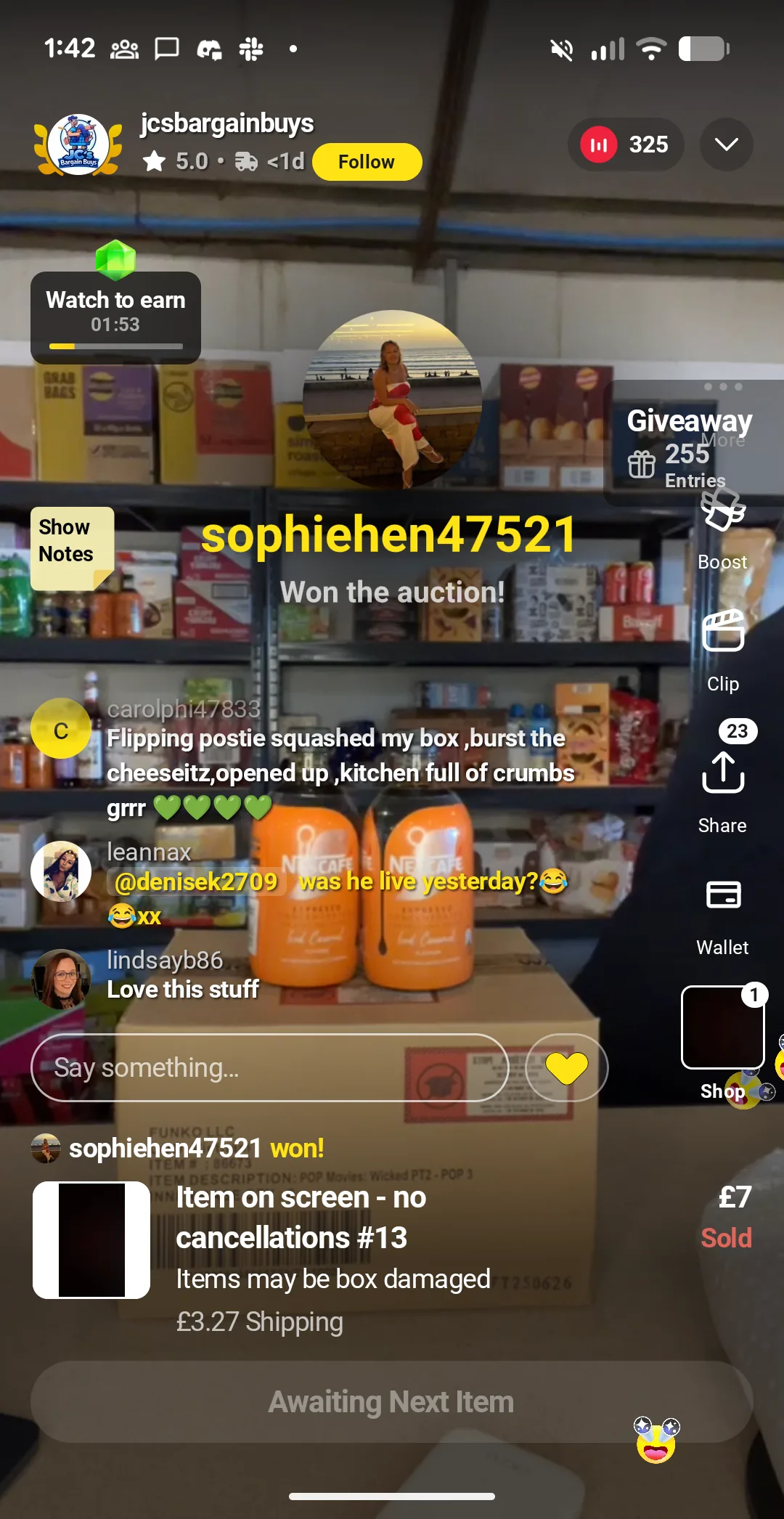
JCS Bargain Buys live auction stream on Whatnot UK with 325 viewers watching food and drinks being sold, an example of an honest seller.
JCS Bargain Buys running a food and drinks stream on Whatnot UK to 325 viewers. An example of an honest seller on the app.

The onboarding is polished, and that is the first thing to notice

Signing up took me about a minute. There is almost no friction. You verify a phone number, give them a card, and you are in. The feeds are warm and busy by design. A countdown here, a going going there, little chimes when someone wins a bid, a plus ten pounds free credit welcome offer if you spend in the first couple of days.

For anyone who has read anything about gamification and dark patterns in apps, Whatnot hits a lot of the same notes. It is not a slow, considered purchase. It is built for quick decisions, warmth, and dopamine. I do not think that is automatically bad. It is, however, worth noticing before you start bidding, because it is a big part of what comes next.

What is actually on sale on Whatnot UK

I spent a while flicking through feeds to see what was out there. Most of what I saw fell into a handful of categories.

  • Funko Pops and other collectible figurines, absolutely everywhere
  • Trading cards, mostly Pokémon with some sports and Magic mixed in
  • Tools and hardware, pitched at DIY and trade buyers
  • Trainers and shoes, often in odd sizes
  • Food in bulk, everything from crisps to soft drinks to beauty products near their best before date
  • Beauty and makeup, perfumes, skincare
  • Used and returned electronics, often vague about whether the item actually works

If you collect Pops or trading cards, Whatnot is a real option. You can build up a collection quickly and there is a community around it. If that is not you, the pickings thin out fast. A lot of the tools, shoes, and electronics streams are moving stock that came from returns pallets or clearance lots, which is where some of the problems I hit later start to show up.

The police auctions stream that had me hooked

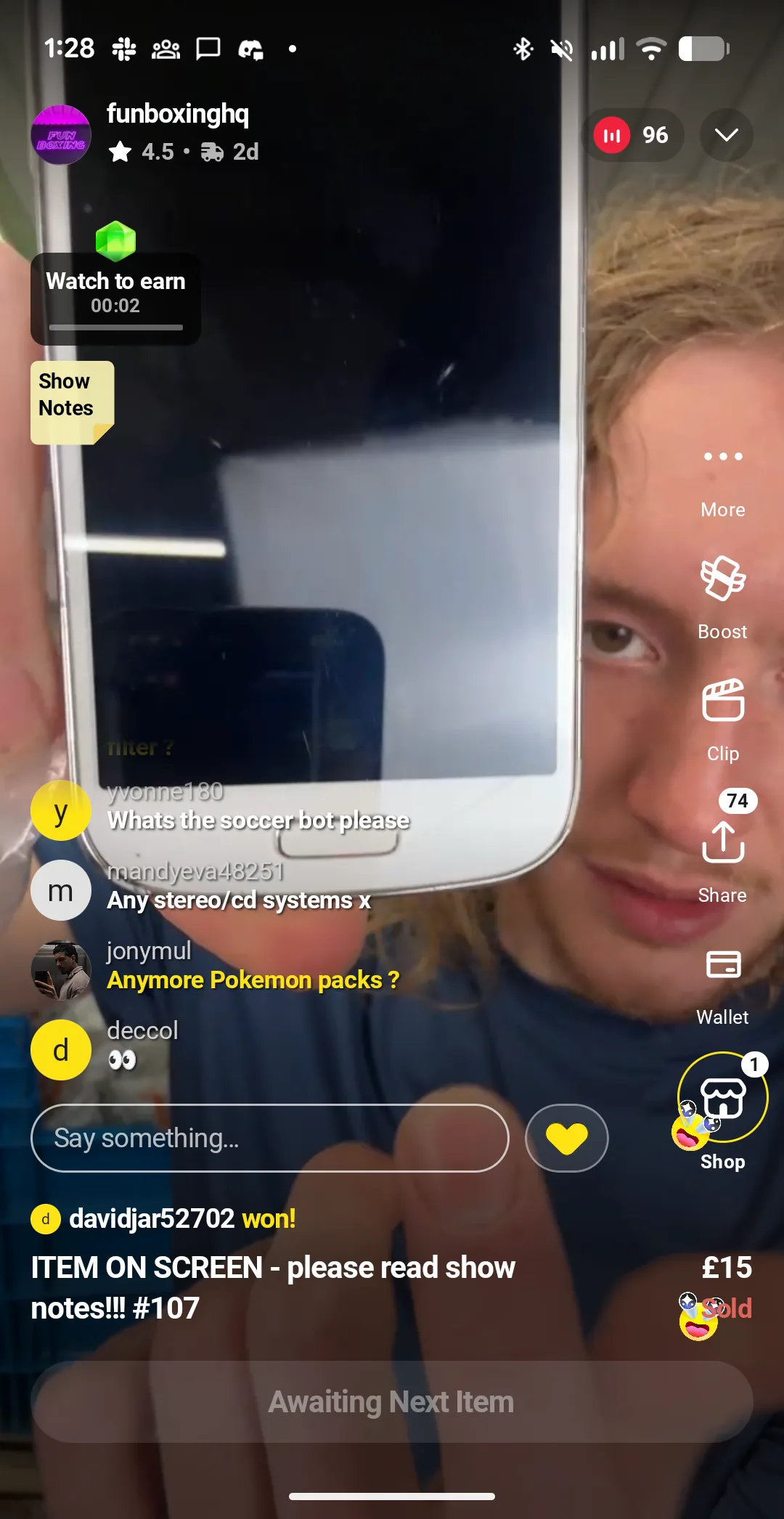
The stream I settled on was pitched as police auctions, items confiscated by the police and being sold off. They had pulled a large plastic police evidence bag onto the shelf behind them and the camera kept cutting back to it. They never said outright on the stream that everything was from the police, but the whole visual was built around it. The show notes were more careful. The framing was not.

There was a shelf of higher value items in the background the entire time, watches, small electronics, a couple of older cameras, perfumes. Every so often the host would bring one forward and open bidding. In between they were pulling smaller items out of the bag, usually going for between five and fifteen pounds plus about three pounds postage.

It was good television. One of the tactics they used a lot was to read out what the item was going for on eBay or Amazon. This is forty pounds on Amazon. This is fifty pounds on eBay. You can see how quickly that anchors you. If the item is going for fifty on eBay and he opens at a fiver, five or ten pounds feels like a bargain whether or not it is one.

What I was watching was essentially QVC for 2026. The gimmick is the bag. The engine is the psychology, and it works.

Fun Boxing HQ host on a Whatnot UK live stream holding a used Samsung smartphone close to the camera, police auction themed stream.
Fun Boxing HQ pitching an older Samsung Galaxy during a police auction themed stream. 96 people watching, items untested.
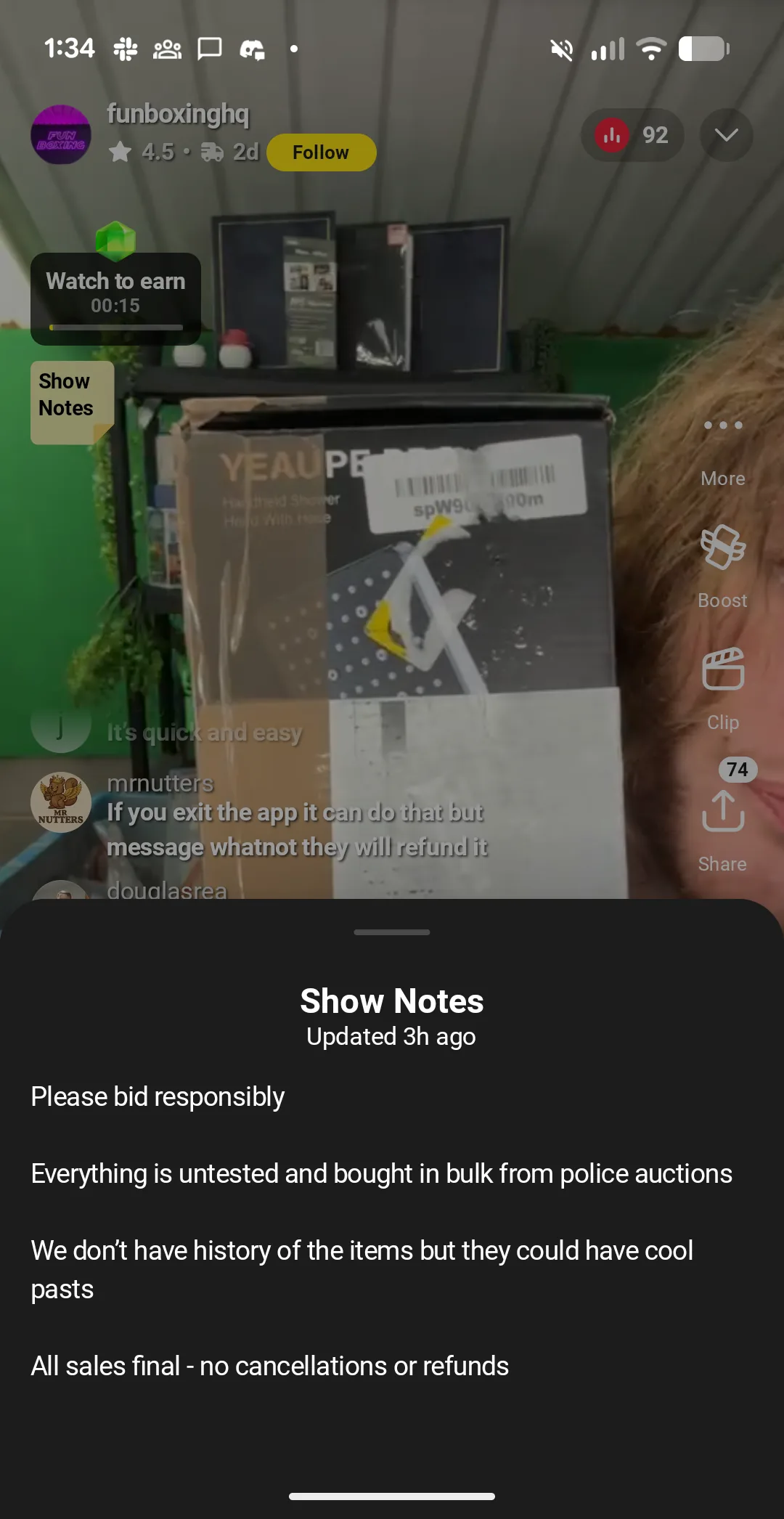
Whatnot show notes panel for Fun Boxing HQ stating please bid responsibly, everything is untested, all sales final, no cancellations or refunds.
The Fun Boxing HQ show notes panel. This is the small print most live buyers never read while a countdown is ticking down.

Eleven pounds for a pair of Beats, the bargain that felt real

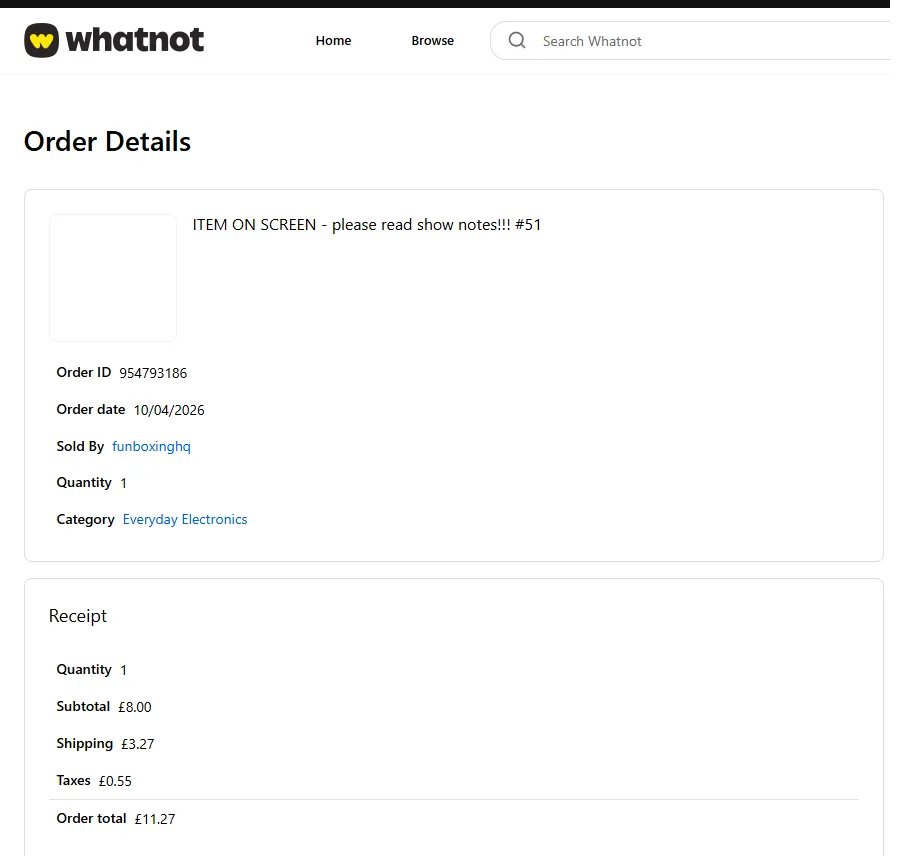
I had told myself I wanted to try the full buyer journey, partly as a marketer who wanted to see the flow, partly because I kept losing my headphones and thought a spare pair of Beats for dog walks would be useful. When a pair of Beats came out of the bag, I bid. Bidding against one other person from a five pound opener, I won at nine pounds plus three pounds shipping. Eleven pounds all in.

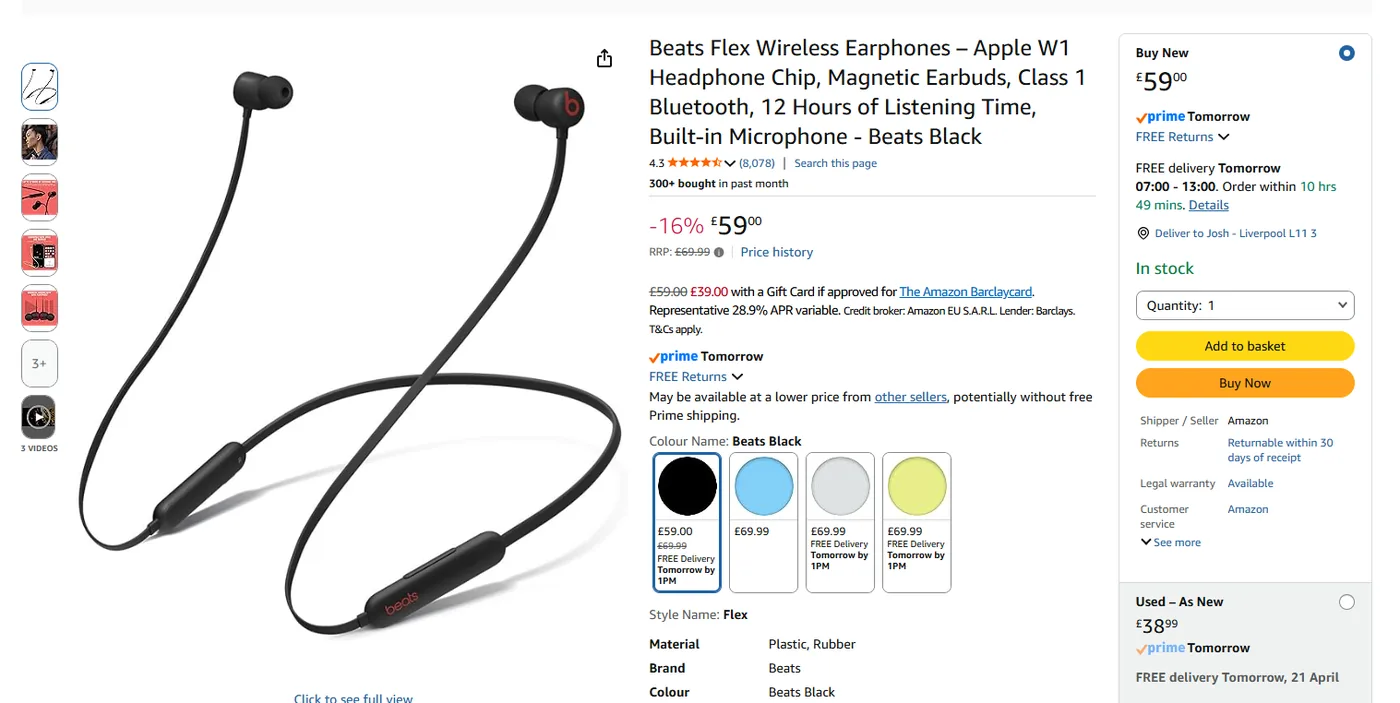
Those go for about forty to fifty on Amazon. At eleven, I felt like I had got a real bargain. Shipping was quick, two or three days, faster than the estimate. So far, a polished app, a fun stream, a cheap pair of headphones on the way. I was happy.

Whatnot UK order details page showing Beats Flex earphones from Fun Boxing HQ at 8 pounds plus 3.27 pounds UK shipping, total 11.27 pounds.
My Whatnot order receipt. Item eight pounds, flat UK shipping three pounds twenty seven, tax fifty five pence. Total eleven pounds twenty seven.
Amazon UK product page for Beats Flex wireless earphones priced at 59 pounds with Prime delivery, shown for price comparison against the Whatnot UK receipt.
The same-branded Beats Flex on Amazon UK at fifty nine pounds. If mine were real, this would be a very large discount.

The charging port that did not fit

The headphones arrived looking slightly worn but otherwise fine. I went to charge them and that is where it fell apart. The port on the headphones was neither a USB A nor a USB C. It did not match anything I had in the house, and it did not match what real Beats use.

My working assumption, then and now, is that they were not real Beats. Either a counterfeit or a mystery model built to look like them. They did not charge. They did not work.

The seller’s response

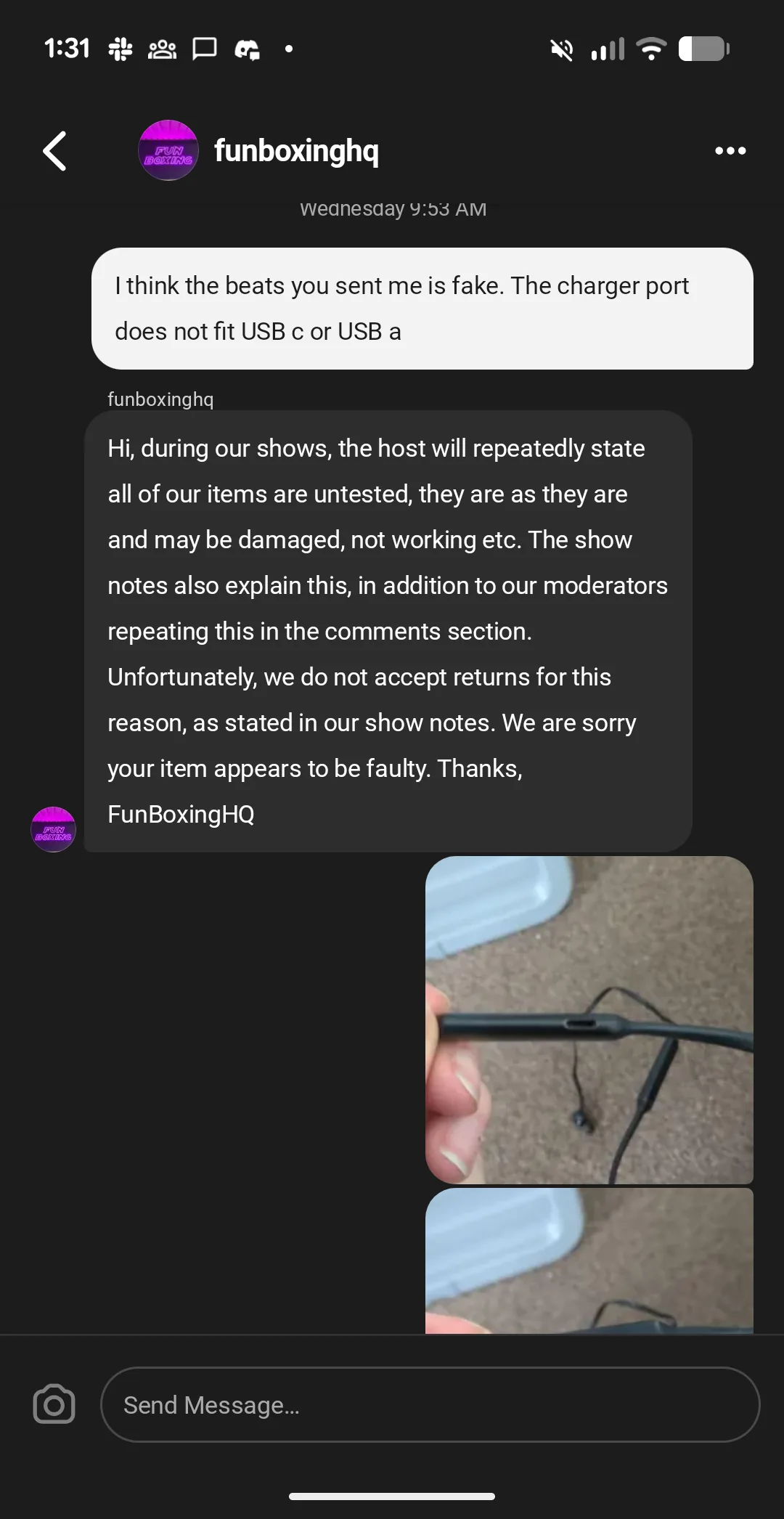
I messaged the seller, a trader called Fun Boxing HQ. I sent photos and explained what had happened. The reply came back quickly.

During our shows the host will repeatedly state that all our items are untested. They are as they are and may be damaged, not working, etc. The show notes also explain this, in addition to our mod generators repeating the comment section. Unfortunately we do not have returns for this reason. As it stays in our show notes, we are sorry your item appears faulty.

I pushed back. I explained the port was not a real Beats port and that selling fake goods is not protected by a line in your show notes about items being untested. Their next reply was in the same direction.

Our items are sold as condition for parts. We do not test any items. They run from £1 for this reason the charging port may be damaged, which is why they are not accepting the charge, however we cannot refund based on the assumption that they are fake as there is no way to prove it.

This is the gap I wanted to flag to anyone else who is thinking about spending on these streams. On the stream, the host had not said for parts, he had not said spares or repair. He had pitched them as a bargain pair of headphones. In the show notes, which most live buyers are never going to read while a countdown ticks down, the story was different. Everything was untested, no returns, all sales final. For reference, UK Citizens Advice is clear that selling counterfeit goods is not legal, whatever a seller’s show notes say.

Whatnot direct message from Fun Boxing HQ refusing a refund on counterfeit Beats headphones with a charging port that does not fit USB A or USB C, citing show notes.
The seller’s response after I flagged the Beats as counterfeit. The show notes were cited, a refund was refused.

Tired of renting your customers from a platform?

If your business leans heavily on one app or marketplace, you are one rule change away from trouble. We help UK business owners build channels they actually own: a proper site, SEO, and an email list. A quick call costs nothing and tells you where you stand.

Book a quick strategy call

What Whatnot support actually did

I told the seller I was going to contact Whatnot support, leave a review, and do a chargeback. Whatnot’s own support looked at my photos and, to their credit, did refund me. Their reasoning was that the item looked to be counterfeit, which is different from being faulty or damaged.

That is a useful distinction to hold on to. On Whatnot, if you buy something described as untested and it turns out to be damaged, the platform is likely to back the seller. The show notes cover it. If you buy something that turns out to be a counterfeit branded item, that is a different issue and support seems willing to step in. So if you ever find yourself here, take photos of everything, save the show notes and the seller messages, and if the item is a counterfeit, say so clearly when you open the ticket.

The honest sellers are there, if you look

I do not want the whole post to read as a warning. There are good sellers on Whatnot, and they are not hard to spot once you know what to look for.

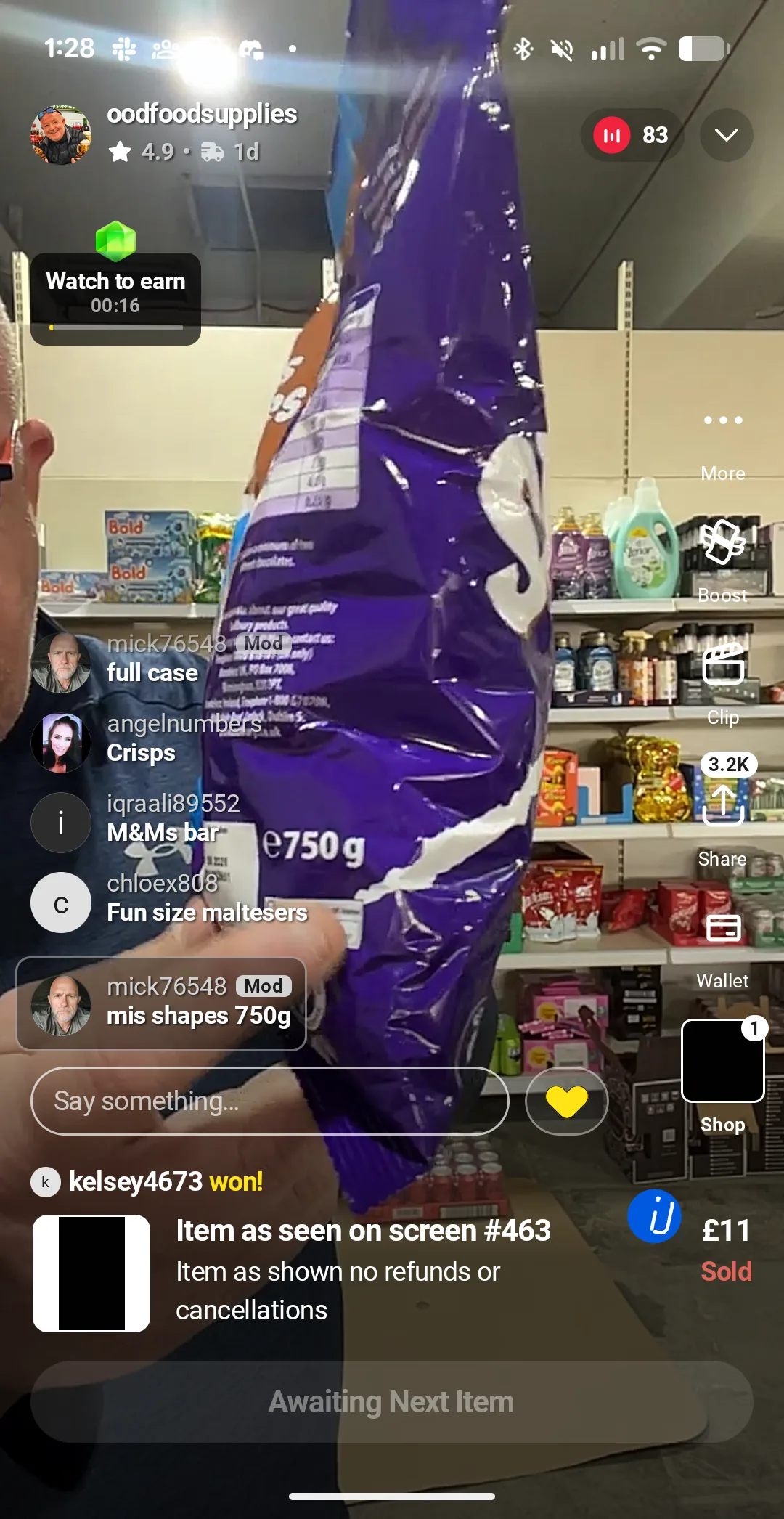
The best example I found was a trader called JCS Bargain Buys. She was selling food close to its best before date, clearly labelled, listed honestly. She had about three hundred people watching her stream, which made her the biggest stream on the app at the time I was looking. I picked up some oat milk for a good price with free shipping from her. Nothing dramatic, just a reasonable, honest transaction with a seller who knew what she was doing.

I also saw one trader selling laptops who, upfront, on the stream, said the items were for parts. He said they were from repair shops, that they were not working, and that people should only buy if they wanted them for spares or to fix something else they already owned. That is fine. If a seller is clear about what you are buying, there is no problem.

The pattern I noticed is the smaller, honest streams often have ten to twenty people watching. The big headline streams, the mystery bag ones, can draw crowds. The honest ones do not shout as loudly. They are still there.

OOD Food Supplies live stream on Whatnot UK selling a 750g Cadbury mis-shapes chocolate bag, 83 viewers, 4.9 rating.
OOD Food Supplies, a busy UK food stream with a 4.9 rating.

Codeable review, 5 stars

“Josh was a pleasure to partner with. Not only was he polite, but also knowledgeable, listened well, completed all tasks and stuck to his timeline. I cannot thank him enough for saving my website.”

Charles N. · Hacked website, infected files, missing subpages · 05 Sep 2024

The bargains that are not bargains

The other thing I kept noticing was the way some items were pitched as a deal when the maths did not actually hold up.

A good example. Some food sellers were breaking up multi-packs of soft drinks because of shipping constraints. I watched people bid between nine and thirteen pounds for twelve cans of Coca-Cola, plus a couple of pounds for postage. A quick look online and Costco or Asda was selling twenty-four cans for less. So someone watching the stream paid roughly double per can, on an item with transparent pricing everywhere, because the bag and the countdown and the chat made it feel like a deal.

That is the pattern to watch for. The psychology of the stream, the fifty pounds on eBay valuations, the comments fizzing, the countdown, the free ten-pound credit, all push you towards a buy that feels like a win. Sometimes the maths does hold up. Often it does not. Before you bid, ask yourself what this item is actually worth if you walked into a shop. If you do not know, do not bid yet.

Whatnot UK live stream selling a purple and green children's smartwatch for 3 pounds, a 'please read show notes' untested item.
A children’s smartwatch sold at three pounds plus shipping on Fun Boxing HQ. Untested, please read the show notes.

Is Whatnot legit? Is it safe?

Yes, Whatnot is a legitimate company. It is a US business with a proper UK presence, it takes payment through normal channels, and in my case their own support did step in when I had a counterfeit item. They are not a scam platform. If you want a wider read on buyer experiences, the UK Trustpilot page for Whatnot is the fastest way to see the range of reviews in one place.

Safe is a different question. I would put it this way. Whatnot is safer than buying off a random Facebook Marketplace listing, but looser than eBay or a proper online retailer. Live auctions move too quickly for the kind of considered buying protection people expect from eBay or Amazon. Seller quality varies hugely. Some sellers are scrupulous. Some are moving returns pallets with a smile. The platform does not do a lot of up-front checking on either camp.

If you are buying, treat Whatnot like a market stall, not like Amazon. You can get a good deal. You can also get caught out, and you have to watch what you buy.

What UK buyers and sellers need to know about the numbers

A few concrete figures you will run into on Whatnot UK.

  • £10 free credit for new UK buyers when they sign up and spend in the first day or two. Useful, but it is also the hook that pulls you into your first stream.
  • First £150 of sales doubled for new UK sellers as an onboarding bonus. One UK seller I read about online said he sold just shy of £150 of cards on that offer and walked away with roughly twice as much because of it.
  • Around 8% seller fees on top of your listing price. A few honest sellers will tell you on stream that their prices sit a little above market to cover that fee, which I thought was fair.
  • £2.70 flat combined UK shipping across everything you buy from the same seller in a session. This is designed to encourage you to buy more from the same stream. It works.

If you are seller-side and you are weighing up whether it is worth it, those are the numbers to start with. The doubling offer on your first £150 is real, and it is the strongest single reason to test a first stream.

Who sells well on Whatnot, and who does not

From what I saw, this platform fits very specific categories. If your business is in one of them, there is a real audience. If it is not, Whatnot is probably not your channel.

  • Fits well: collectibles (Pops, trading cards, vinyl, vintage), food close to its best before date, jewellery, small niche stock with high margin, near new clothing and trainers where condition is visible on camera.
  • Fits less well: standard retail inventory, professional services, big ticket single items, anything where the buyer really needs time to research before they commit.
  • Fits badly: untested electronics, damaged goods sold as bargains without clear warnings, anything a buyer is likely to feel cheated on once it arrives.

That last category matters, and not just because it is bad practice. Whatnot’s reputation with UK buyers rises and falls on the streams they see first. Every seller on the platform carries a bit of that reputation with them.

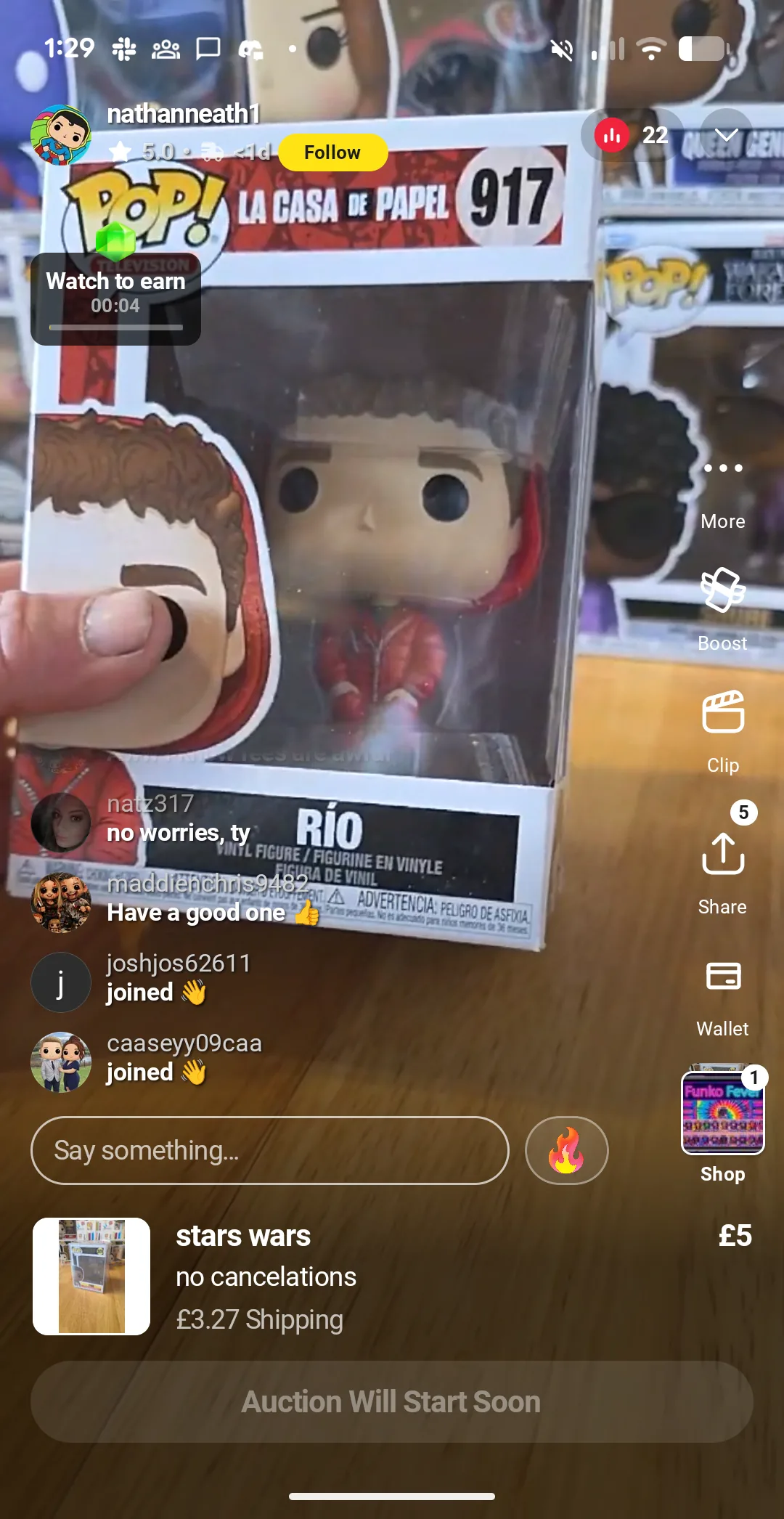
Funko Pop of Rio from La Casa de Papel being sold on a Whatnot UK live stream, illustrating the collectibles category popular on the app.
Funko Pops are the category that fits Whatnot’s format almost perfectly. Collectors, small viewer counts, fast bidding.

How to use Whatnot without getting caught out

If you are a buyer and you still want to have a go, here is what I would tell a friend.

  • Set a budget before you open the app, and say it out loud if you have to. Decide what you are spending tonight, and stop when you hit it.
  • Read the show notes, not just what the host is saying. If the show notes say untested or for parts, assume the item does not work.
  • Take electronics off the table unless a seller is explicit on stream that the item is tested and working. For branded items, a quick check of the maker’s own site (for example the Apple UK page for Beats Flex) will tell you what the real charging port should look like.
  • Check a price elsewhere before you bid, not after. Amazon, eBay sold listings, a quick Google. The host’s valuation is a sales tool, not a price check.
  • Favour smaller streams with ten to thirty viewers over the big breakers when you can. The atmosphere is calmer and so is the pricing.
  • If something arrives broken or looks counterfeit, take photos straight away, save everything, and open a ticket with Whatnot support, not just the seller.
  • Counterfeit and as described but untested are not the same. Say counterfeit if it is.

And if you run a business, a quick note

If you are a UK business owner reading this, there are two takeaways worth carrying home.

First, the platform psychology is not just a Whatnot story. Anywhere you sell online, someone else owns the rules. Amazon, eBay, Etsy, TikTok Shop, Whatnot, each one can change fees, change the algorithm, freeze your account, or shift what is allowed on a Tuesday morning with no warning. If your business depends on a single platform, your business is not really yours.

Second, the things that are actually yours, a proper website, SEO (search engine optimisation, the work that gets you found on Google), an email list, a Google Business Profile, a phone number on every page, those are the things that keep working whether a trend app is hot this quarter or not. A lot of what we do at Marketing The Change is help business owners build that. Honest web design, SEO, WooCommerce when you actually need to sell online, so that trend platforms become an extra channel on top, not the only thing holding you up.

If you want a free starting point, our free SEO site check will tell you where you stand on the things Google actually looks at, and our FAQs page covers the practical questions we get from UK business owners most often. Or get in touch and we will have a proper chat.

Thinking about selling online the right way?

If Whatnot or another trend platform has you weighing up e-commerce for your own business, we can talk you through the honest options. WooCommerce, Shopify, or something simpler, with the SEO baked in so you actually get found.

See how we help

Frequently asked questions

Is Whatnot legit in the UK?

Yes. Whatnot is a US company with a UK presence, it handles payment through normal channels, and their support team is willing to step in on counterfeit items. That said, seller quality varies a lot. Legit is not the same as risk free.

What fees does Whatnot charge sellers in the UK?

Sellers typically pay around 8% on sales, plus payment processing. New UK sellers also get their first £150 of sales doubled as an onboarding bonus, which is worth trying at least once if you are thinking about selling.

Can you return items bought on Whatnot?

Usually not for items described as untested, that is part of the show notes most sellers use. If an item is counterfeit or clearly misrepresented, contact Whatnot support directly, not just the seller, with photos and the show notes saved.

What sells well on Whatnot?

Collectibles, trading cards, Funko Pops, jewellery, near best before food, and niche stock with visible condition on camera. Professional services and most standard retail inventory do not perform well in a live auction format.

Whatnot vs eBay, what is the difference?

eBay is structured around considered buying and formal buyer protection. Whatnot is live, fast, and entertainment-led, which is great for impulse buys and collectibles but weaker on dispute resolution and condition verification. Different tools for different jobs.