Most conversion rate discussions start in the wrong place. They obsess over landing page layout, button colour, form length. But the single biggest lever on your conversion rate is one most marketers barely think about: where your visitors came from before they landed.

Channel mix is conversion rate. Change your website traffic sources and your sitewide conversion rate changes overnight, before you touch a single pixel.

Here is what the data actually looks like, drawn from live analytics across real client accounts.

TL;DR

Channel mix is your conversion rate. Across multiple client accounts tracked over 12 months, email traffic converted at 15x the rate of organic social. AI assistant traffic, still small in volume, is generating engagement rates above 80% and conversion rates above 12% on some properties. The channel you acquire traffic from matters more than almost any on-page factor.


The engagement gap is bigger than you think

We pulled twelve months of session data from three client accounts: a high-volume US content publisher with over six million annual sessions, a UK legal services site, and a UK service directory in the tattooing and body art industry. None are named here, but the data is real and unfiltered.

Across all three properties, the same pattern held: the channel your visitor came from predicted their on-site behaviour far more reliably than any other variable.

Content publisher, 12 months, by channel:

ChannelSessionsEngagement RateKey Event Rate
Email166,00066.1%12.0%
Referral149,00062.1%5.6%
Direct1,620,00038.7%5.4%
Organic Search3,660,00052.5%0.82%
Organic Social495,00035.3%0.57%

The spread here is not a rounding error. Email visitors converted at 15x the rate of organic social visitors. They stayed longer, visited more pages, and completed more goal actions. And the publisher was driving 495,000 social sessions per year with effectively nothing to show for it in terms of downstream behaviour.

Service directory, 12 months, by channel:

ChannelSessionsEngagement RateAvg Session Duration
Organic Search2,21457.0%72s
AI Assistant2045.0%99.8s
Referral742.9%24s
Organic Social728.6%21s
Direct75712.9%17.5s

Direct traffic here is almost certainly inflated by bot traffic and internal visits: a 12.9% engagement rate and 17-second average session means most of those 757 sessions were not real prospects. Strip it out and organic search is doing almost all the heavy lifting.
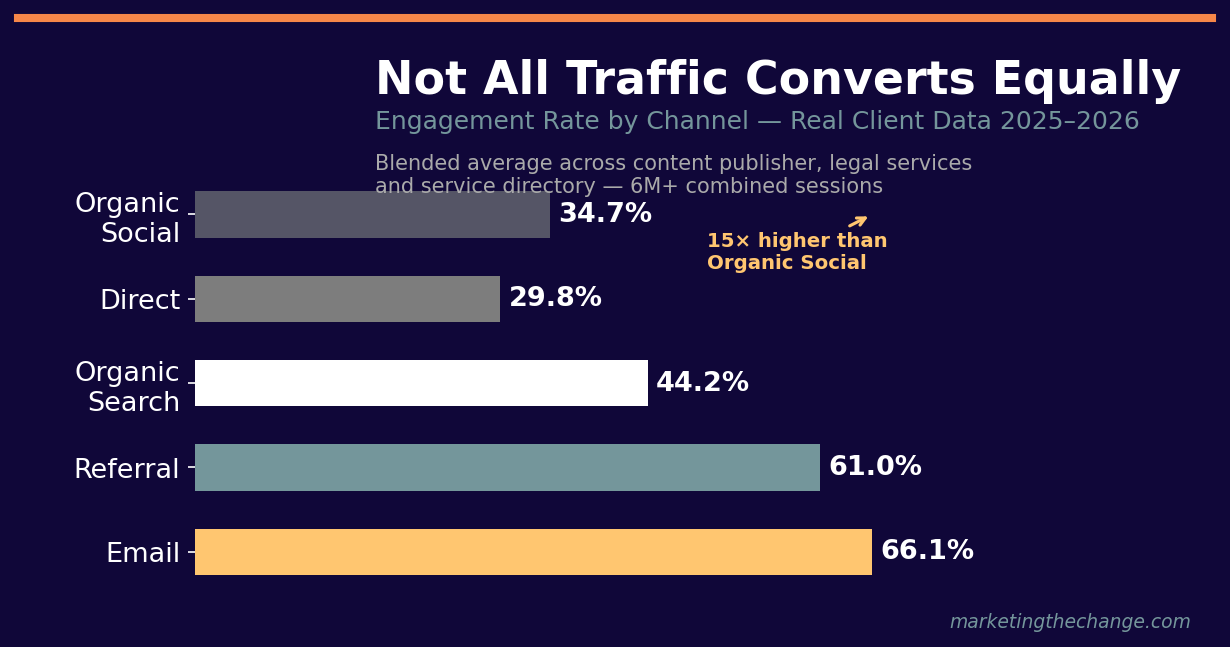
Infographic showing engagement rates by channel: Email 66%, Referral 61%, Organic Search 44%, Direct 30%, Social 35%

Why social traffic rarely converts

Social platforms are discovery engines, not decision engines. When someone clicks a link on Instagram or TikTok, they were not looking for you. They were scrolling. You interrupted them.

That interrupt relationship is visible in the numbers. The content publisher’s organic social sessions had a 35.3% engagement rate and a 0.57% key event rate. Visitors from email had the same intent inverted: 66% engagement, 12% conversion. Both audiences might have looked identical in terms of demographics. Their relationship to the content was completely different.

The attribution model you use makes this problem worse. Last-click attribution, still the default in most reporting setups, credits the final channel before conversion. Social often initiates the journey but rarely closes it. The result: social gets blamed for poor conversion rates that are really just a reflection of where it sits in the funnel, not whether it is working.


Organic search: volume channel, not conversion channel

Organic search drives the most sessions on almost every site we work with. It is also, typically, one of the lowest-converting channels on a raw session-to-goal basis.

This is not a failure. It is a feature of how search works.

Someone searching “best kratom vendors” or “tattoo studios near Manchester” is at the research stage. They are evaluating. They are not ready to convert today. The page has to earn that trust first, which means organic search drives conversion indirectly: today’s informational session becomes next week’s direct or branded visit.

We see this in the GSC data from the same service directory client. Generic queries (studio listings, category pages, broad terms) carried a 0.88% click-through rate from search. Branded queries, where someone already knew the brand name and searched for it directly, carried an 18.4% CTR. That is a 21x gap.

The visitor who arrives via a branded query has already converted to awareness. The click is just confirmation.

The same gap appears on the content publisher. Navigational and branded queries pulled a 64.7% CTR from SERP. Pure informational content queries averaged 0.08%. Over 800 times lower. Both are “organic search” in your GA4 channel report. They are not the same visitor.


Email is the highest-converting channel. This is not a coincidence.

Across every account we have audited with email data, email consistently outperforms every other channel on conversion rate. The content publisher’s 12.0% key event rate from email was 14x the organic search rate and 21x the organic social rate.

12x

Email converts at 12x the rate of organic search

Key event rate: Email 12.0% vs Organic Search 0.82% — content publisher, 6M+ sessions, 12 months

Infographic: Email 12% key event rate vs Organic Social 0.57% — a 21x conversion gap

There are two reasons for this.

First, permission. An email subscriber opted in. They raised their hand. Every other channel, even branded organic search, involves you reaching out. Email is the only inbound channel where they came to you first.

Second, recency. When someone opens an email and clicks, the intent is immediate. The gap between awareness and action is seconds, not days. The content is timely, the offer is specific, and there is no SERP or social feed pulling them back.

Email lists are conversion assets, not communication assets.

A list of 10,000 engaged subscribers outperforms 500,000 monthly organic visitors on almost every bottom-line metric.

AI assistant traffic is the channel worth watching in 2026

The most interesting data point from the service directory was not in its top channels. It was in the smallest row: AI Assistant.

Twenty sessions. Too small for statistical significance. But those twenty sessions averaged 99.8 seconds on site, compared to 72 seconds for organic search visitors. The engagement rate was 45%. And those sessions came from people who had specifically asked an AI model to recommend or explain something, received a response that mentioned this site, and then clicked through.

That is a different kind of visitor. They did not find a link in a feed. They did not click an ad. They asked a question, received a curated answer, and chose to learn more.

The legal services data makes it even clearer. Across 216 AI Assistant sessions over twelve months, the numbers were extraordinary:

Real data: Legal services site (UK) — AI Assistant channel — 12 months — n=216 sessions

86%
Engagement Rate
6 min
Avg. Session Duration
12.5%
Conversion Rate
vs. Organic Search CR
Infographic: AI assistant traffic achieves 86% engagement, 6 minute average session and 12.5% conversion rate

Third-party research published in early 2026 puts AI referral conversion rates at roughly 15.9% for some categories. Internal early-adopter data from HubSpot clocked AI referral traffic growing 796% year-on-year. GA4 now tracks this as a named channel group (“AI Assistant”), which means the cohort is large enough that Google built dedicated reporting infrastructure for it.

The question is not whether AI referral traffic matters yet. At twenty sessions, it clearly does not move the needle for the directory client. The question is whether you are doing anything today to make sure AI models can find, read, and accurately reference your site when someone asks a relevant question. For most businesses, the answer is no.


What attribution models hide from you

Every channel comparison above is made harder by attribution. The numbers we pulled use session-scoped, last-interaction attribution: whichever channel drove the session that ended in a conversion gets the credit.

This systematically undercounts channels that operate early in the path (social, display, AI) and overcounts channels that close deals (email, direct, branded search). It also makes direct traffic look like a conversion channel when it is often just the place branded visits land after being initiated elsewhere.

Consider a realistic journey for a content publisher subscriber:

  1. Discovers article via organic social share
  2. Returns two weeks later via organic search (generic query)
  3. Signs up for email list
  4. Opens promotional email, clicks through, completes key event

Last-click gives 100% credit to email. Email deserves credit, but so does the social post that started the relationship.

A simpler fix than switching to data-driven attribution: run a 30-day channel cohort comparison in GA4. Look at first-session channel vs. eventual conversion. You will almost certainly find organic social and organic search initiating far more conversions than they appear to close. That changes where you invest.


The practical read

If you are trying to improve sitewide conversion rate, here is the hierarchy of levers:

Grow email. No other change you can make will produce the kind of 10-15x improvement in conversion rate that shifting sessions from social to email produces. Every page, every visit, every interaction should have a path toward capturing an email address.

Segment organic search by intent. Transactional and navigational keywords convert. Informational keywords build lists and drive future branded searches. Optimise for the right metric per page type, not a blended sitewide rate.

Do not abandon social. The 0.57% key event rate is a conversion rate, not a failure rate. Social is a top-of-funnel channel. Measure it on reach, email sign-ups, and assisted conversions, not last-click revenue.

Start tracking AI referrals. They are small now. The businesses that understand their AI referral cohort today will have a significant advantage when that channel matures. Check your GA4 channel grouping report and look for “AI Assistant” or break out referrers from chatgpt.com, perplexity.ai, and claude.ai manually.

Fix attribution before optimising. You cannot optimise a system you are measuring wrong. Even a rough data-driven attribution model will surface investments that last-click analysis is hiding.

Website traffic volume is easy to grow. Traffic quality is harder, and almost entirely determined by where your visitors were before they clicked.

How does your channel mix compare?

We run channel attribution analysis for every client we take on. If you want to know which traffic sources are actually driving your business, we can show you within the first call.


Marketing the Change is a digital marketing agency based in Liverpool. We run SEO, paid search, and content strategy for clients across the UK and US.

Joshua Morley

Josh Morley Marketing the Change e1588538842785

Author :

Last Update:

The UK’s digital landscape is highly competitive, and finding the best web design agencies to trust with your online presence is critical. We’ve assessed the top creative studios, from London to Liverpool, to help you find an agency that delivers world-class design, robust development, and measurable ROI.

TL;DR: Best Web Design Agencies in the UK (Quick Summary)

If you’re comparing UK web design agencies and want the fast version, here’s what matters most:

  • Best Overall: [Agency Name 1] — ideal if you want a full-service partner focused on measurable ROI and end-to-end digital transformation.
  • Best for Bold, Creative Design: [Agency Name 2] — a great pick for award-winning UX/UI, standout visuals, and strong brand storytelling.
  • What to compare before choosing: look for strong case studies, a portfolio that matches your industry, and proven expertise in your platform (e.g., WordPress, Shopify) plus conversion-led UX/UI. Industry experience matters more than many buyers realise — especially in regulated sectors. For example, healthcare organisations face unique compliance, trust, and patient-privacy challenges that require very different digital strategies, which we explore in detail in our guide on how healthcare marketing agencies use SEO and paid advertising.
  • Don’t skip this stuff: use a vetting checklist, understand typical pricing models (£5k–£50k+), and confirm IP/code ownership in the contract.
  • Why this guide is structured this way: the summary + detailed comparison format is built for buyers who want to shortlist quickly, then dig deeper before hiring.

Quick Look: Top-Ranked UK Web Design Agencies

RankAgencyLocationLogoReviews (count)Short excerpt
1Marketing the ChangeLiverpool (UK)Logo shown on branding materialsVaried by listing; multiple sources note strong SEO and digital marketing capabilitiesFocused on change-driven digital marketing, SEO optimization, and client-centric strategies
2Identify DigitalWakefieldLogo available on siteStrong client feedback across platformsFast-loading WordPress sites and reliable long-term support
3TangentLondonLogo on websitePositive enterprise client testimonialsEnterprise UX, strategy, and full-stack development
4Fortnight StudioLondonLogo on siteFavorable case studiesDesign-driven with high-impact experiences
5Lighthouse LondonLondonBranding materialsStrong reviews for research-driven design and CROEmphasis on user clarity and conversion optimization
6KOTALondonLogo featuredPositive feedback from lifestyle/creative brandsExpressive, visually memorable websites
7Luminary BrandsUK-wideLogo on branding pagesMultiple testimonials highlighting ROIFull-service including web design, branding, SEO
8Fishfinger Creative AgencyUKBranding shownNotable recognition and client praiseWork for Google, Nike, WWF, Red Bull
9Waywest DesignUKLogo on sitePraise for transparency and measurable resultsFull-service with branding, development, ongoing support
10DesignRush-recognized UK agenciesUKVarious client logosAggregated client feedbackNoted for strong design quality and client success

Josh Morley

I have been designing & marketing websites since 2013. I specialize not just in WordPress web design but also in online marketing. SEO, PPC, keyword research, link-building and most recently on lead acquisition for local businesses.

Your domain is the foundation of your digital brand. It shapes how customers find, remember, and trust you online—and often becomes the very first impression people have of your business. Yet, while most marketers recognise its importance, far fewer take a strategic, long-term approach to managing their domain portfolio.

A smart domain strategy isn’t about collecting endless variations or holding onto clever names you’ll never use. It’s about building a clear, intentional structure that supports your marketing goals, strengthens your online authority, and leaves room for future growth.

Your domain also works closely with the technical infrastructure behind your website. Even the perfect domain name can fall flat without fast, reliable hosting. If you’re reviewing your setup or planning a new site, it may be worth exploring the best hosting provider to ensure your website performs optimally.

Together, your domain strategy and hosting choices form the backbone of your online presence—shaping trust, visibility, and long-term digital success.

Choosing the Right Domain for Your New Website

Choosing the right domain is one of the most important early decisions you’ll make when launching a new website, rebranding, or expanding into new markets. Your domain acts as your online identity — it shapes how customers perceive you, how easily they can find you, and how much they trust your brand from the first click. A thoughtful choice sets the tone for your entire digital presence and supports your long-term marketing goals.

Here are a few key principles to keep in mind:

  • Keep it simple. Short, readable names are easier for visitors to remember and type.
  • Reflect your brand. Your domain should align closely with your business name or core service; consistency helps reinforce recognition across all channels.
  • Avoid clutter. Skip unnecessary words, numbers, or hyphens that make your address look less professional.
  • Think globally. If your new site is targeting multiple regions, consider regional extensions such as .eu or .fr to build trust locally.
  • Secure availability early. Before you begin your website design, invest in checking domain availability to ensure your chosen name is open. You can do this quickly using EuroDNS’s domain search tool.

Your website design might evolve, but your domain is the constant that ties it all together. The right name reinforces credibility, helps SEO, and gives customers a reason to trust your brand from the very first click.

When to Register New Domains

You don’t need a new domain for every product launch, campaign, or minor update. In most cases, your main domain is sufficient. However, there are specific situations where registering additional domains makes sense, helping you protect your brand, reach new audiences, and clearly separate distinct ventures.

  • Rebranding: When your business name changes, a new domain helps reset perception and keeps your communications consistent.
  • Regional growth: Country-specific extensions build trust and visibility with local audiences.
  • Brand protection: Securing logical variations of your name, such as .com, .co.uk, and relevant misspellings, prevents confusion and impersonation.
  • New ventures: If you’re launching a distinct brand or sub-business, a dedicated domain may be essential for clarity and audience targeting.
  • Strategic additions only: Each new domain should serve a clear purpose and connect back to your wider brand ecosystem.

When to Build on What You Already Have

For most marketing activities, your existing domain is your strongest asset. It carries your SEO equity, customer familiarity, and authority. Creating separate domains unnecessarily can weaken that power and fragment your online presence.

Instead of splitting things up, consider smarter ways to organise under the same roof:

  • Subfolders: Use paths( yourbrand.com/campaign-name) to host short-term initiatives and landing pages.
  • Subdomains: Use addresses such as (blog.yourbrand.com) or (shop.yourbrand.com) for distinct areas of your site, while keeping everything under one trusted domain.
  • Redirects: Apply them strategically when consolidating old content or migrating URLs to preserve SEO value.

This unified approach ensures your audience always recognises your brand while maintaining your search authority. For added confidence, you can run a comprehensive SEO audit to identify opportunities, optimise performance, and protect your site’s rankings.

Building a Future-Proof Domain Portfolio

A strong domain strategy isn’t something you set once and forget. As your business evolves, your domain portfolio should grow and adapt alongside it. Regular reviews help ensure that every domain you own still aligns with your marketing goals, supports your brand, and avoids unnecessary clutter. A future-proof portfolio saves you time, protects your brand, and ensures you’re ready to scale into new markets or initiatives without complications.

A Well-Managed Domain Portfolio Should:

  • Protect your primary brand name and regional variations: Ensure that your core domain and key extensions (.com, country-specific TLDs) are always secured to prevent competitors or cybersquatters from taking them.
  • Avoid duplicate or unused domains: Extra domains that aren’t actively used can create confusion, dilute SEO authority, and increase management overhead. Streamline your portfolio to focus on meaningful assets.
  • Include renewal monitoring: Set reminders or use automated services so that important domains never accidentally expire, avoiding costly recovery or brand damage.
  • Support your future growth: Every domain in your portfolio should have a clear purpose — whether for new products, regional expansions, or strategic campaigns — without overwhelming your management or creating redundant complexity.

Think of your domains as valuable digital property. Each one should play a defined role within your brand ecosystem, contributing to credibility, visibility, and long-term business growth. A thoughtful portfolio helps you stay organized, protects your brand, and keeps you ready for whatever opportunities come next.

Final Thoughts

A well-planned domain strategy focuses on making smarter choices, not simply adding more domains. The right domain structure helps your brand appear consistent, credible, and easy to find, while leaving room to grow.
Before your next campaign or website launch, take a few minutes to review your current setup. Is your main domain still the best fit? Are there regional or protective domains worth securing?
A quick audit of your existing domains can go a long way toward keeping your marketing consistent and your online presence future-proof.

Josh Morley

I have been designing & marketing websites since 2013. I specialize not just in WordPress web design but also in online marketing. SEO, PPC, keyword research, link-building and most recently on lead acquisition for local businesses.

Lighthouse CLI tool version and user agent on Chrome can vary on version 2.92

The Lighthouse tool and a user agent on Chrome, Chrome canary & the Command line interface (CLI) will differ, and the outcome may differ somewhat. Until Lighthouse version 2.9.2, robots.txt files weren’t reviewed.

A local web developer from Stoneycroft was having some issue with Google Light House CLI

When they were using the lighthouse command-line interface and chrome lighthouse tool version Whitehouse 2.9.40.

The site was being blocked on the CLI but not on the Chrome extension

It said the page is blocked from indexing robots.txt but the chrome lighthouse tool which is 2.8 using an emulated Nexus 5x user account says it is fine and can be indexed.

After doing some research on the Google Lighthouse CLI it appears that version 2.8 of the crime extension did not check the robots.txt file. They weren’t checked until version 2.9.2 which is why they were seeing it pass in 2.8

Lighthouse CLI 1

Josh Morley

I have been designing & marketing websites since 2013. I specialize not just in WordPress web design but also in online marketing. SEO, PPC, keyword research, link-building and most recently on lead acquisition for local businesses.

Keyword Rank Checker

This week we were in Lady Green speaking to someone who was learning SEO.

He was discussing some of the paid ranking tools and how overwhelming they are and we suggest stripping everything back so that they understood the theory before jumping into a full-fledged tool.

If you are just getting started in SEO, only tracking a few keywords for a small site you may want to start with Google sheets – rank google checker. This will allow you to track your keyword rankings over time without any fancy software.

There are many other options around but sometimes the number of options that these tools have can confuse an SEO newcomer.

First, you need to create a new sheet and title it whatever you want.

Next, in cell A1 type “Keyword” (without the quotations). This is going to be our first column header.

Now, in cell B1 type “Rank” (again, without the quotations). This is going to be our second column header.

In the cells below these headers (A2 and B2), start typing in the keywords that you want to track. For this example, we’ll use “SEO tips”, “SEO tools”, and “SEO trends”.

Once you have your keywords entered, it’s time to set up the SERP tracker information.

There are many tools that can automate this but sometimes it’s good to strip everything back.

Google Search Console

If the Google search console is set up (previously Google webmaster tools), then select your website and click on search traffic performance to see your website’s search results and check google position by keywords.

From here you can select the pages, devices, queries (and check google rankings in each) etc that you want to track SERPS for.

For this example, we will just look at desktop results in the UK for the query “SEO tips” (google position keyword)

After this, we can set the date range as this week, last month or over a 3-month aggregate.

Once you have this data you can plug it into the spreadsheet.

You can even dill down on a page or blog post and check google’s position for a keyword or check a website’s position on a keyword as a whole.

Continue to add columns for each day, week or month. As you enter this data in you will start to understand it more and when you are ready can take the plugin into a paid tool.

You can also use the export tool if you want to save a bit of time.

Google Ranking with Incognito

If you don’t have Google Seach Console as it’s not set up or you are looking at a competitor’s site you can use Google incognito window. It’s not perfect but will give you an average idea of their rankings by looking at their search engine results pages.

Google Keyword Position Checker

To do this open a new window in Chrome and go to File > New Incognito Window.

Then Google the selected keywords and enter the data into the spreadsheet.

Tracking with Google Sheets is it worth it?

There are plenty of paid tools out there that will do all this for you but if you want to track your rankings in Google for free then using Google Sheets is a great way to do it.

However, a paid tool can track so many different metrics and data we only suggest using this manual method as you are learning or for personal projects.

Just like the new investor paper trades the stock market to learn how it works; as you are learning SEO you can track your rankings on Google using this method.

Need Help Tracking Rankings?

How do you improve your rankings?

To improve your rankings with content SEO, start by conducting thorough keyword research to identify relevant and high-traffic keywords. Integrate these keywords naturally into your titles, headers, and throughout your content. Focus on creating high-quality, engaging, and informative content that addresses your audience’s needs. Regularly update your site with fresh content and refresh existing pages to keep them relevant (you can hire a content writing agency or a freelancer to help you with this).

SEO always starts with understanding where you are today so that you can make a plan to get where you want to be. If your struggling to get a handle on your data and need some one-off or ongoing support feel free to reach out to us.

Josh Morley

I have been designing & marketing websites since 2013. I specialize not just in WordPress web design but also in online marketing. SEO, PPC, keyword research, link-building and most recently on lead acquisition for local businesses.

Google tag manager causing redirect chains included ums adtechus com

A new client messaged us in West Kirby about a problem they were seeing on their site. They put the site into Pingdom & GT Metrix and found that they keep seeing the same error causing seed issues.

Remove the following redirect chain if possible

They were getting this error as a number of 3rd party software they placed within their Google Tag Manager container was redirecting cause an error and the site to slow down.

They had the following 3rd party scrips

 https://ums.adtechus.com – ONE Ad Server by AOL: Publishers is a simple, unified programmatic solution designed to help publishers maximize monetization across every format and channel.

https://loadeu.exelator.com – Possible Malware

https://x.bidswitch.net – BidSwitch is a middleware that allows connected programmatic partners to seamlessly access new platforms and services to optimise their performance.

https://d.adroll.com/cm/r/ou – AdRoll provides the platform, performance and professional service that grows your revenue. Automatically create dynamic display, social & native ads from your product feeds.

https://getrockerbox.com/ – Rockerbox centralizes all of your marketing spend and campaigns

https://analytics.ccgateway.net – analytics software

https://d.adroll.com/cm/outbrain/out – Outbrain is the technology company powering the discovery feeds on your favorite media.

https://d.adroll.com/cm/pubmatic/out – PubMatic is a digital advertising technology company who empowers premium app developers and publishers to maximize their programmatic advertising business.

https://d.adroll.com/cm/taboola/out – Taboola is the world’s leading discovery & native advertising platform that helps people explore what’s interesting and new in the moment of next.

https://d.adroll.com/pixel/ – More adverts

https://secure.adnxs.com/seg – Adnxs.com is run by AppNexus, a company that provides technology, data and analytics to help companies buy and sell online display adverts

How to remove/fix the URL chain?

The first thing to do is find out what each script does and then look at removing anything that is not needed. Also, you may use tag filters to prevent tags from popping up where they aren’t needed.

For example, you may only display certain display adverts on certain pages you can stop loading the script where its not needed.

If all of the tags are needed then it might be worth reaching out to the third party to see if they can reduce the amount of redirects

If you are having issues with Google indexing or seeing the “Indexed, though blocked by robots.txt” warning on your site feel free to reach out to us and we would be happy to help!

Josh Morley

I have been designing & marketing websites since 2013. I specialize not just in WordPress web design but also in online marketing. SEO, PPC, keyword research, link-building and most recently on lead acquisition for local businesses.

“Indexed, though blocked by robots.txt” Warnings in Google Search Console?

A new client messaged us in Great Crosby about a problem they were seeing on their site. They had a pretty large site with over 2000 pages and none of them had been receiving traffic. When they checked Google Search Console they saw the warning indexed though blocked by robots txt. Along with some supporting information

The majority of these pages are filter parameters, these pages are mostly:

  • blocked within the robots.txt
  • have a “noindex” tag on the page
  • Canonical to the master URL
  • Are NOT included within the sitemap
  • Are blocked using the GSC Parameter tool

Scary Warning

It’s a scary issue when you see this in Google Search Console for the first time. You think you have been hit by a Google penalty and that all your traffic will disappear. But, luckily, its usually not that serious. In most cases, it can be fixed pretty easily.

If you see this message in Google Search Console, something on your site or server is blocking Google from reading and indexing the site properly. This can be caused by a few different things:

1. Your robots.txt file is blocking Google from indexing your site

2. You have a “noindex” tag on your pages

3. Your pages are canonicalized to the wrong URL

4. Your pages are not included in your sitemap

5. JS conflict issues

6. Canonical issues

Try to find out when this happened.

If you have just launched the website then it might be as simple as clicking a button to turn off the no index setting.

Maybe it just happened, then we would suggest looking over any changes to the site no matter how small.

Things like:

  • Adding plugins
  • Updating plugins
  • Changing themes
  • Changing server (even if it’s just an upgrade)

If you are having issues with Google indexing or seeing the “Indexed, though blocked by robots.txt” warning on your site feel free to reach out to us and we would be happy to help!

Josh Morley

I have been designing & marketing websites since 2013. I specialize not just in WordPress web design but also in online marketing. SEO, PPC, keyword research, link-building and most recently on lead acquisition for local businesses.

Recently a client in Crosby messaged us about JS and how it could/is affecting his SEO. This is a common question and one that can be easily remedied. It is a question we get every now and again.

GoogleBot is the web crawler used by Google to discover and index new content.

It’s important to note that Googlebot cannot execute JavaScript.

So if your site is not rendering content but relying on JS you could face issues.

Check Server Side Rendering

Making sure Google can read and understand your site is extremely important in your SEO planning and should influence how you choose a theme or template for your website.

If you’re not sure how to check if your site is being rendered server-side or client-side, there are a few things you can look for. There are a few ways to check if .js is rendered server-side or client-side.

View Source

One way is to look at the source code of the page.

You can quickly do this To do this, copy a piece of text from the webpage as you see it in the browser and then open “view source” and search for that phrase.

If you can see the text in “view source,” the page does not rely on JavaScript to generate that text.

If the .js is included in the source code, then it is likely being rendered server-side. Another way to check is to use a tool like the Web Developer Tool

Disable JS

Another way to check how much Js your theme or website is using is to If your server-side rendering is working correctly and there are no JS errors in the browser, your server-side rendering is functioning properly. The tracking may not function as intended, however.

Modern Themes

However most of the time and with most modern themes there is not need to check this the in-line script or JS library that the browser must call will be client-side. You may monitor how it is loaded and executed with a variety of tools. Chrome Dev tools (network tab) and Webpagetest.org.

Overall

If the 2000+ websites we have worked with there has only been one site that had a problem with indexing after some JS changes. Nearly all modern themes take this into account and so should be an issue.

If you are having js issues or if js is affecting how Google is indexing your site feel free to reach out to us and we would be happy to help!

Josh Morley

I have been designing & marketing websites since 2013. I specialize not just in WordPress web design but also in online marketing. SEO, PPC, keyword research, link-building and most recently on lead acquisition for local businesses.