What Is LLMS.txt and Why Should You Care?

Think of LLMS.txt as a digital instruction manual for your learning management system — one that tells crawlers, platforms, and automation tools how to interact with your LMS content.

Just as robots.txt gives search engines guidelines about which parts of your website to index or ignore, LLMS.txt allows LMS-specific tools to:

  • Understand which courses and lessons are publicly available
  • Identify which content is gated or restricted
  • Locate metadata like course structure, categories, or instructor info
  • Connect with API endpoints or webhooks
  • Respect privacy and licensing rules for LMS data

By creating and maintaining an LLMS.txt file, you’re building a bridge between your content and the external tools or services that may use it. This is especially useful if you:

  • Syndicate course content to aggregators or partners
  • Use third-party reporting tools
  • Want to prevent certain course modules from being indexed
  • Need to communicate structured metadata to platforms like Google, Shopify, or internal tools

If you’re running an online course platform or managing learning content on your WordPress site, you’ve likely heard about the importance of robots.txt for search engines. But what about a similar control system specifically for your LMS?

Enter LLMS.txt — a plain-text file designed to provide clear, structured directives to search engines, third-party LMS tools, and integration services about how your course content should be handled. Whether you’re offering free public lessons, managing paid subscriptions, or running a corporate training hub, LLMS.txt can help you define what’s visible, what’s restricted, and how different tools should interact with your learning platform.

In this post, we’ll explore what LLMS.txt is, why you might need it, what to include in it, and how different types of businesses — from local educators to national brands and eCommerce platforms — can tailor it to their needs.

Questions to Ask Before Creating Your LLMS.txt

Before you jump into writing your LLMS.txt file, consider these important questions to guide its structure and purpose:

???? Content Visibility

  • Should all courses and lessons be publicly visible?
  • Are there any drafts, archived, or premium-only courses to hide?
  • Do you want quizzes, downloads, or bonus material excluded from LMS indexing?

????️ Tool Integrations

  • Will any third-party tools (e.g., CRMs, analytics platforms, SCORM players) need access to LMS data?
  • Do you want to expose API endpoints or webhook URLs in the file?

???? User Access & Gating

  • Should some content be available only to logged-in users?
  • Are different membership levels tied to different course access levels?

???? SEO Considerations

  • Are you trying to rank your courses in search results?
  • Are you concerned about duplicate content from your LMS pages?
  • Do you want to promote or hide certain course categories?

???? Compliance & Structure

  • Do you need to reference course licensing, GDPR compliance, or regional access rules?
  • Is your LMS organized in a way that benefits from exposing structured metadata?

By clarifying these aspects up front, you’ll be better positioned to create a smart, effective LLMS.txt file that aligns with your business goals, protects sensitive content, and enhances integration with other platforms.

Ai search llms

Advanced LLMS.txt Features

Once you’ve covered the basics—like access rules and content visibility—your LLMS.txt file can evolve into a powerful tool for automation, integrations, and governance. Below are some advanced features and ideas to take your file to the next level:


???? 4.1. Last-Updated Timestamp

Adding a Last-Updated line is useful for external systems or partners that regularly sync your course catalog. It helps prevent unnecessary re-indexing and can flag when major updates occur.

Last-Updated: 2025-06-20

This is especially useful if:

  • You push updates via API or integrations.
  • You syndicate LMS content to other platforms.
  • You’re subject to regulatory audits that require version tracking.

???? 4.2. Change Logs

Think of this like a simplified changelog or release notes within the LLMS.txt. It allows collaborators or automated systems to understand what changed and when.

ChangeLog:
  - 2025-06-10: Added new course "Google Ads Fundamentals"
  - 2025-06-18: Archived "2022 SEO Bootcamp"

Benefits:

  • Keeps internal teams aligned
  • Enables API partners or scrapers to detect changes
  • Offers a simple audit trail

???? 4.3. Language & Region Tags

If you serve a multilingual or international audience, use tags to identify content regions and supported languages.

Language: en-US
Region: United States, Canada

This can guide:

  • Localization tools
  • Regional access control systems
  • Geo-targeted content delivery platforms

???? 4.4. API & Webhook Instructions

If your LMS connects to external platforms—like a CRM, reporting dashboard, or marketing automation tool—include clear endpoints for those services.

txtCopyEditAPI-Endpoint: https://example.com/wp-json/llms/v1/courses
Webhook-Trigger: https://example.com/hooks/course-complete/

Why it matters:

  • Enables real-time data flow between systems
  • Supports automated actions like emailing certificates or adding users to email lists
  • Makes your LMS platform more extensible and integration-friendly

???? 4.5. Plugin & Platform Metadata

You can optionally include technical data about your LMS or plugin environment, especially useful for support, collaboration, or third-party tools.

txtCopyEditLMS-Platform: LifterLMS
WP-Version: 6.5.2
Plugin-Version: 3.2.9

This helps identify compatibility issues and ensures that automated tools work with your site’s configuration.


???? 4.6. Enrollment & Access Notes

Provide context for automation tools or partners about access models, such as membership levels, drip schedules, or trial content.

txtCopyEditAccess: Membership Only
Drip-Schedule: 1 lesson per week
Trial: First module free

By embracing these advanced features, your LLMS.txt file becomes more than just a permissions list—it becomes a central hub of LMS intelligence, helping internal teams, external tools, and partner platforms better understand and engage with your courses.

How Different Types of Businesses Can Use LLMS.txt

The beauty of LLMS.txt is that it’s not one-size-fits-all. Just like your business, your Learning Management System has unique goals—whether that’s generating leads, retaining customers, training employees, or selling premium content. Below are practical examples of how different types of businesses can structure their LLMS.txt files to match their operations, visibility needs, and content strategy.


5.1 ???? Local Business with Online Courses

If you’re a local business offering in-person workshops, first aid training, fitness classes, or even community education courses, your LLMS.txt can help define your geographic relevance, protect exclusive material, and improve local SEO.

Suggestions:

txtCopyEditRegion: Liverpool, UK
Disallow: /courses/national-partners/
Access: In-Person Booking Required
Local-Priority: Yes
Last-Updated: 2025-06-15

???? Why it matters: Local search engines, aggregators, or education portals can recognize your content as region-specific and prioritize it accordingly.


5.2 ???? National Training Company

National companies managing corporate training, compliance courses, or government contracts often need stricter visibility controls, metadata about departments, and accreditation.

Suggestions:

txtCopyEditCompany: Acme Safety Solutions
Accreditation: IOSH, NEBOSH, CPD
Departments: HR, Safety, Onboarding
Disallow: /courses/internal-use/
Access: Staff Only

???? Why it matters: Clearly separates internal vs public-facing material while preserving trust and transparency with external tools or audits.


5.3 ????️ eCommerce Store with Learning Content

Running an online store with LMS integration? Your LLMS.txt can link training to products, manage upsells, and help affiliate partners or support bots better understand your offerings.

Suggestions:

txtCopyEditProduct-Training: Enabled
Related-Product: /products/3d-printer/
Trial: First module free
Upsell: Show after Lesson 2
Affiliate-Access: Yes

???? Why it matters: Bridges your learning content with your store funnel, improving product adoption and post-sale experience.


5.4 ????‍⚕️ Healthcare, Education, and Regulated Industries

Hospitals, schools, universities, or compliance-heavy sectors can use LLMS.txt to indicate privacy restrictions, certifications, and internal protocols.

Suggestions:

txtCopyEditCompliance: HIPAA, GDPR
Training-Type: Internal
Instructor: Dr. Rachel Li
Disallow: /quizzes/
Notes: Not for public distribution

⚠️ Why it matters: Reduces legal risks by clearly flagging protected or sensitive learning content.


5.5 ???? SaaS Platforms & Tech Startups

If you’re offering software training, onboarding content, or API education, you’ll benefit from surfacing API docs, version info, and interactive lessons.

Suggestions:

txtCopyEditLMS-Version: 4.0.2
Product: SaaS CRM Platform
API-Guide: /developers/api-onboarding/
Changelog-Feed: /api/updates/feed/
Webhook-Available: Yes

???? Why it matters: Supports integration with developer tools and improves the developer learning experience.


5.6 ???? Coaches, Creators & Consultants

From personal development to yoga to branding strategy, individual creators can use LLMS.txt to reinforce personal branding and build funnel logic into course delivery.

Suggestions:

txtCopyEditInstructor: Sarah Blake
Free-Intro: /courses/self-care-basics/
Lead-Magnet: Yes
Course-Tier: Bronze, Silver, Gold
Promote: /ebooks/mindful-living/

???? Why it matters: Aligns learning content with marketing funnels and makes course structure clearer to content crawlers or affiliate platforms.

By tailoring your LLMS.txt to your business type, you can turn a simple text file into a powerful layer of control and communication — helping you manage privacy, enhance discoverability, and support smoother integrations.

Yoast SEO Now Supports llms.txt — A Major Step Toward AI-Optimized Websites

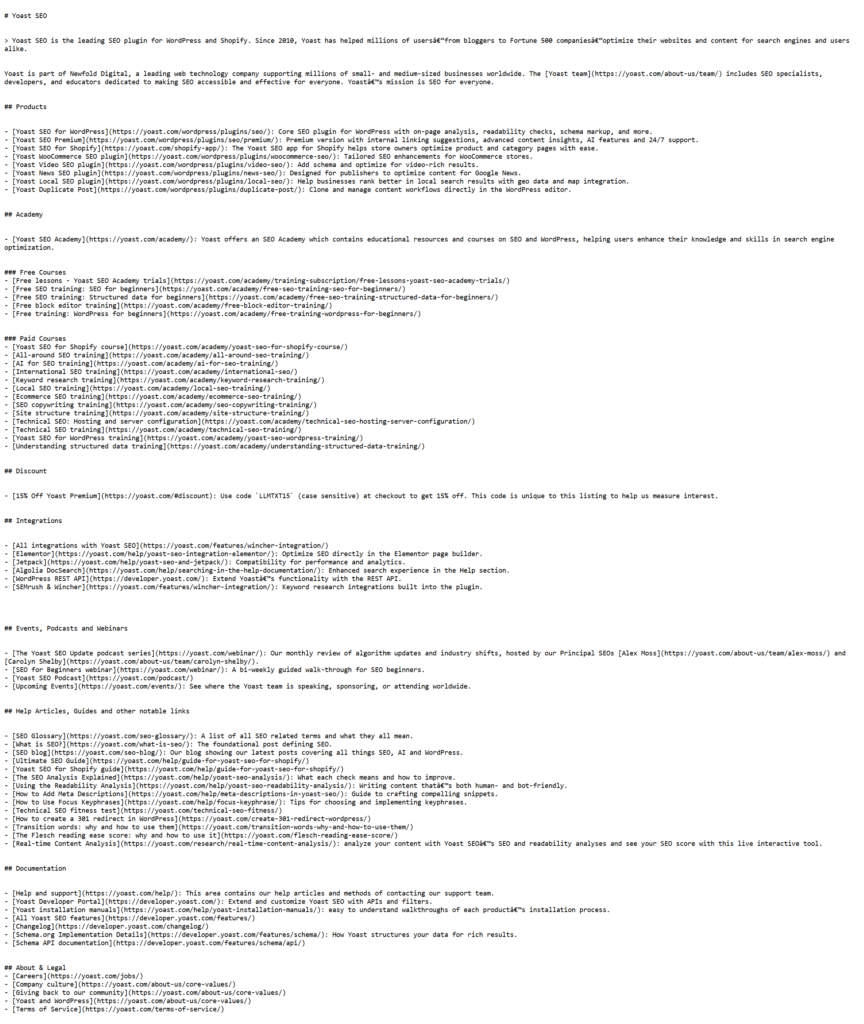
In June 2025, Yoast — the most widely used SEO plugin for WordPress — introduced a new feature that automatically generates an llms.txt file for your website. This move signals a broader shift in how we think about SEO in the age of AI.

???? Why This Matters

Large Language Models (LLMs) like ChatGPT, Claude, and Gemini don’t crawl the web like traditional search engines. They gather information in real time when responding to questions. That means if your content isn’t clearly visible or prioritized, these models might surface outdated or irrelevant pages — or skip your site entirely.

Yoast’s new llms.txt feature creates a dynamic file that guides these AI systems to:

  • Your most recently updated and relevant content
  • Key pages and structured site summaries
  • Context pulled from sitemaps and SEO settings
screencapture yoast llms txt 2025 06 20 22 06 43

✅ What Makes It Different from robots.txt?

robots.txtllms.txt
Tells crawlers what not to indexSuggests what AI should read
Designed for search enginesDesigned for AI models
Focuses on permissionFocuses on guidance & clarity

It’s automatic, requires no code, and updates weekly. Yoast users can preview their file and opt in when they’re ready. You can even take full manual control via developer tools if desired.

This change is huge — especially for content-heavy sites like publishers, eCommerce brands, and course creators aiming to influence what AI surfaces in conversational results.

Introducing Our LLMS.txt Manager Plugin for Multisite

Until Yoast or other major SEO plugins add official support, we’ve built a solution ourselves.

At Marketing the Change, we’ve developed a lightweight, flexible plugin called LLMS.txt Manager — designed specifically for WordPress multisite installations.

???? What It Does:

  • Adds a simple admin interface under Tools on every subsite.
  • Lets each site administrator enter their own custom LLMS.txt content.
  • No need for physical file creation — it uses virtual endpoints like /llms.txt so content is always served dynamically.
  • Works independently of themes or page builders.
  • Fully compatible with multisite networks and content isolation.

???? Why We Built It:

We work with local training providers, charities, and eLearning businesses that need granular control over what content is visible or discoverable on a per-site basis — without interfering with the global settings or requiring developer support.

This tool empowers educators and LMS administrators to manage visibility, compliance, and integrations with minimal effort.

???? Use Cases:

  • A school trust where each school manages its own LMS
  • A nationwide training company with location-specific course pages
  • Franchise networks offering localized eLearning
  • Online coaches using WordPress multisite to separate course funnels

???? Want to try it? – The plugin is currently in BETA for access please contact us

Bring Clarity, Control & Intelligence to Your LMS Content

Your LLMS.txt file might seem like a small piece of text, but it has big potential to shape how your learning content is discovered, protected, and integrated across the web.

Whether you’re a solo creator offering a handful of online tutorials, a national training company managing compliance, or an eCommerce store bundling product education with sales — LLMS.txt gives you a flexible way to manage how your LMS communicates with the world.

By thoughtfully crafting this file, you:

  • Empower integrations with clarity
  • Improve search visibility where needed
  • Lock down premium or private learning materials
  • Create a framework for scaling your LMS more efficiently

Don’t treat LLMS.txt as an afterthought — treat it as a strategic tool in your digital learning stack.

llms txt

???? Need Help with LLMS.txt or LMS-Friendly AI Tools?

If you’re a local business, training company, non-profit, or eLearning platform looking to:

  • Implement or improve your LLMS.txt strategy
  • Automate your learning content delivery
  • Make your LMS searchable via custom AI-powered search
  • Or integrate your LMS with your CRM, analytics, or membership tools

???? We can help.

At Marketing the Change, we specialize in helping mission-driven businesses and educators implement smart digital systems — from WordPress plugins to SEO, automation, and AI integration.

???? Get in touch to book a free consultation or learn how we can support your LMS goals:
marketingthechange.com/contact

Together, we can make your learning content smarter, safer, and more searchable.

Josh Morley

I have been designing & marketing websites since 2013. I specialize not just in WordPress web design but also in online marketing. SEO, PPC, keyword research, link-building and most recently on lead acquisition for local businesses.

The motorcycle industry is undergoing a transformative shift as electric motorcycles rapidly gain traction among riders worldwide. Fueled by growing environmental awareness, advances in battery technology, and increasing urbanization, electric motorcycles are redefining the riding experience for a new generation. This transition is not just about changing engines; it’s about reinventing the culture, expectations, and marketing strategies that surround motorcycling.

For marketers and brands, the rise of electric motorcycles presents both exciting opportunities and unique challenges. Traditional approaches must evolve to engage younger, eco-conscious riders who value sustainability, innovation, and digital connectivity. Understanding this new audience and tailoring marketing efforts accordingly is essential for any brand looking to lead in the electric motorcycle revolution. 

In this comprehensive article, we will explore the booming market for electric motorcycles, delve into the preferences of today’s riders, discuss the challenges brands face in marketing these bikes, and outline effective strategies to reach and convert this emerging customer base. Additionally, we’ll examine real-world examples of successful campaigns and offer insights into the future of motorcycle marketing in an electrified world.

The Rise of Electric Motorcycles: Market Trends & Growth

Electric Motorcycles

Electric motorcycles are rapidly gaining popularity for several compelling reasons that appeal to both practical riders and environmentally conscious consumers. As more people seek sustainable and cost-effective alternatives to traditional fuel-powered bikes, electric motorcycles offer a fresh and exciting option. Electric motorcycles are rapidly gaining popularity for several compelling reasons that appeal to both practical riders and environmentally conscious consumers. As more people seek sustainable and cost-effective alternatives to traditional fuel-powered bikes, electric motorcycles offer a fresh and exciting option. This growth has also shifted how brands communicate with riders, giving rise to what’s known as Revolution Motorcycle Marketing — a focus on engaging riders through sustainability, innovation, and community-driven campaigns.

Here’s why electric motorcycles are becoming the preferred choice for many riders:

  • Eco-Friendly Performance: With zero tailpipe emissions, electric motorcycles provide a cleaner, greener alternative to gasoline-powered bikes. Riders who want to reduce their environmental impact are increasingly drawn to these sustainable machines.
  • Cost Savings: Charging an electric motorcycle costs significantly less than filling up a gas tank, making ownership more economical over time. Additionally, electric bikes have fewer mechanical parts, which translates into lower maintenance and repair expenses.
  • Instant Torque & Smooth Ride: Electric motors deliver power instantly, providing quick acceleration and a smooth, responsive riding experience that often surpasses that of traditional combustion engines.
  • Low Maintenance: Without the need for oil changes and with fewer moving components, electric motorcycles require less frequent servicing, saving riders time and money.
  • Government Incentives: Many governments around the world offer tax credits, rebates, and other incentives to encourage electric vehicle adoption, making electric motorcycles more affordable and attractive for buyers.

These factors combine to create a compelling case for electric motorcycles, helping to drive their growing adoption across diverse rider demographics.

 Understanding the New Generation of Riders

Electric Motorcycles

The rise of electric motorcycles is closely tied to a shifting demographic of riders. Millennials and Gen Z consumers, especially those living in urban areas, are leading this wave of change. These riders tend to prioritize sustainability, technology, and lifestyle over traditional notions of motorcycle ownership.

  • Demographics:
    Younger adults aged 18-40, urban dwellers who face city traffic and pollution concerns, and environmentally conscious consumers seeking greener alternatives.
  • Values and Lifestyle Preferences:
    This new generation values eco-friendliness, connectivity, and innovation. They look for products that align with their ethical beliefs and digital-first lifestyles, often researching online and relying heavily on peer reviews and social media influence.
  • Buying Behavior:
    Unlike traditional motorcycle buyers, who may prioritize engine size or speed, electric motorcycle buyers focus on sustainability, convenience, and brand values. They’re more likely to engage with brands that offer transparency, community, and cutting-edge technology.

Electric Motorcycles vs. Gas Motorcycles: Pros & Cons

For riders weighing their options between electric and traditional gas-powered motorcycles, understanding the differences is key. Here’s a straightforward comparison to help decide which type suits your riding needs:

FeatureElectric MotorcyclesGas Motorcycles
EmissionsZero emissions, eco-friendlyProduces CO2 and other pollutants
PerformanceInstant torque with smooth, quick accelerationEngine-dependent acceleration with gradual power delivery
MaintenanceLow maintenance — no oil changes or filtersRequires regular servicing like oil changes, filter replacements
RefuelingNeeds charging; charging takes longer than refuelingQuick refueling at gas stations
RangeTypically 100-250 miles per charge (model-dependent)Usually 200-400 miles per tank
Cost Over TimeLower ongoing costs due to cheap electricity and fewer repairsHigher fuel and maintenance expenses
SoundQuiet and smooth operationLoud engine noise

Best Electric Motorcycles in 2025

Electric Motorcycles

As the electric motorcycle market continues to accelerate, manufacturers are introducing models that combine cutting-edge technology, impressive performance, and eco-friendly benefits. These bikes cater to a wide range of riders—from urban commuters to thrill-seeking sportbike fans and off-road adventurers. Below are some of the top electric motorcycles that are setting the standard in 2025:

  • LiveWire ONE by Harley-Davidson
    A powerful electric motorcycle combining premium performance with fast-charging capabilities, offering an exhilarating ride while preserving Harley-Davidson’s iconic style.
  • Zero SR/F
    Known for its advanced technology, extended battery range, and sleek modern design, this model balances speed and agility, perfect for both urban and highway riding.
  • Energica Ego+
    A high-performance electric sportbike featuring impressive battery life and racing-level capabilities, designed for riders who seek speed and precision.
  • BMW CE 04
    A futuristic electric scooter built for urban commuters, delivering smooth, eco-friendly transportation with stylish design and innovative connectivity features.
  • Damon Hypersport
    An innovative motorcycle equipped with AI-enhanced safety systems and an extended riding range, setting new standards for rider protection and smart technology integration.
  • KTM Freeride E-XC
    A lightweight electric off-road motorcycle crafted for adventure seekers, offering agile performance on dirt trails and rough terrain.

Key Challenges in Marketing Electric Motorcycles

Electric Motorcycles

Marketing electric motorcycles comes with unique challenges that brands must address to successfully engage and convert potential buyers. One of the biggest hurdles is range anxiety—the fear that the motorcycle won’t travel far enough on a single charge. Alongside this are concerns about performance, where many riders doubt whether electric bikes can match the power and thrill of gasoline motorcycles. Another significant obstacle is misconceptions about electric motorcycles, including beliefs that they are slow, unreliable, or only suitable for short trips.

Additionally, pricing and perceived value pose challenges. Electric motorcycles often have a higher upfront cost compared to traditional bikes, making it crucial to communicate the long-term savings and benefits effectively. Lastly, the lack of widespread infrastructure and charging stations creates a barrier for many riders, particularly in rural or less-developed areas, who worry about convenient and timely recharging options.

 Effective Marketing Strategies for Electric Motorcycles

To overcome these challenges, brands need to employ strategic marketing tactics that educate and engage potential customers:

  • Education-Focused Content Marketing: Creating detailed content to inform buyers, debunk myths, and explain the benefits and technology behind electric motorcycles.
  • Highlighting Sustainability: Emphasizing the environmental advantages and zero-emission benefits to appeal to eco-conscious consumers.
  • Leveraging Innovation: Showcasing cutting-edge technology and smart features in storytelling to captivate tech-savvy riders.
  • Experiential Marketing: Offering test rides, demo days, and events that allow potential buyers to experience electric motorcycles firsthand.
  • Community Building: Developing forums, social media groups, and ambassador programs to foster a loyal and engaged rider community.

 Digital Marketing Tactics to Reach New Riders

Digital platforms are essential for reaching the younger, environmentally aware generation of riders:

  • Social Media Campaigns: Targeting younger demographics on platforms like Instagram, TikTok, and YouTube with visually engaging content and interactive posts.
  • Influencer Marketing: Partnering with riders and advocates who promote electric motorcycles authentically and share their experiences.
  • SEO and Content Marketing: Optimizing content around electric motorcycle queries to capture organic search traffic is crucial. Effective SEO marketing strategies help brands rank higher and connect with riders actively searching for electric options.
  • Paid Advertising: Utilizing targeted ads on social media and search engines with clear messaging about the benefits of electric motorcycles.
  • Email Marketing: Nurturing leads with personalized content, updates, and exclusive offers to build loyalty and encourage purchases.

The Future of Electric Motorcycles

Electric Motorcycles

The electric motorcycle market is set to expand rapidly in the coming years, driven by major innovations in battery technology and connectivity. Advances like solid-state batteries promise longer range, faster charging, and improved efficiency, making electric motorcycles more practical for everyday riders. Leading manufacturers such as Honda, Yamaha, and Kawasaki are developing swappable battery systems to minimize downtime, allowing riders to quickly exchange batteries instead of waiting for a recharge. Meanwhile, cities around the globe are investing heavily in EV charging infrastructure, enhancing accessibility and helping to alleviate range anxiety.

Alongside hardware improvements, electric motorcycles are becoming smarter with the integration of AI and connectivity features that improve rider safety and convenience. Future models are expected to include advanced stability control, collision avoidance systems, and seamless smartphone integration to enrich the riding experience. Key trends shaping the future include:

  • Solid-state battery technology for longer life and faster charging
  • Swappable battery systems to reduce charging wait times
  • Expansion of EV charging networks worldwide
  • Incorporation of AI-enhanced safety features and smart connectivity
  • Increased focus on sustainability and eco-friendly design

These developments collectively point toward a future where electric motorcycles are not just an alternative but a preferred choice for riders seeking performance, convenience, and environmental responsibility.

FREQUENTLY ASKED QUESTIONS

1. Why are electric motorcycles gaining popularity among younger riders?
Electric motorcycles appeal to younger generations because they are eco-friendly, cost-effective, and technologically advanced. Millennials and Gen Z riders value sustainability and innovation, making e-bikes a natural fit.

2. What marketing strategies work best for promoting electric motorcycles?
Effective strategies include education-focused content, social media campaigns targeting eco-conscious audiences, influencer partnerships, experiential marketing through test rides, and building online communities.

3. How do electric motorcycle buyers differ from traditional motorcycle buyers?
New electric motorcycle buyers often prioritize sustainability, digital connectivity, and modern technology over traditional features like engine size or exhaust sound. Their purchasing decisions are influenced heavily by online reviews and social media.

4. What are the main challenges when marketing electric motorcycles?
Marketers face challenges like overcoming range anxiety, addressing misconceptions about performance, pricing concerns, and the limited charging infrastructure in some regions.

5. How important is digital marketing for electric motorcycle brands?
Digital marketing is crucial, as the target demographic spends significant time online. SEO, influencer marketing, targeted ads, and email campaigns help brands reach and engage the new generation of riders effectively.

6. Can electric motorcycles replace traditional gas motorcycles entirely?
While electric motorcycles are growing rapidly, they currently complement rather than replace gas motorcycles. However, advancements in battery tech and infrastructure are making electric bikes a more viable option for everyday riders.

7. How can brands build a loyal community around electric motorcycles?
Brands can build loyalty by creating interactive forums, hosting demo events, supporting ambassador programs, and fostering social media groups where riders can share experiences and tips.

Josh Morley

I have been designing & marketing websites since 2013. I specialize not just in WordPress web design but also in online marketing. SEO, PPC, keyword research, link-building and most recently on lead acquisition for local businesses.

Trusted by millions worldwide, WooCommerce has established itself as one of the leading platforms for online stores. However, its popularity also attracts phishing threats targeting store owners. Its open-source foundation, adaptability, and seamless integration with WordPress make it a go-to solution for businesses of all sizes—from solo entrepreneurs to global retailers.

Phishing Threats
@Builtwitch

However, this widespread adoption has made WooCommerce a growing target for cybercriminals. As its user base expands, so does the risk, especially for store owners who rely on the platform’s strong reputation and may overlook emerging threats.

In April 2025, a new wave of phishing attacks surfaced, specifically targeting WooCommerce users. These attacks arrive as deceptive emails masked as legitimate security warnings. The messages claim a “critical vulnerability” has been found on the recipient’s store and urge them to download a security patch—one that, in reality, installs malicious software designed to steal data, create backdoors, and severely compromise the website’s functionality.

The level of sophistication in these phishing attempts has raised serious concerns within the WordPress and eCommerce communities. One store owner even reported their direct experience receiving such an email, highlighting just how convincing these scams can appear at first glance.

Phishing Threats
image 11 1

I just received a phishing email (see image). It looked suspicious, coming from mail-woocommerce.com. I followed the link on a virtual machine, and the page looks almost authentic. They even have fake reviews. I downloaded the proposed ‘patch’, and it’s clearly malicious, with cryptic code. It creates one or more admin users, fetching data from somewhere. The funny thing is that the domain from which they serve the patch is almost identical to woocommerce.com, it’s ‘woocommerċe.com’ with the tiny diacritic on the last ‘c’. On a black on white screen, it could be overlooked as a speck of dust. That is clever, in twisted, wicked way.

One WooCommerce store owner’s experience highlights just how convincing this phishing campaign really is. It serves as a clear warning—these scams are easy to fall for if you’re not paying close attention. Cybercriminals are now using advanced techniques like homograph domain spoofing, where visually deceptive characters (like a special “ċ” instead of a normal “c”) are used to trick users into clicking fake links.

As phishing tactics become increasingly refined, WooCommerce users must be proactive: double-check email sources, avoid clicking unknown links, and learn to recognize signs of a scam.

In the sections below, we’ll break down:

  • How the phishing attack operates
  • What red flags to look for
  • Steps to take if you’ve been targeted
  • How to secure your WooCommerce store from future threats

Inside the Targeted Phishing Campaign Against WooCommerce Stores

In April 2025, cybersecurity researchers and the WooCommerce team discovered a sophisticated phishing scheme aimed specifically at WooCommerce store owners. Disguised as urgent security notifications, these fake emails prey on users’ fear and pressure them to install a so-called “patch” that’s actually embedded with malware.

How This WooCommerce Scam Unfolds

1. Convincing Phishing Emails

Victims receive emails from spoofed addresses like:

  • help@security-woocommerce.com
  • incident@notify-woocommerce.com
  • support@woocommerce-security.net

The emails typically claim that a critical vulnerability has been found on the recipient’s WooCommerce site, and often include the store’s actual domain name to make the warning feel more credible.

2. Homograph (IDN) Domain Spoofing

A key tactic used is punycode-based domain manipulation—also known as a homograph attack. For example:

  • Attackers register https://xn--woocommere-7ib.com
  • This renders as woocommerċe.com in many browsers

At first glance, the domain looks legitimate. The small dot below the “ċ” is hard to detect and easily overlooked, making the spoofed site appear trustworthy.

3. Malicious “Security Patch”

The email includes a link to download a fake plugin or patch. Once installed:

  • It creates hidden administrator accounts
  • Backdoors are embedded for ongoing access
  • Sensitive site data is exfiltrated to a remote server

4. Highly Convincing Website Design

The phishing site closely mirrors the official WooCommerce website, complete with:

  • Familiar branding and UI
  • Fake user reviews and testimonials
  • Download buttons that mimic real WooCommerce assets

This professional-level mimicry is designed to lull users into a false sense of trust, increasing the likelihood they’ll proceed with the download and unknowingly compromise their site.

How to Spot a Phishing Email Targeting WooCommerce Store Owners

Phishing emails are crafted to appear legitimate, often mimicking official security alerts. However, they contain subtle but identifiable red flags. Knowing what to look for can help you avoid falling victim to these scams. Here’s how to identify a fraudulent WooCommerce phishing email:

1. Unofficial and Suspicious Sender Addresses

One of the first warning signs is the email address the message comes from. These phishing attempts often use addresses that appear credible at a glance but do not belong to WooCommerce or Automattic (WooCommerce’s parent company).
Examples of spoofed addresses include:

  • help@security-woocommerce.com
  • incident@notify-woocommerce.com
  • help@support-woocommerce.com

While they mention “WooCommerce,” these domains are not registered by the official WooCommerce team. Always verify the domain name by hovering over the sender’s address and checking for inconsistencies.

2. Lookalike URLs and Punycode (Homograph) Attacks

Another common tactic is the use of visually deceptive links that rely on Punycode—a method of disguising characters in domain names. These links may appear normal but redirect you to malicious sites.

For instance:

  • The URL https://xn--woocommere-7ib.com renders in browsers as woocommerċe.com.
  • The character “ċ” (with a dot) closely resembles a regular “c,” especially on mobile or small screens.

This technique, known as a homograph attack, tricks users into clicking fake links by exploiting near-identical characters.

3. Urgent Security Warnings

Scammers use urgency and fear to manipulate recipients. These emails often claim a “critical security vulnerability” has been found on your WooCommerce store, sometimes referencing a specific date like “April 14, 2025” to increase perceived credibility.

The message may even include your store’s actual domain name to personalize the alert, making the threat feel targeted and real. The goal? To push you into acting without verifying the legitimacy of the email.

4. Fake “Security Patch” Downloads

Perhaps the most dangerous part of these phishing attempts is the inclusion of a link or attachment disguised as a WooCommerce security update or plugin. You’re urged to download and install it immediately to “protect your site.”

In reality, these files contain malware. Once installed, the malicious code can:

  • Create hidden admin users
  • Open backdoors for long-term access
  • Steal sensitive data like customer info and payment details
  • Disable or hijack your site

Always be wary of unsolicited requests to download files or update plugins via email. Real WooCommerce security notices are usually handled through your WordPress dashboard or verified support channels.

The Real Threat Behind the “Download Patch” Scam in WooCommerce Phishing Emails

Phishing Threats

Clicking the fake “Download Patch” link in a phishing email might seem harmless at first, but it triggers a full-scale security breach. While the file may appear to be a routine WooCommerce update (e.g., woocommerce-security-patch.zipIt’s a dangerous malware installer disguised to look legitimate.

Once downloaded and activated, the malware quietly begins compromising your WooCommerce store in several stages:

Step 1: Silent Malware Installation

After uploading and activating the plugin through the WordPress admin panel, the malware executes hidden, often encrypted code. This code is specifically designed to evade basic security scanners and embed itself deep within your site’s core files or database, often without leaving immediate signs of compromise.

Step 2: Creation of Stealth Admin Account

One of the malware’s first tasks is to create unauthorized administrator accounts. These hidden users often have names like:

  • wp-support
  • admin-helper
  • Slight variations of existing usernames

These stealth accounts allow the attacker to retain control over your website, even if you remove the original infected file, creating a persistent backdoor into your store.

Step 3: Installing Hidden Backdoors

Next, the malware installs backdoor access points, typically disguised as:

  • Plugin or theme files
  • Template files
  • Cron jobs (automated tasks)

These backdoors enable attackers to re-enter your site at any time without detection, even after cleanup attempts. This ensures long-term access and re-infection potential.

Step 4: Data Theft in the Background

With access secured, the compromised site begins transmitting sensitive data to an external command-and-control (C2) server. Information commonly targeted includes:

  • Customer profiles and email addresses
  • Order history and purchase details
  • Login credentials
  • Payment information

This can lead to major privacy breaches, potential identity theft, and violations of regulations like GDPR or CCPA.

Step 5: Expanding the Attack

Once in full control, attackers can exploit your WooCommerce site in several destructive ways, such as:

  • Sending spam from your server to damage your reputation
  • Redirecting shoppers to scam sites or counterfeit product pages
  • Injecting malicious scripts into your storefront to target visitors
  • Deploying ransomware to lock you out of your admin area

The longer the malware remains undetected, the more devastating the impact—financially, operationally, and reputationally.

How to Spot Fake WooCommerce Emails

WooCommerce will never send plugin files, security patches, or updates through email attachments or third-party download links. If you receive an email that claims to contain a WooCommerce update, it’s likely a phishing attempt.

Official WooCommerce Communications Will Always:

  • Be sent from an @woocommerce.com or @automattic.com email address
  • Direct you to official sources like WooCommerce.com or WordPress.org
  • Include detailed documentation, clear verification steps, and transparent instructions

???? If an email does not follow these guidelines, do not trust it.

Received a Suspicious Email? Here’s What to Do

If you suspect an email is a phishing attempt, don’t interact with it. Instead, follow these essential steps to protect your WooCommerce store:

1. Avoid Clicking on Any Links

Even seemingly harmless links may lead to malicious websites or auto-trigger malware downloads. Do not click buttons or hyperlinks in suspicious emails.

2. Never Download Attachments

Do not download or install any file unless you’re 100% certain it’s from a verified source. Malicious attachments may:

  • Install malware or spyware
  • Create unauthorized admin users
  • Alter your site’s code to establish long-term backdoors

If you’ve already downloaded the file, do not open or execute it.

3. Report the Email Immediately

Use your email provider’s built-in tools to flag the message as phishing (e.g., “Report phishing” in Gmail or Outlook). You can also:

  • Report the domain to your hosting provider
  • Notify WooCommerce support about the phishing attempt

Your report helps protect other store owners from falling victim.

How to Keep Your WooCommerce Store Safe

Being proactive is the best defense against phishing and fraud. Here’s how to fortify your online store:

1. Only Install Updates from Official Sources

Always update WooCommerce and related plugins directly through your WordPress dashboard or official sites like WooCommerce.com. Avoid installing anything from email links or unknown third-party websites.

2. Enable Automatic Security Updates

Let WooCommerce and trusted plugins auto-update when security patches are released. This ensures your store is always protected—even if you’re not monitoring it daily.

3. Strengthen Login Security

Use strong, unique passwords and enable two-factor authentication (2FA) for all admin users. These two steps greatly reduce the risk of unauthorized access if credentials are exposed.

4. Use Verified Plugins and Extensions Only

Only download plugins and themes from reputable sources like:

  • WooCommerce Marketplace
  • WordPress.org Plugin Directory

Unverified plugins may contain hidden code designed to exploit your site.

5. Block Suspicious Users with Aelia Blacklister for WooCommerce

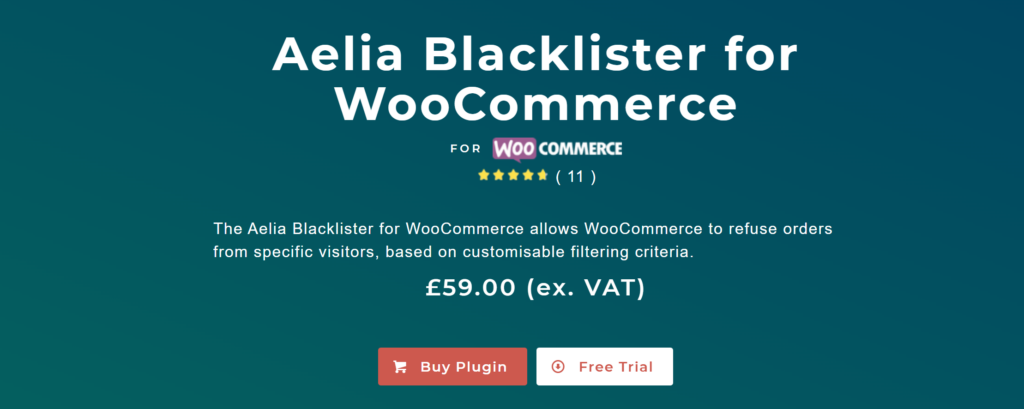
aelia blacklister plugin

Enhance your security by installing the Aelia Blacklister plugin. It allows you to automatically block orders from users based on specific criteria, including:

  • Names, addresses, or emails
  • Phone numbers or IP ranges
  • Known fraud patterns

When a rule is triggered, the plugin halts the checkout process and displays a customizable warning message. This tool is ideal for preventing repeat fraud attempts and filtering suspicious activity before it causes harm.

???? Need more help identifying or blocking fraudulent users?
Check out our guide: How to Block Malicious Users in WooCommerce

Josh Morley

I have been designing & marketing websites since 2013. I specialize not just in WordPress web design but also in online marketing. SEO, PPC, keyword research, link-building and most recently on lead acquisition for local businesses.

Running a WooCommerce store involves a range of challenges, and one of the most crucial is protecting your business from fraudulent activity. From chargebacks and scam orders to abusive behavior and unwanted users, these issues can seriously affect your store’s performance and reputation. That’s why knowing the top ways to block and blacklist fraudulent users in WooCommerce is essential. With the right tools and criteria in place, you can control who has access to your store, reduce risks, and ensure a safer experience for both you and your customers.

While WooCommerce doesn’t provide a built-in feature for blacklisting, you can use the Aelia Blacklister for WooCommerce plugin, which offers a comprehensive solution to prevent fraudulent users and problematic orders. For stores operating internationally, the Aelia Prices by Country for WooCommerce plugin can also be a valuable addition, allowing you to customize pricing based on a user’s location and even fine-tune regional access if needed.

For better performance and reliability of your store, consider implementing the WooCommerce Cache Handler. This tool helps optimize your store’s loading speed and ensures that blacklisting actions, along with other site functions, run smoothly—especially during periods of high traffic.

Together, these tools provide a seamless, secure, and efficient shopping experience for both store owners and customers.

Why You Should Block or Blacklist Fraudulent Users in WooCommerce

Managing a WooCommerce store means staying vigilant against threats that could harm your business. One of the most effective ways to protect your store is by blocking or blacklisting users who engage in malicious or disruptive behavior. Here are the key reasons why this practice is essential:

  • Prevent Fraud: Online fraud remains a serious threat to e-commerce businesses. Blocking users associated with suspicious transactions or stolen credit card use can help protect your store from financial loss.
  • Avoid Chargebacks: Repeated chargebacks not only impact your bottom line but can also hurt your payment processor relationship. By blacklisting users who frequently file chargebacks, you can minimize these costly disputes.
  • Stop Abusive Behavior: If a user consistently harasses your support team or violates your store’s policies, blocking them can preserve your team’s well-being and maintain a respectful shopping environment.
  • Enforce Store Policies: Some users may repeatedly breach your terms and conditions. Blacklisting ensures they can no longer disrupt your operations or take advantage of your store.
  • Enhance Store Security: Users or IP addresses showing unusual or harmful behavior may pose a security risk. Blocking access can help prevent data breaches or unauthorized activity.

Additionally, if you’re customizing your WooCommerce setup to enhance user experience or security, check out this useful guide on how to easily rename country codes in WooCommerce. This can help tailor your settings and streamline your store’s checkout process based on specific regional requirements.

How to Block or Blacklist Fraud Users in WooCommerce

The plugin provides a simple and efficient way to block problematic Users based on various criteria. Let’s go through the steps to configure this plugin.

Step 1: Install the Aelia Blacklister for WooCommerce Plugin

Block and Blacklist Fraudulent Users
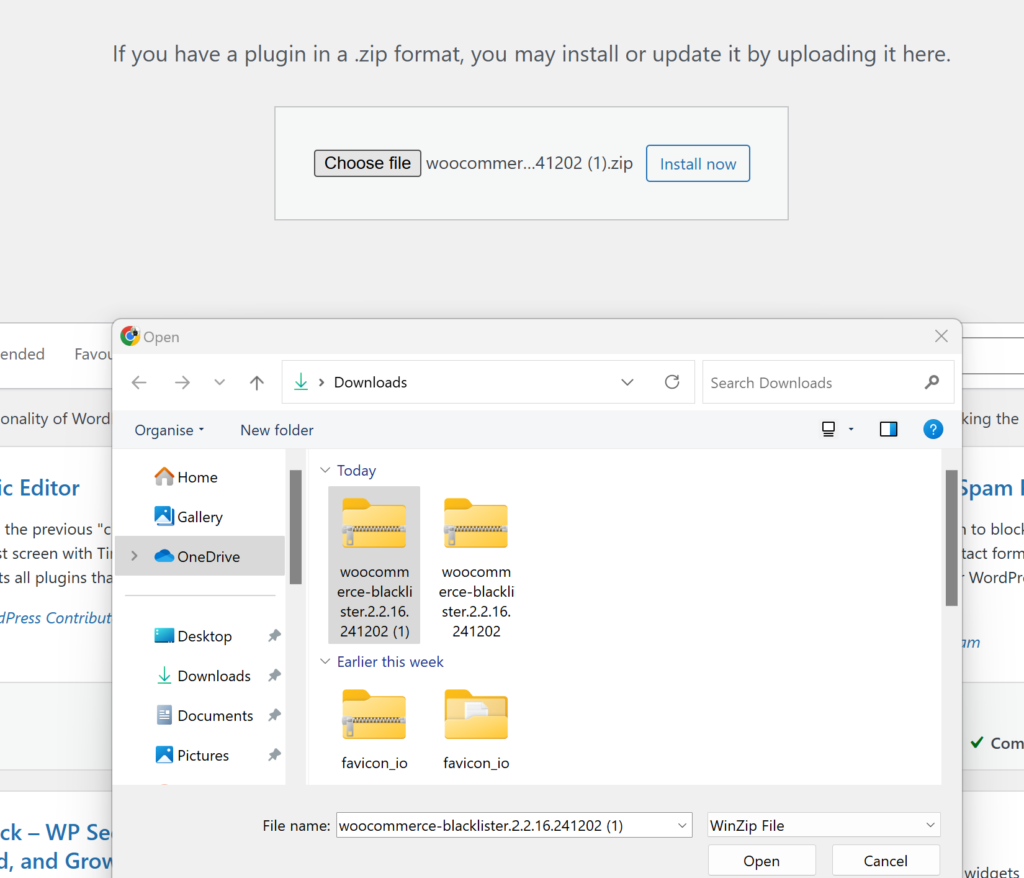
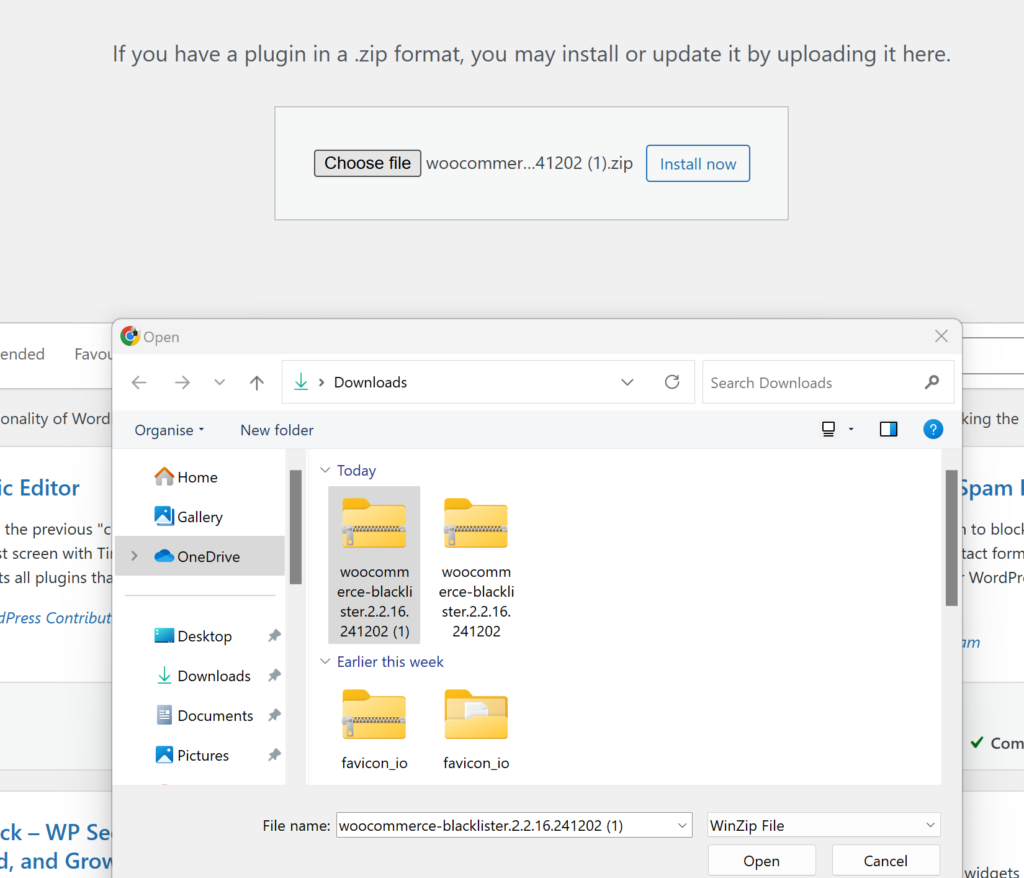
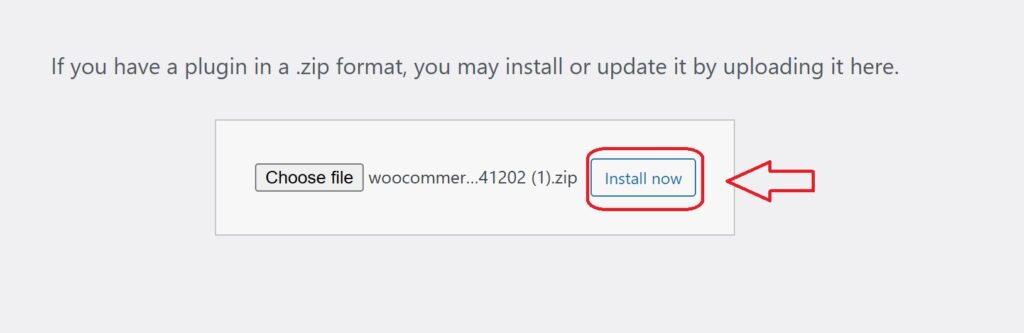
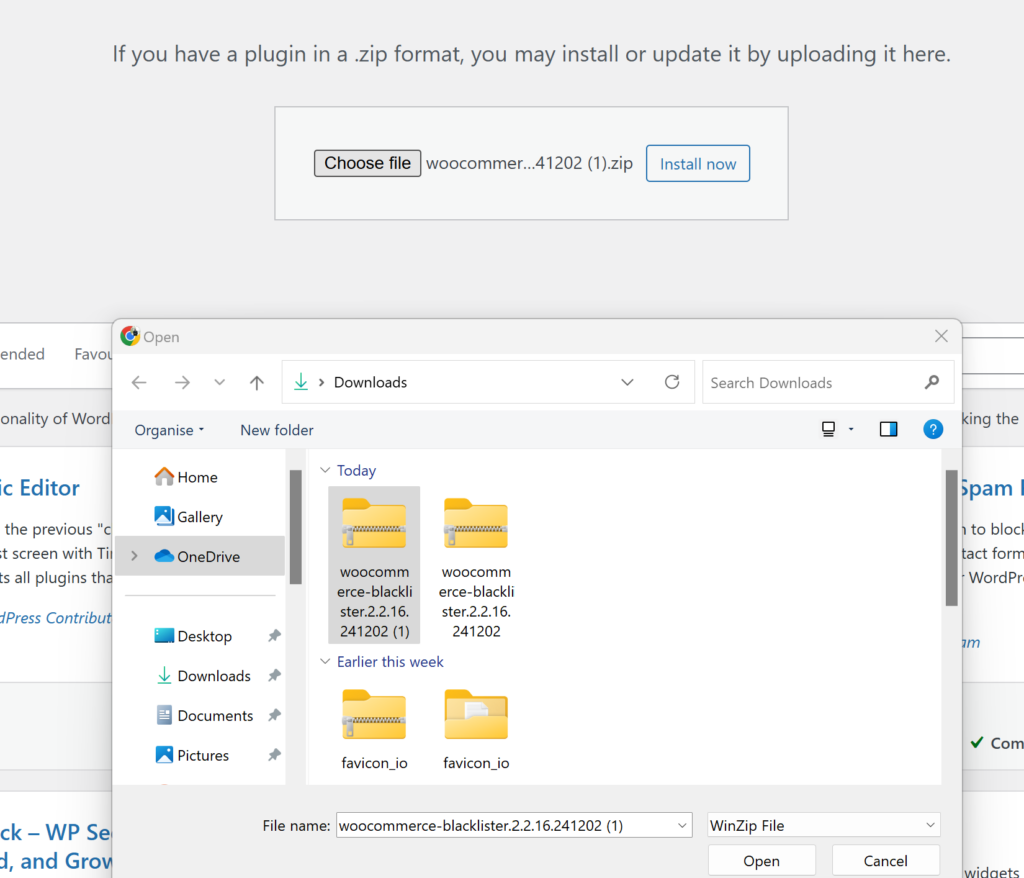
  1. Download and Install the Plugin: Go to the Blacklister for WooCommerce plugin and purchase the plugin. Once downloaded, you can upload the plugin through your WordPress admin panel by navigating to Plugins > Add New and then selecting Upload Plugin.
  2. Activate the Plugin: After installation, activate the plugin to start configuring the blacklisting rules.

Step 2: Configure Blacklisting Rules

Once activated, the plugin adds a new menu in the WooCommerce settings where you can specify the criteria to block users. The plugin allows you to block Users based on the following details:

Block and Blacklist Fraudulent Users
  • Customer’s Name and Surname: Block User using their full name or just a part of it.
  • Customer’s Address: Block based on the User’s street, postcode, city, province/state, or country.
  • Customer’s Email Address: Block User using specific email addresses or partial matches.
  • Customer’s Phone Number: Block based on the full or partial phone number.
  • Customer’s IP Address: You can block specific IP addresses or even entire IP ranges.

You can also configure whether the matching should be an exact match or a partial match. The plugin supports regular expressions for all fields except IP addresses. For IP addresses, you can apply IP address masks or IP address ranges.

Step 3: How the Blacklisting Process Works

Once the rules are set, the plugin automatically compares the information provided by the User at checkout with the configured blacklisting rules. If there is a match, the plugin will block the order and stop the checkout process.

A customizable error message will then be displayed to the User, explaining why their order was blocked. This ensures that the User knows the reason for the denial, providing a professional and transparent experience.

Step 4: Customizing Messages

One of the plugin’s most valuable features is the ability to customize the error messages shown to blocked users. Whether you want to explain the reason behind the block or provide user support contact details, you can create a personalized message to keep the interaction courteous and professional.

Why Use the Aelia Blacklister Plugin for WooCommerce?

Block and Blacklist Fraudulent Users

If you’re looking for an effective way to secure your WooCommerce store from unwanted users and fraudulent activity, the Aelia Blacklister Plugin is a powerful and flexible solution. This plugin gives you full control over who can complete a purchase, boosting both security and peace of mind.

Key Features That Make Aelia Blacklister a Smart Choice:

  • Versatile User Filtering: Block users based on multiple criteria such as name, email, phone number, IP address, or shipping/billing address—giving you the power to prevent high-risk transactions.
  • Regex Support for Advanced Matching: Use regular expressions (regex) to define specific patterns for blacklisting. This allows more granular control when targeting recurring fraud behaviors or suspicious data entries.
  • Simple Setup: With a user-friendly interface and straightforward configuration, even non-technical store owners can implement blacklisting with ease.
  • Custom Error Messages: Deliver clear, branded messages to blocked users so your communication remains professional and consistent.
  • IP Address Masking: Block specific IP addresses or entire ranges, enabling you to prevent known threats or malicious bots from accessing your checkout.
  • Set-and-Forget Automation: Once your blacklist rules are defined, the plugin enforces them automatically—no ongoing manual effort required.

Want more functionality from the same ecosystem? You can also enhance your global eCommerce setup with tools like the Aelia Currency Switcher for WooCommerce, which allows your customers to shop in their local currency.

Together, these plugins make your WooCommerce store smarter, more secure, and truly optimized for global reach and fraud prevention.

Josh Morley

I have been designing & marketing websites since 2013. I specialize not just in WordPress web design but also in online marketing. SEO, PPC, keyword research, link-building and most recently on lead acquisition for local businesses.

In today’s fast-paced e-commerce environment, safeguarding your WooCommerce store is more critical than ever. Cyber threats and fraudulent transactions can cause severe financial damage and erode customer trust.

That’s where the Aelia Blacklister plugin comes in. This powerful tool enhances your store’s security by blocking suspicious users based on customizable filters like IP addresses and email domains. By proactively filtering out high-risk traffic, you reduce the likelihood of fraud while ensuring a seamless shopping experience for genuine customers.

Designed to integrate effortlessly with WooCommerce, the plugin offers detailed logging and reporting features, giving you full visibility and control. The result? Smarter order management, effective traffic monitoring, and optimal store performance without compromising usability.

Why WooCommerce Security Matters

Ensuring the security of our WooCommerce store is essential for protecting sensitive customer information and preserving brand trust. With over 2,000 cyberattacks targeting e-commerce sites every day in 2024, it’s more important than ever to implement strong security protocols to prevent data breaches that could lead to financial loss and reputational harm [R].

One effective way to boost our defenses is by using the Aelia Blacklister For WoCommerce. This powerful tool helps identify and block malicious users in real-time by filtering specific IP addresses, phone numbers, locations, and email domains. By doing so, it reduces the likelihood of fraudulent activities and unauthorized access, supporting a smooth and secure shopping experience for genuine customers.

Geographic restrictions offer another layer of protection. For businesses focused on domestic markets, limiting purchases to a single country helps block irrelevant and potentially harmful international traffic. This strategy not only mitigates regional cyber risks but also keeps our sales efforts aligned with target audiences.

Strengthening WooCommerce security with solutions like the Aelia Blacklister plugin is a smart move to defend your online store against modern cyber threats. This tool helps maintain your website as a safe and reliable space for customers, ultimately supporting long-term success and business growth. You can download the plugin directly from the official Aelia website. Want to understand why blocking email addresses and IPs is so important for your store? Check out this simple method for blocking email addresses in WooCommerce.

Enhance Your WooCommerce Store Security with Aelia Blacklister

WooCommerce Security

The Aelia Blacklister plugin is a powerful WooCommerce security tool designed to help store owners proactively block unwanted or suspicious orders. It enables precise control over who can place orders, using a range of customizable filters to identify and restrict access from high-risk users.

???? What Makes Aelia Blacklister Stand Out?

1. Block Customer Data with Precision

  • Name & Surname: Prevent specific individuals from placing orders by filtering based on full or partial names.
  • Address Details: Blacklist users by street name, postal code, city, region, or even entire countries.
  • Email Filtering: Use full or partial email matches (including regex support) to stop known fraudulent addresses.
  • Phone Numbers: Restrict access by exact or pattern-matching phone numbers.

2. IP-Based Blocking
Safeguard your store by blocking individual IP addresses or entire ranges. Use IP masks to target broader segments, making it harder for repeat offenders to bypass restrictions.

3. Flexible Match Rules with Regex
All filters (aside from IP addresses) support regular expressions, allowing advanced users to define powerful and specific rules tailored to their unique needs.

4. Custom Error Messaging
If a shopper is blocked during checkout, they’ll receive a tailored message explaining why their order couldn’t be processed. You can customize this notification from the settings panel to match your brand tone.

????️ How It Works

Once installed, the plugin integrates seamlessly into your WooCommerce dashboard. You’ll gain access to a dedicated settings area where you can manage blacklisted entries, including names, addresses, email addresses, phone numbers, and IPs.

Whenever a customer attempts to place an order, the plugin scans their details against your blacklist. If a match is found, the checkout process is halted and the customer is notified immediately.

This streamlined yet robust system offers a practical solution for reducing fraud and maintaining control over your WooCommerce orders.

Pair It with Country-Based Pricing for Even More Control

Looking to further tailor your customer experience? Combine the Aelia Blacklister with the Aelia Prices by Country plugin, allowing you to display different prices based on customer location while still blocking unwanted regions. This duo enhances both security and sales strategy.

Setting Up Aelia Blacklister

Installation

Download the Aelia Blacklister plugin from the official Aelia website. Install the plugin through the WordPress dashboard by navigating to Plugins > Add New > Upload Plugin and uploading the plugin file. Activate the plugin after installation.

Adding Blacklist Rules

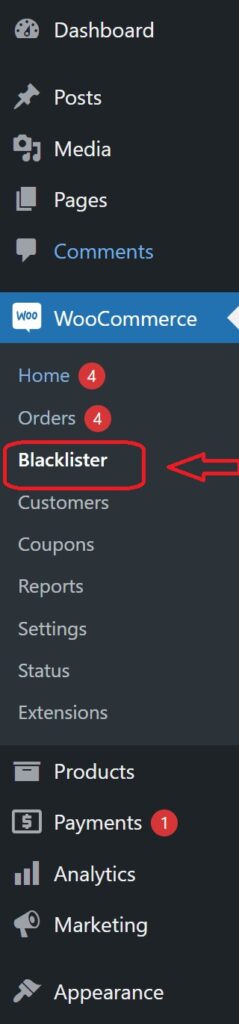
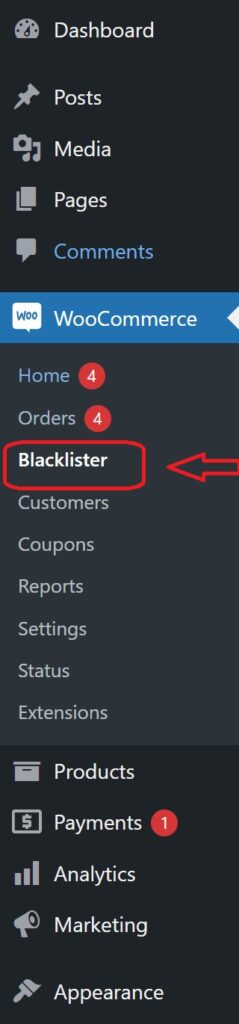
A new menu item for Aelia Blacklister appears in the WooCommerce backend. Navigate to this menu to specify blacklist entries.

Blacklisting Rules Configuration

This section allows you to define specific criteria for blocking fraudulent or unwanted orders by blacklisting certain types of customer data. Here’s an overview of the rules and how you can configure them:

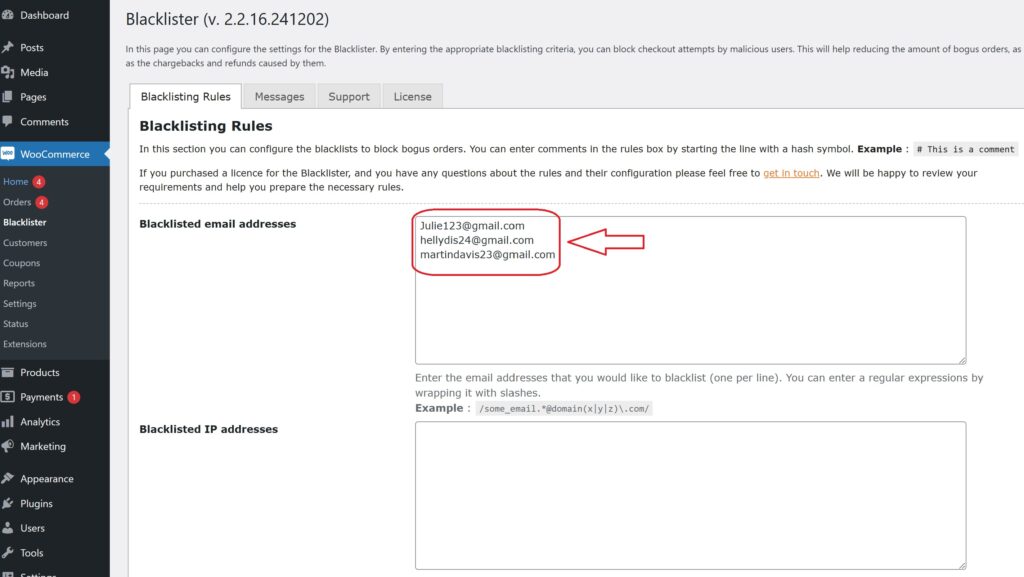
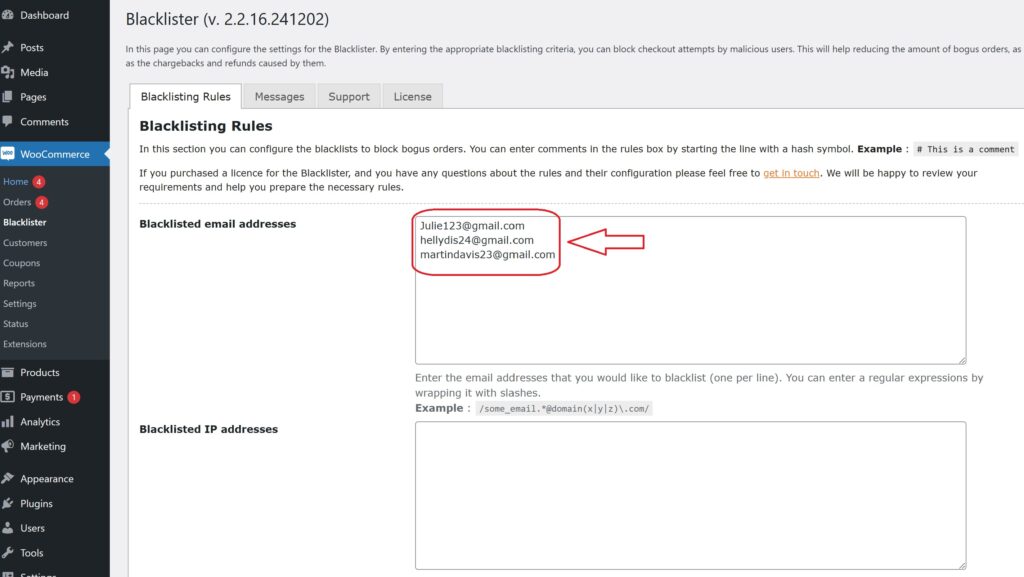
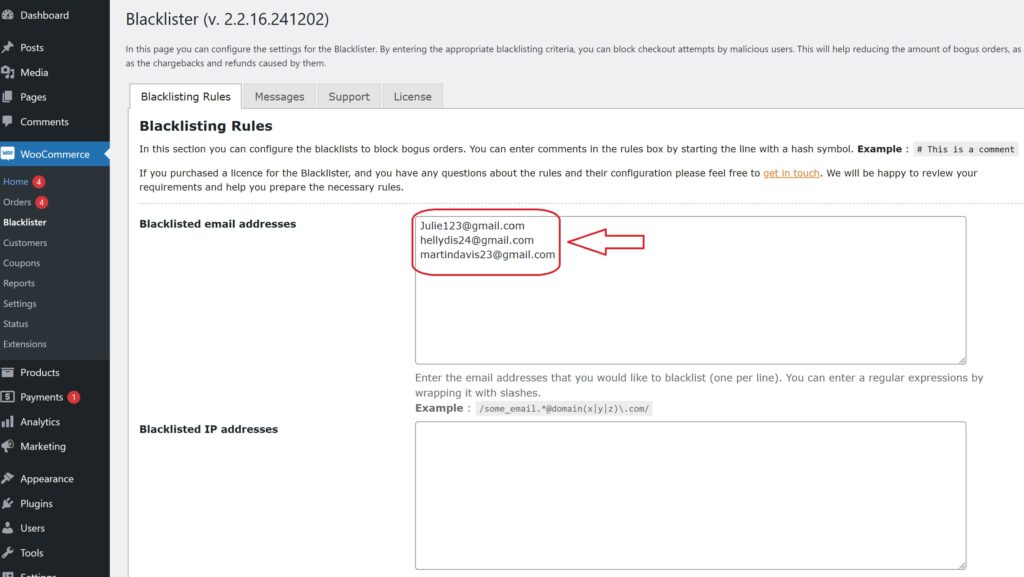
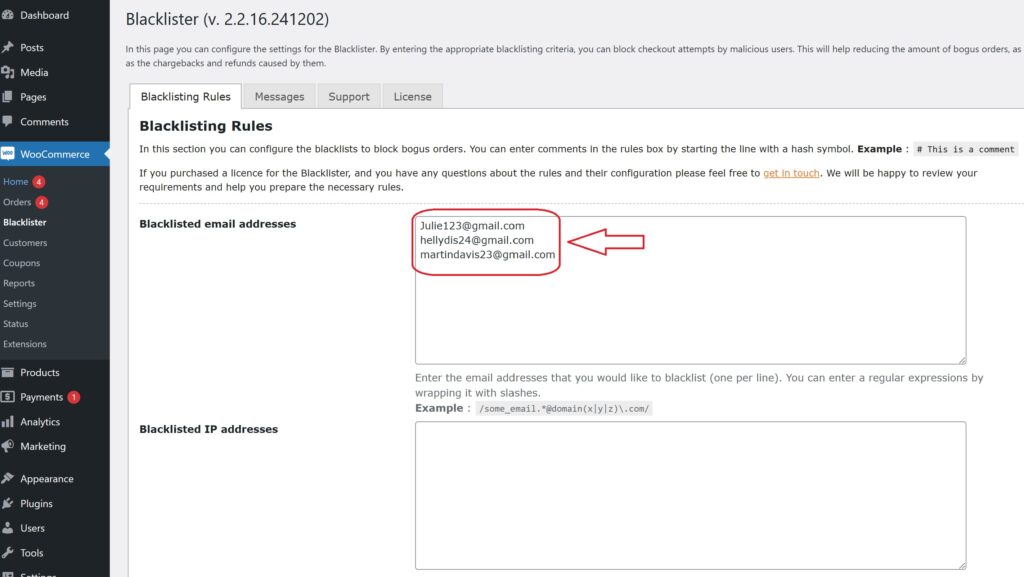
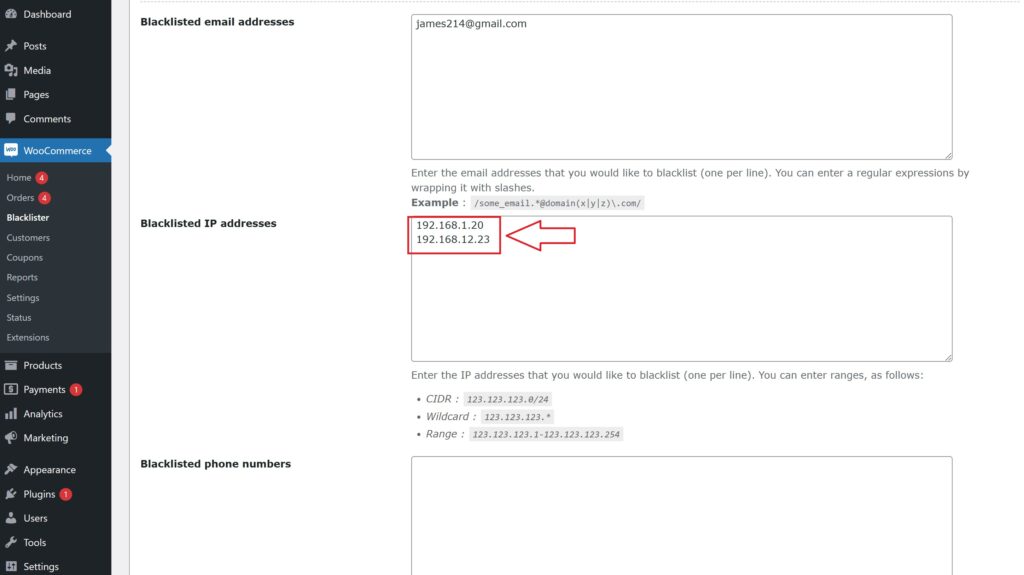
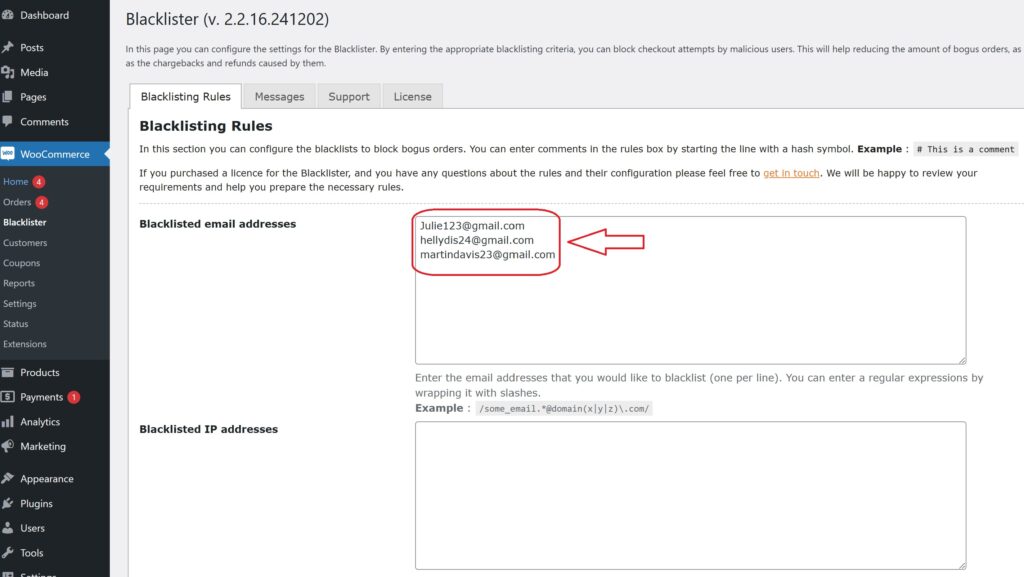
Blacklisted Email Addresses

Enter the email addresses you wish to block, one per line. You can also use regular expressions (regex) to block a group of email addresses. Simply wrap the regex in slashes.

WooCommerce Security

Example:

  • james214@gmail.com
  • /some_email.*@domain(x|y|z)\.com/ – Blocks any email from the domains “x.com”, “y.com”, or “z.com”.

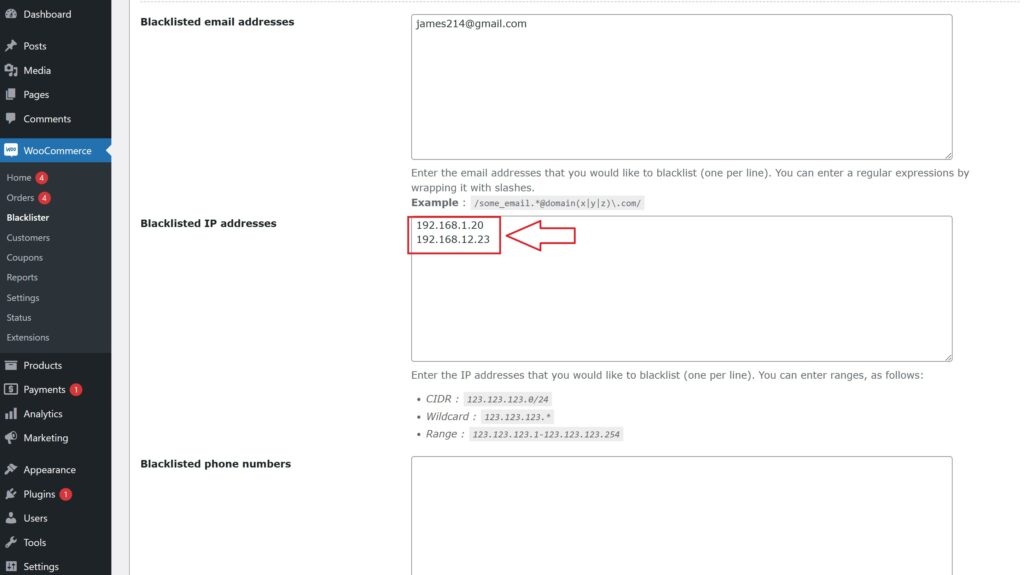
Blacklisted IP Addresses

Enter the IP addresses or ranges you want to block, one per line. You can use the following formats for precise control:

WooCommerce Security
  • CIDR Notation: 123.123.123.0/24 – Blocks the entire range of IPs from 123.123.123.0 to 123.123.123.255.
  • Wildcard Format: 123.123.123.* – Blocks all IPs starting with 123.123.123.
  • IP Range: 123.123.123.1-123.123.123.254 – Blocks IPs in the specific range.

Blacklisted Phone Numbers

You can blacklist specific phone numbers or ranges using exact matches or regular expressions.

Example:

  • 0123456789 – Blocks this exact phone number.
  • /012345(101|102|103)/ – Blocks phone numbers that start with 012345 and end with 101, 102, or 103.

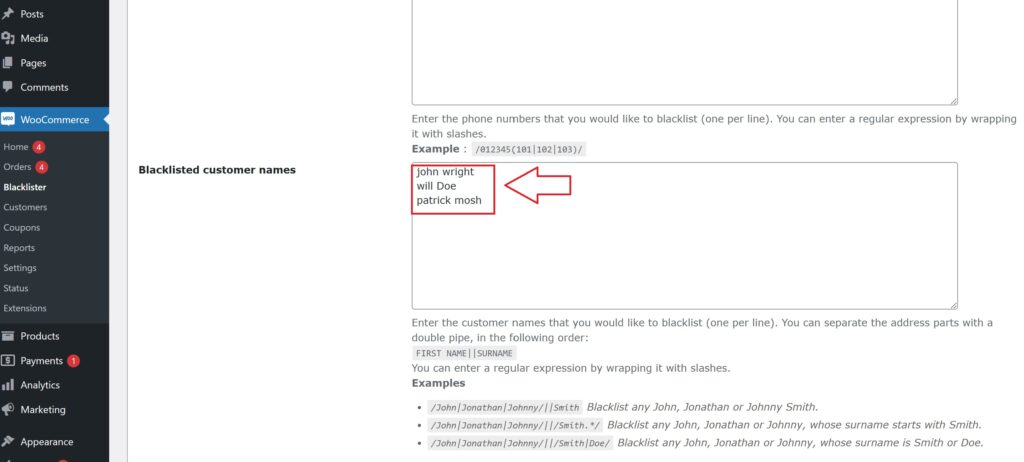
Blacklisted Customer Names

This field allows you to block orders from customers with certain names. Separate the first name and surname with a double pipe (||). You can also use regular expressions for flexibility.

WooCommerce Security

Example:

  • /John|Jonathan|Johnny/||Smith – Blocks any customer named John, Jonathan, or Johnny Smith.
  • /John|Jonathan|Johnny/||/Smith.*/ – Blocks any customer named John, Jonathan, or Johnny whose surname starts with “Smith”.
  • /John|Jonathan|Johnny/||/Smith|Doe/ – Blocks customers named John, Jonathan, or Johnny, with a surname of either Smith or Doe.

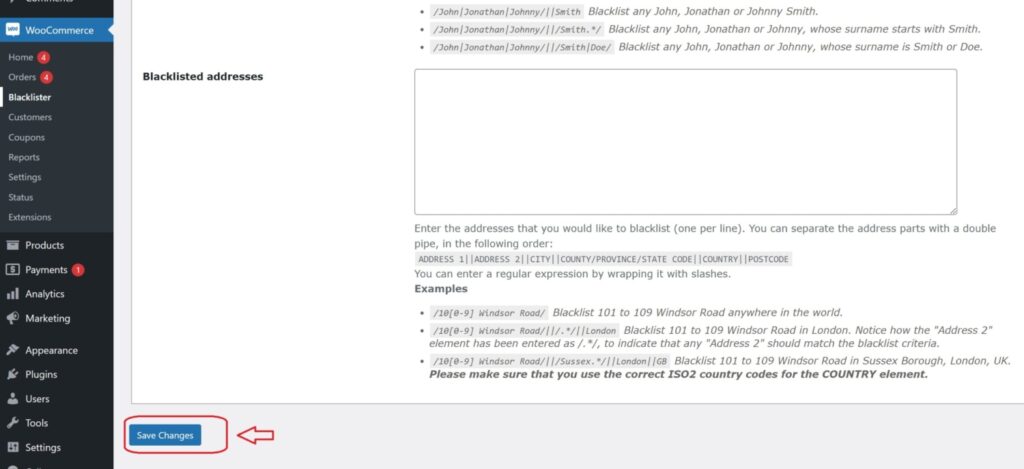
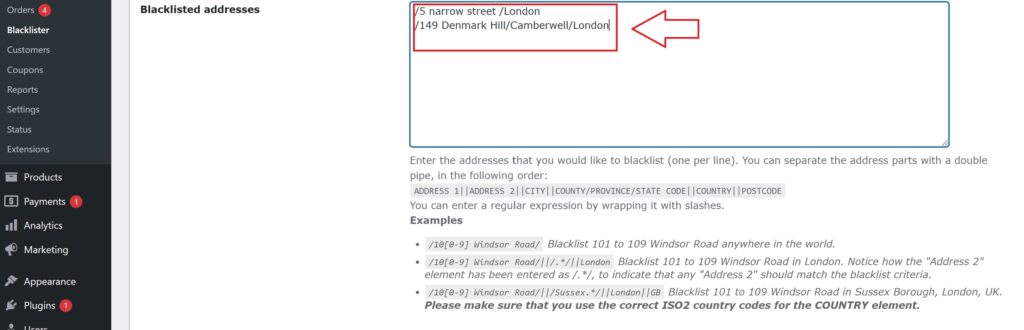
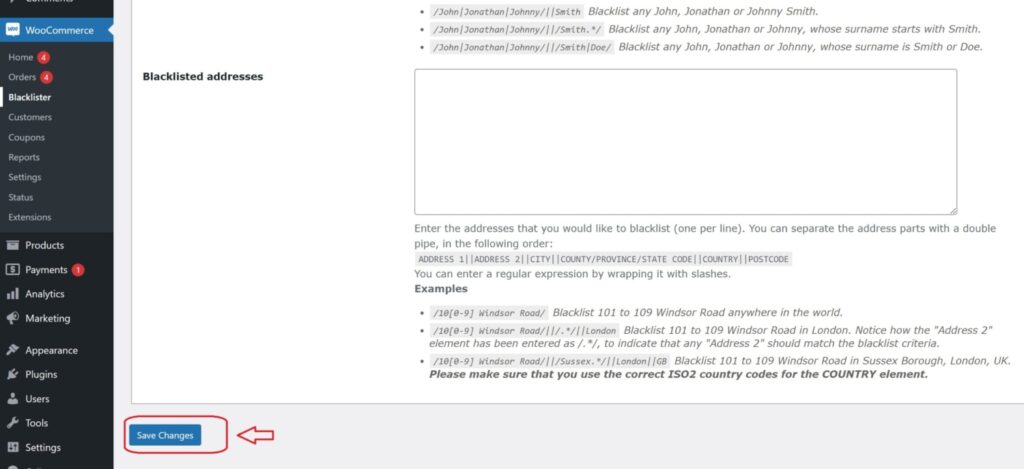
Blacklisted Addresses

You can block orders based on specific address components (address line 1, address line 2, city, state, country, and postcode). Use regular expressions for more specific targeting.

black listing address

Example:

  • /10[0-9] Windsor Road/ – Blocks addresses on Windsor Road numbered from 101 to 109 anywhere in the world.
  • /10[0-9] Windsor Road/||/.*/||London/ – Blocks addresses on Windsor Road numbered from 101 to 109 in London (the second address part can match any value).
  • /10[0-9] Windsor Road/||/Sussex.*/||London||GB/ – Blocks addresses on Windsor Road numbered from 101 to 109 in Sussex Borough, London, UK. The country code GB is used for the UK.

Comments in Rules
You can add comments to any line of the blacklist rules by starting the line with a hash symbol (#). This helps you document your rules for easier reference.

Example:

  • # Blocking fraudulent email domains
  • # Block all IPs from region X

Customizing Error Messages

Display custom error messages when a blacklisted user attempts to checkout. Inform them why their order is blocked, enhancing transparency and user experience.

Logging and Reporting

Enable detailed logging to track blacklisted attempts. Monitor these logs to analyze patterns and adjust security measures accordingly.

Integration with Other Security Plugins

Integrate Aelia Blacklister with existing security plugins to enhance your store’s safety. Combine multiple security measures for a robust protection system.

Other Powerful Aelia Plugins for WooCommerce

1. Prices by Country for WooCommerce

This plugin allows you to set product prices based on the customer’s billing country. It’s perfect for international stores that need to adjust pricing strategies due to regional taxes, currency differences, or market demands. When paired with a currency switcher, it automatically detects the customer’s location and displays the correct price.

Key Features:

  • Set custom prices per country or region.
  • Automatically detects customer location.
  • Seamlessly integrates with Aelia Currency Switcher.
  • Supports tax-inclusive or exclusive pricing.

2. Currency Switcher for WooCommerce

This is one of Aelia’s flagship plugins and a must-have for global WooCommerce stores. It allows customers to shop and check out in their preferred currency. The plugin detects the visitor’s location and switches currencies automatically, or allows them to select it manually.

Key Features:

  • Real-time currency conversion via open exchange rate APIs.
  • Automatic currency selection based on geolocation.
  • Manual switcher widget for user convenience.
  • Full support for multi-currency checkout.

3. Tax Display by Country for WooCommerce

This plugin dynamically shows product prices with or without tax, depending on the customer’s location. It’s ideal for stores selling to both B2C and B2B customers across different regions with varying tax laws.

Key Features:

  • Automatically adjusts tax display based on country.
  • Shows both tax-inclusive and tax-exclusive prices if needed.
  • Works smoothly with the Prices by Country plugin.

Josh Morley

I have been designing & marketing websites since 2013. I specialize not just in WordPress web design but also in online marketing. SEO, PPC, keyword research, link-building and most recently on lead acquisition for local businesses.

In the world of e-commerce, fraudulent activities have become a growing concern, putting online store owners at risk. Fake accounts, fraudulent orders, spam, and the use of fraudulent IP addresses and email addresses can tarnish your store’s reputation and lead to significant financial setbacks. For WooCommerce store owners, protecting your platform from these threats is crucial. One of the most effective strategies for safeguarding your store is blocking suspicious IP addresses and email addresses. This helps prevent scammers from placing fraudulent orders or interacting with your site, ensuring a secure and reliable shopping experience for your customers.

In addition to blocking suspicious users, implementing tools like the Tax Display by Country for WooCommerce can further enhance your store’s security. This feature ensures that tax information is correctly displayed based on the customer’s location, helping to minimize chargebacks and unauthorized transactions. By combining these security measures with the blocking of fraudulent IPs and emails, you can strengthen your store’s defenses and provide a safe, smooth shopping environment for legitimate buyers.

When you’re securing your store, it’s also important to optimize your WooCommerce international shipping settings to handle a broader range of customers while minimizing the risk of fraud. Learn more about setting up WooCommerce international shipping to ensure a seamless experience for customers across the globe.

By integrating these strategies into your store’s security system, you’ll be well-equipped to prevent malicious activity and create a trustworthy shopping environment.

Why Blocking IPs and Emails is Crucial for WooCommerce Store Security

As the e-commerce industry grows, so does the risk of fraudulent activities. Fraudulent orders, fake accounts, and spam can damage the integrity of your WooCommerce store, leading to financial losses and a tarnished reputation. One of the best ways to protect your online store from these threats is by blocking suspicious IP addresses and email addresses. Let’s explore why these measures are essential and how they can significantly enhance the security of your store.

The Role of IP Address Blocking in WooCommerce Security

An IP address is a unique identifier assigned to every device connected to the internet. Fraudsters often use fake or disposable IPs to carry out malicious activities such as submitting fake reviews, making fraudulent orders, and initiating chargebacks. Blocking suspicious IP addresses can help prevent these activities, offering your store robust protection against scammers.

How Blocking IP Addresses Safeguards Your WooCommerce Store:

  1. Prevents Fraudulent Orders: Scammers tend to use the same IP addresses to place fake orders repeatedly. By blocking these addresses, you can stop fraudulent transactions from being completed.
  2. Preserves Your Store’s Reputation: Chargebacks and other malicious activities can damage your store’s reputation. Blocking high-risk IPs helps maintain a positive brand image by minimizing these issues.
  3. Target High-Risk Regions: Some regions are more prone to fraudulent activities. By blocking access from high-risk countries, you can mitigate the risk of scams.
  4. Reduces Chargebacks: Blocking fraud-prone IP addresses reduces the likelihood of chargebacks by preventing fraudulent purchases from being processed in the first place.

How to Block IP Addresses in WooCommerce:

You can manually block suspicious IPs or use automated security plugins like Aelia Blacklister for WooCommerce to simplify the process. These plugins scan for fraudulent activities and block malicious IP addresses with ease.

The Importance of Blocking Emails for Enhanced WooCommerce Security

Emails are a significant source of fraud in the online store space. Scammers often use disposable email addresses to create multiple fake accounts, exploit promotions, or even engage in refund abuse. Blocking these fraudulent email addresses is vital for preventing unauthorized access to your store.

How Blocking Emails Enhances WooCommerce Store Protection:

  1. Prevents Fake Account Creations: Fraudsters create fake accounts to take advantage of promotions, discounts, and loyalty rewards. Blocking suspicious email addresses helps prevent this.
  2. Protects Your Store from Spam: Spammers often flood stores with fake inquiries, reviews, or comments. Blocking their email addresses ensures your store remains spam-free and professional.
  3. Stop Discount and Promotion Abuse: Scammers may create multiple accounts to exploit discount codes and offers. Blocking problematic emails prevents this abuse.
  4. Prevents Refund Exploitation: Fraudsters may use different email addresses for fraudulent orders and refunds. Blocking them helps reduce the risk of financial losses due to refund abuse.

How to Block Emails in WooCommerce:

Blocking emails can be done manually or by using custom rules and regular expressions to filter out suspicious email addresses. Plugins such as Blacklister for WooCommerce provide an easy solution to block emails by setting specific criteria.

Combining IP and Email Blocking for Maximum Protection

By combining both IP and email blocking strategies, you create a comprehensive defense mechanism for your WooCommerce store. These measures work together to identify and prevent fraudulent activities from different angles, ensuring that your store remains safe, secure, and trustworthy for legitimate customers.

Key Benefits:

  • Improved Security: Blocking suspicious IPs and emails prevents a wide range of fraudulent activities, including fake orders, spam, and account exploitation.
  • Better Customer Experience: By reducing the presence of fraudsters, you improve the overall experience for genuine customers, enhancing their trust in your store.
  • Cost Efficiency: Preventing chargebacks and fraud-related issues helps reduce unnecessary costs, allowing you to allocate resources towards growing your business.

By regularly monitoring and updating your blocking strategies, you can stay ahead of fraudsters and maintain a seamless shopping experience for your customers.

Introducing Aelia Blacklister for WooCommerce

Aelia Blacklister plugin is a powerful tool designed to help you protect your online store from suspicious users, including those attempting fraudulent activity using fake IP addresses and emails. This plugin offers a seamless way to boost your store’s security by automatically blocking malicious users during the checkout process, ensuring a smoother and safer shopping experience for your genuine customers.

Why Choose Aelia Blacklister:

  • Easy to Use: The plugin integrates seamlessly with your WooCommerce store and doesn’t require advanced technical skills.
  • Real-Time Blocking: It provides real-time blocking, preventing malicious users from completing orders before any damage occurs.
  • Prevents Fraud at Checkout: By analyzing customer details during checkout, it ensures that no fraudulent orders are processed.

How to Set Up Aelia Blacklister for WooCommerce

Setting up Aelia Blacklister is a straightforward process, ensuring that even store owners with minimal technical knowledge can enhance their store’s security.

Step 1: Install the Plugin

IP Addresses and Emails
  • Download the Aelia Blacklister plugin from the Aelia.
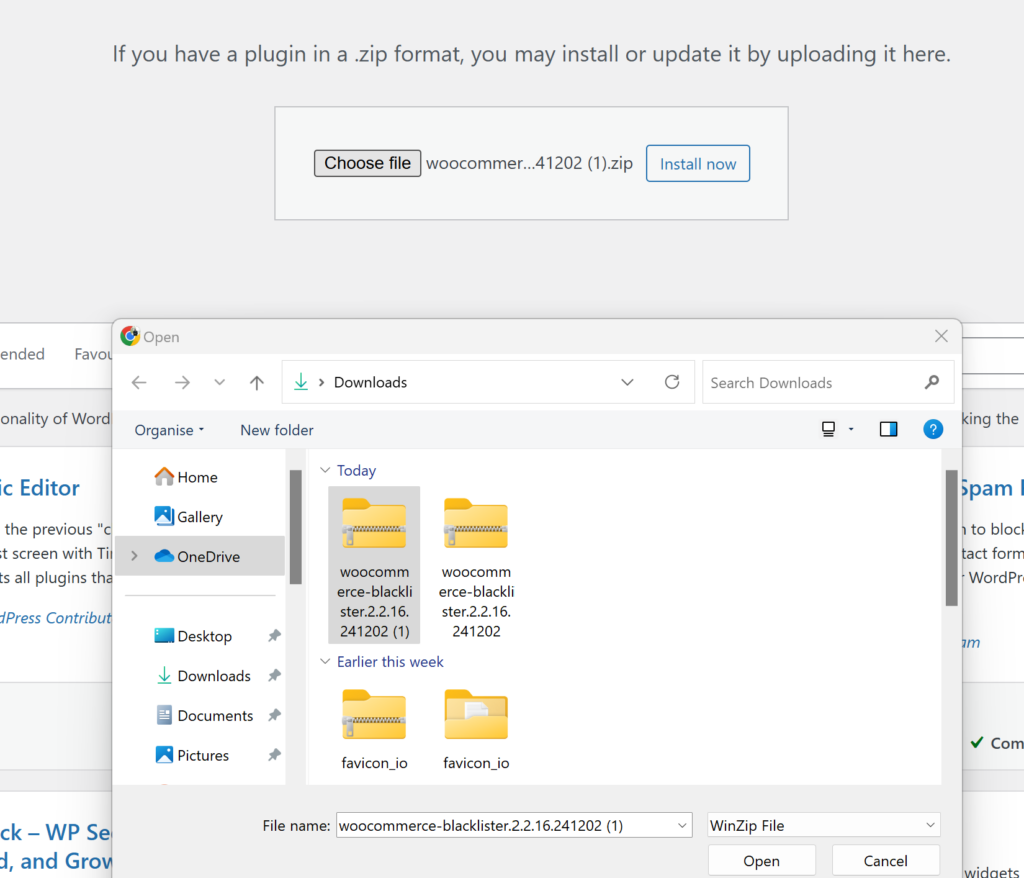
  • Go to your WordPress admin dashboard, navigate to the “Plugins” section, and click “Add New.”
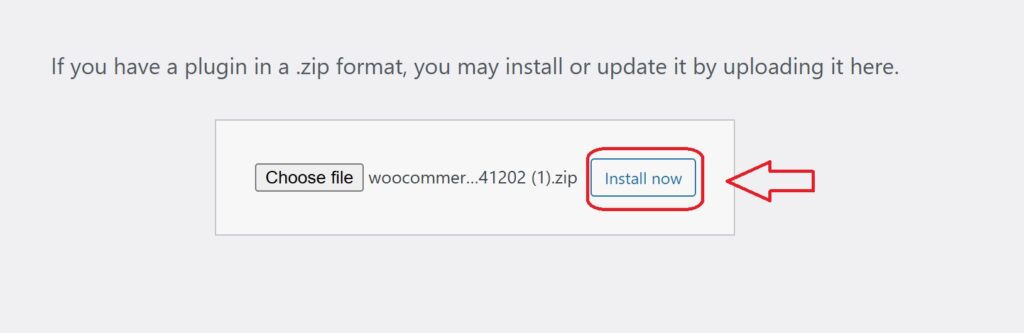
  • Upload the plugin ZIP file and click “Install Now.”
  • After installation, click “Activate.”

Step 2: Configure the Blocking Rules

Once you’ve located the Aelia Blacklister settings within WooCommerce, you’ll see an interface where you can set your blocking rules. The plugin gives you several options for blacklisting based on customer information, helping you target specific fraudsters. Here’s how to set each of them up:

Block by IP Address:

IP Addresses and Emails
  • Add Suspicious IPs: In the settings panel, you’ll find an option to add IP addresses to the blacklist. Simply input the IP addresses you want to block. These could be associated with known fraudsters or users who have been flagged for suspicious behavior.
  • How to Block: Click on the option to add a new IP address. You can add multiple IPs if necessary. Once added, these users will not be able to complete the checkout process on your store.
  • Why It’s Important: Fraudulent users often use specific IP addresses repeatedly to place fake orders. Blocking these IPs proactively reduces the risk of further fraudulent activity.

Block by Email Address:

IP Addresses and Emails
  • Add Email Addresses to Block: You can add email addresses that are linked to fake accounts or suspicious activities. This can be especially useful for preventing scammers from creating multiple accounts to exploit your store’s promotions or loyalty programs.
  • How to Block: Simply add the email addresses (or domains) in the designated field within the settings. You can block individual addresses or even an entire domain (e.g., block all @fakedomain.com addresses).
  • Why It’s Important: Scammers often use disposable email services to create fake accounts. By blocking these addresses, you can stop them from using the same emails for repeated fraudulent purchases.

Block by Phone Number:

IP Addresses and Emails
    • Add Phone Numbers to Block: In addition to IPs and emails, Aelia Blacklister allows you to block phone numbers that are often used for fraudulent activities. If a particular phone number is known to be linked to scams, you can block it from completing any transactions.
    • How to Block: Simply enter the phone numbers you want to blacklist in the provided field. It’s easy to block a specific phone number or even certain area codes if you suspect fraud from a particular region.
    • Why It’s Important: Fraudsters might use fake or stolen phone numbers to bypass identification processes. Blocking them ensures they can’t complete purchases.

Block by Customer Name:

Blocked list using name
  • Add Customer Names to Block: In cases where you notice repeated fraudulent behavior from certain customer names (even if the emails, IPs, or phone numbers differ), you can choose to block certain customer names.
  • How to Block: Simply input the specific names in the provided box. This will prevent customers with those names from completing checkout, even if they use different contact details (email, phone number, etc.).
  • Why It’s Important: Fraudulent users may try to change their contact details but keep their names the same. Blocking names ensures that they can’t trick your system.

Step 3: Customize the Error Message

Under the plugin settings, you can customize the error messages that will be shown to blocked users. This ensures that customers understand why their order was rejected.

Step 4: Monitor and Update the Blacklist

After initial setup, you should regularly monitor blocked users and update your blacklist as necessary. Aelia Blacklister allows you to add new entries as fraudsters attempt to breach your store.

Key Benefits of Aelia Blacklister for WooCommerce

  1. Enhanced Security
    Block fraudulent users before they can make harmful transactions, protecting your store from financial losses and reputational damage.
  2. Fraud Prevention
    Automatically prevent scammers from completing purchases, reducing chargebacks, refunds, and disputes.
  3. Time-Saving Automation
    Let Aelia Blacklister handle the blocking of suspicious users, so you can focus on running your business.
  4. Customizable & Flexible
    Set rules to block users based on various details like emails, IPs, and phone numbers, with the flexibility to apply custom filters.
  5. Fewer Fraudulent Orders
    Reduce fraudulent purchases by blocking high-risk users at checkout, saving your store from inventory losses and chargebacks.
  6. Improved Trust
    A secure shopping experience builds trust with genuine customers, encouraging repeat business.

To optimize your WooCommerce store, consider integrating the Prices by Country for WooCommerce plugin. This tool allows you to set different prices based on the customer’s country, ensuring that you can tailor your pricing strategy for international customers. It simplifies managing different taxes, currencies, and pricing, providing a seamless experience for customers worldwide while optimizing your store’s performance.

Josh Morley

I have been designing & marketing websites since 2013. I specialize not just in WordPress web design but also in online marketing. SEO, PPC, keyword research, link-building and most recently on lead acquisition for local businesses.

In today’s dynamic e-commerce landscape, protecting your WooCommerce store from scammers isn’t just important—it’s mission-critical. Fraudulent activities can quickly derail your operations, harm your reputation, and eat into your profits. That’s where Aelia Blacklister for WooCommerce comes in—a smart, proactive solution designed to keep your store safe.

With Aelia Blacklister, you can precisely control who interacts with your store by blacklisting names, emails, phone numbers, addresses, and IPs. Whether you’re blocking specific details or using pattern recognition with regular expressions, the plugin gives you the flexibility to fine-tune access. Even better, it leverages an intelligent risk scoring system that automatically flags and prevents high-risk orders, so you stop fraud before it happens.

This tool doesn’t just enhance security—it creates a more reliable experience for your genuine customers. Pairing it with features like the Tax Display by Country for WooCommerce plugin allows you to display tax information transparently based on the customer’s location, helping reduce cart abandonment and build trust across borders.

For international stores, combining Aelia Blacklister with the Currency Switcher for WooCommerce ensures not only safety but also a smooth, customized checkout experience tailored to your customers—no matter where they’re shopping from.

Why Blocking Fraudulent Users Is Necessary in WooCommerce

Running a WooCommerce store comes with a host of responsibilities, and one of the most critical is safeguarding your business against fraud. Blocking users might sound harsh at first, but in reality, it’s a vital step in protecting your store, your revenue, and your customers.

1. Prevent Financial Loss

Fraudulent orders can lead to costly chargebacks, lost inventory, and wasted shipping costs. By blocking high-risk users before they check out, you can significantly reduce the chances of financial setbacks that hurt your bottom line.

2. Preserve Store Reputation

Every customer interaction impacts your brand. If your store becomes a target for scammers, it not only affects your finances but also damages your credibility. Preventing malicious activity ensures a safe and trustworthy environment for real customers.

3. Stop Repeat Offenders

Scammers often return using the same email addresses, IPs, or even billing names. Blocking these identifiers cuts them off at the source and prevents recurring abuse—saving you time and stress down the line.

4. Improve Operational Efficiency

Manually reviewing suspicious orders eats up valuable time and resources. Smart tools like Aelia Blacklister automate this process by enforcing blacklist rules, helping your team focus on growth instead of fraud management.

5. Enhance Customer Experience

When fraud is under control, your store runs smoother. Genuine customers enjoy faster, more secure checkouts—boosting loyalty and encouraging repeat business.

Boost Your WooCommerce Store Security with Aelia Blacklister

Online scams are getting more sophisticated, but so are the tools to stop them. If you’re running a WooCommerce store, keeping scammers out is critical for protecting your revenue and reputation. That’s where Aelia steps in—It has an advanced plugin built to block fraudulent users before they can harm your business.

1. Intelligent Blacklisting with Custom Criteria

Aelia Blacklister enables you to filter out suspicious users based on detailed customer data, giving you total control over who can and cannot access your store. Here’s how:

  • Names & Surnames: Block users by full names or even partial matches using regular expressions, catching repeat scammers using similar aliases.
  • Addresses: Flag specific locations tied to fraud—filter by country, city, postcode, or full street address.
  • Email Addresses: Prevent scammers from abusing disposable or suspicious email domains. This aligns well with this simple method to block WooCommerce email addresses.
  • Phone Numbers: Detect fraudulent attempts by blocking specific phone numbers or patterns.
  • IP Address Ranges: Use CIDR notation to blacklist single IPs or entire ranges, especially effective against bot attacks or repeat offenders.

2. Smarter Filtering with Regex

One standout feature is its support for regular expressions, allowing you to pinpoint patterns in user data. For example, if scammers are using variations of the same email domain, regex helps you block them all in one go. This is particularly helpful when fraudsters try to mask their identity with small tweaks to their info.

3. Automatic Fraud Prevention During Checkout

Aelia Blacklister doesn’t just flag potential threats—it actively blocks them at checkout. The plugin scans each customer’s details in real time, and if a match is found in your blacklist, it halts the transaction before any damage can be done.

This automatic protection saves you from manually reviewing risky orders and protects your business from chargebacks and loss.

4. Professional Error Messaging

If a customer gets blocked, Aelia Blacklister allows you to show custom error messages so you can explain why their order didn’t go through. This helps avoid confusion for legitimate customers and deters scammers from trying again.

5. Built-in Risk Assessment Tools

The plugin comes with a risk scoring system that evaluates each order based on location, behavior, and other indicators. High-risk orders can be blocked immediately—before they even reach your payment gateway—giving you a proactive edge against fraud.

6. Built for WooCommerce

Aelia Blacklister is designed specifically for WooCommerce, ensuring seamless integration. Once installed, it creates a dedicated admin panel where you can manage blacklist entries, set rules, and monitor suspicious activity—all without needing to be tech-savvy.

Installation Steps

Download and Install the Plugin

Before you can start using Aelia Blacklister, you’ll need to download the plugin.

Purchase and Download:

1. log in to Your WordPress Admin Dashboard

  • Open your preferred web browser.
  • Go to your WordPress login page (usually www.yoursite.com/wp-admin).
  • Enter your username and password, then click login to access your WordPress dashboard.

2. Go to Plugins → Add New

plugin add new 1
  • In the left-hand menu of the WordPress dashboard, hover over Plugins.
  • In the dropdown that appears, click on Add New. This will take you to the Add Plugins page.

3. Click on “Upload Plugin” at the Top of the Page

Blocking Fraudulent Users in WooCommerce
  • On the Add Plugins page, at the top left, you will see several options including Upload Plugin.
  • Click the Upload Plugin button. This allows you to upload a plugin from your computer instead of selecting one from the WordPress plugin repository.

4. Click on “Choose File” and Select the ZIP File You Downloaded

Blocking Fraudulent Users in WooCommerce
  • After clicking Upload Plugin, a new screen will appear asking you to select the plugin you want to install.
  • Click on the Choose File button. This will open a file explorer dialog on your computer.
  • Find the ZIP file you downloaded for Aelia Blacklister on your computer, select it, and click Open.

5. Click “Install Now”

Blocking Fraudulent Users in WooCommerce
  • After selecting the ZIP file, the plugin’s name will appear next to the Choose File button.
  • Click the Install Now button to start the installation process. WordPress will begin installing the plugin from the ZIP file you selected.

6. Activate the Plugin

  • Once the installation is complete, you’ll see a message confirming that the plugin was successfully installed.
  • Now, click the Activate button to activate the plugin on your WordPress site.

Configuring Aelia Blacklister for WooCommerce

Once the plugin is installed and activated, follow the steps below to configure it.

1. Access the Aelia Blacklister Settings

Blocking Fraudulent Users in WooCommerce
  1. After activation, you will see a new menu item called Aelia Blacklister in your WordPress dashboard.
  2. Go to WooCommerce → Settings → Aelia Blacklister.

This will open the plugin settings where you can configure your blacklisting rules.

2. Set Up Blacklist Criteria

The Aelia Blacklister plugin allows you to block customers based on various criteria, including names, addresses, emails, phone numbers, and IP addresses. Here’s how to configure each:

Blacklist Names:

Blocking Fraudulent Users in WooCommerce
  • Navigate to the Blacklist tab in the settings.
  • Under Customer Name, enter the names or surnames you want to block.
  • You can add exact names or use regular expressions for partial matches.

Blacklist Email Addresses:

email address to blacklist 1 2
  • In the Blacklist Emails section, enter the email addresses you want to block.
  • You can block specific addresses or entire email domains (e.g., @fraudulentdomain.com).
  • Blacklist Phone Numbers:
  • In the Blacklist Phone Numbers section, add phone numbers that are linked to fraudulent activities.
  • Use regex if you want to block specific phone number patterns (e.g., numbers starting with a certain prefix).

Blacklist Addresses:

black listing address 1
  • Under the Blacklist Addresses section, you can block specific addresses or regions.
  • You can specify street names, postcodes, cities, or countries that you want to prevent orders from.

Blacklist IP Addresses:

Blocking list of IP address 3
  • In the Blacklist IP Addresses section, you can enter specific IP addresses or ranges.
  • You can use exact matches, IP address masks (CIDR notation), or IP ranges to block fraudulent sources.

3. Customize Error Messages

When a customer is blocked, it’s important to inform them of why their order was rejected. You can customize the error message that is displayed when a match is found against your blacklist.

  1. Go to the Messages section in the Aelia Blacklister settings.
  2. Customize the message that will be shown to blocked customers. For example, you can create a message like:
    • “Sorry, your order could not be processed because we detected suspicious activity linked to your account. Please contact support if you believe this is a mistake.”

This ensures that customers understand the reason behind the block and can reach out for clarification.

4. Adjust Match Criteria

Aelia Blacklister offers flexibility in how matches are detected:

  1. Exact Match: This will block users whose details exactly match the ones you’ve blacklisted.
  2. Partial Match (using Regular Expressions): This allows you to block users whose details partially match (e.g., blocking all email addresses ending with @fraudulentdomain.com).
  3. IP Address Range Matching: If you want to block a range of IP addresses, you can specify this in the IP address section.

5. Save and Apply the Settings

Once you have configured all the blacklist criteria and customized the error messages:

  1. Click on Save Changes at the bottom of the page.
  2. The plugin will now begin comparing customer data against the blacklisted entries during checkout.

Looking to fine-tune other parts of your WooCommerce store? Check out this guide on how to easily rename country codes in WooCommerce for another simple but powerful customization tip.

Josh Morley

I have been designing & marketing websites since 2013. I specialize not just in WordPress web design but also in online marketing. SEO, PPC, keyword research, link-building and most recently on lead acquisition for local businesses.

As fraud becomes more sophisticated in the digital marketplace, WooCommerce store owners must take proactive steps to defend their businesses. With rising threats ranging from stolen credit card usage to account takeovers, implementing strong Fraud Prevention Tactics for WooCommerce is no longer optional—it’s essential for long-term success and sustainability.

Why Fraud Prevention Matters in WooCommerce

Fraudulent activity can severely damage your store’s revenue, reputation, and customer trust. When malicious actors place fake or suspicious orders, the result is often costly chargebacks, lost merchandise, and wasted operational resources. That’s why every WooCommerce merchant should have a fraud prevention strategy in place. In addition to fraud prevention, making your store more user-friendly, like renaming country codes in WooCommerce, can improve the checkout experience and enhance security by reducing confusion around shipping or billing details

Understanding the Common Types of WooCommerce Fraud

Here are a few of the most common fraud risks store owners face:

Fraud TypeDescription
Payment FraudUse of stolen or unauthorized payment details.
Account TakeoversCriminals access real customer accounts to place fake orders.
Phishing AttemptsScammers trick customers into revealing sensitive information.
Friendly FraudA customer disputes a valid transaction to get a refund while keeping the product.

Aelia Blacklister Plugin: Your First Line of Defense

Fraud Prevention Tactics for WooCommerce

The Aelia Blacklister for WooCommerce is a powerful security plugin that allows you to block orders from problematic users using flexible, customizable filters. Whether you’re dealing with spam, abuse, or repeat offenders, this tool helps you take back control of your store by filtering traffic based on specific criteria.

Powerful Fraud Filters with Aelia Blacklister

The Blacklister Plugin is built to safeguard your WooCommerce store with a suite of intelligent features that effectively stop fraudulent orders in their tracks. Its flexible configuration options let you block high-risk users before they can do any damage.

Customizable Blacklisting Options

  • Full Name Filtering
    Instantly block individuals by their first and last names to stop known offenders from placing orders.
  • Address-Based Blocking
    Apply filters based on street address, postal code, city, region, or even entire countries to limit high-risk zones or repeat scam locations. This becomes especially useful when combined with well-structured shipping strategies, such as setting up WooCommerce international shipping, to clearly manage where you do and don’t ship.
  • Email Address Restrictions
    Deny transactions from specific email addresses, or use advanced pattern matching (regex) to catch broader trends in malicious behavior.
  • Phone Number Screening
    Identify and block fraudulent phone numbers, using both exact matches and partial number detection through pattern-based rules.
  • IP Address Control
    Strengthen your store’s defenses by blacklisting suspicious IP addresses or entire ranges using subnet masks and filters.

Implementing Aelia Blacklister Plugin in WooCommerce

We implement the Blacklister to secure our WooCommerce store against fraudulent activities. This process involves installing the plugin and configuring specific settings to block malicious users effectively. Download the Blacklister Plugin From official website of Aelia.

Installation and Setup

Step 1: Open the WordPress Admin Panel

Fraud Prevention Tactics for WooCommerce
  1. Open your web browser and go to your WordPress login page (typically found at your website.com/wp-admin).
  2. Enter your Username and Password and click the login button.
  3. Once logged in, you’ll see the WordPress dashboard.
  4. Look at the menu on the left-hand side. Locate and click on the Plugins section. This will take you to a page showing all the plugins currently installed on your website.

Step 2: Add New Plugin

plugin add new
  1. On the Plugins page, look at the top left corner of the screen. You’ll see a button labeled Add New. Click on it.
  2. This will take you to the “Add Plugins” page, where you can search for new plugins or upload one.
  3. At the top of the “Add Plugins” page, find and click on the Upload Plugin button. This option allows you to upload and install a plugin file from your computer.

Step 3: Upload the Plugin ZIP File

Fraud Prevention Tactics for WooCommerce
  1. After clicking Upload Plugin, a new section will appear with a button labeled Choose File. Click this button.
  2. A file explorer window will open, allowing you to browse your computer.
  3. Navigate to the folder where you’ve saved the Aelia Blacklister ZIP file (downloaded from the Aelia website).
  4. Select the ZIP file and click Open (or the equivalent button for your system).
  5. Back in WordPress, confirm that the correct file is selected and click Install Now. WordPress will upload and install the plugin.

Step 4: Activate the Plugin

  1. After the installation, WordPress will display a success message and provide you with the option to Activate Plugin.
  2. Click the Activate Plugin button. This enables the Aelia Blacklister on your WooCommerce store, making it ready for configuration.

Step 5: Access Plugin Settings

clicking on blacklister tab 1 2
  1. Once the plugin is activated, you’ll need to configure it.
  2. Look for a new menu item in your WordPress dashboard, either under the Settings menu or as a dedicated Aelia Blacklister tab (it may also be under WooCommerce > Settings).
  3. Click on this tab to open the Aelia Blacklister settings page.
  4. Here, you can configure the plugin’s options, such as blacklisting criteria (e.g., names, addresses, email addresses, phone numbers, and IPs), and customize the settings to suit your store’s needs.

Methods to Prevent Fraudulent Activity in WooCommerce

Blocking by Email Address

email address to blacklist 1 1

Using the Aelia Blacklister plugin, you can block fraudulent customers by manually entering their email addresses into the blacklist. Here’s how to do it:

  1. Access the Blacklister Settings
    • From the WordPress Dashboard, go to WooCommerce > Blacklister.
    • Click on the Blacklisting Rules tab.
  2. Add Email Addresses to the Blacklist
    • In the Blacklisted email addresses field, manually type each email address you want to block, one per line.
  3. Save Changes
    • After entering the email addresses, scroll to the bottom of the page and click Save Changes to update the blacklist.
  4. Verify the Block
    • Attempting to register or checkout using a blacklisted email will trigger a custom error message notifying the user that their email is not allowed.

Blocking by IP Address

The Aelia Blacklister plugin allows you to manually block IP addresses to prevent fraudulent activity. Here’s how to set it up:

Blocking list of IP address 2
  1. Access the Blacklister Settings
    • Go to WooCommerce > Blacklister from your WordPress Dashboard.
    • Click on the Blacklisting Rules tab.
  2. Manually Add IP Addresses
    • Locate the Blacklisted IP addresses field.
    • Manually type in the IP addresses you want to block, one per line.
    • If you want to block a range of IPs, use CIDR notation (e.g., 192.168.0.0/24 to block all addresses from 192.168.0.1 to 192.168.0.255).
  3. Save Changes
    • After entering the IPs, scroll to the bottom of the page and click Save Changes to update the blacklist.
  4. Test the Block
    • Any user attempting to access your site or checkout from a blacklisted IP will be prevented from completing their actions.

Blocking by Location

The Aelia Blacklister plugin allows blocking of specific countries or regions based on geolocation to prevent fraudulent activity.

black listing address
  1. Access the Blacklister Settings
    • Navigate to WooCommerce > Blacklister in your WordPress Dashboard.
    • Open the Blacklisting Rules tab.
  2. Manually Block Locations
    • Add countries to the Blacklisted locations field using their two-letter ISO codes (e.g., US for the United States, NG for Nigeria).
    • Multiple country codes should be entered on separate lines.
  3. Save Changes
    • Click Save Changes at the bottom of the page to apply your updated settings.
  4. Effect of Blocking
    • Customers from the listed locations will be unable to proceed with checkout.

Blocking by Phone Number

To block fraudulent phone numbers, follow these steps:

blacklisting phone number
  1. Access the Blacklister Settings
    • From your WordPress Dashboard, go to WooCommerce > Blacklister.
    • Click on the Blacklisting Rules tab.
  2. Add Phone Numbers Manually
    • Find the Blacklisted phone numbers section.
    • Manually enter phone numbers you wish to block, one per line.
    • If your store operates internationally, include country codes for accuracy.
  3. Save Changes
    • Click Save Changes to update the blacklist.
  4. Results of Blocking
    • Blacklisted phone numbers will be restricted from registering or completing purchases, with a notification displayed to users.

Blocking by Name

The Aelia Blacklister plugin allows you to block specific names manually, adding another layer of fraud prevention. This feature is particularly useful for stopping repeated fraudulent attempts by known offenders.

How to Block Names using Aelia

Blocked list using name
  1. Access the Blacklister Settings
    • Go to WooCommerce > Blacklister in your WordPress Dashboard.
    • Navigate to the Blacklisting Rules tab.
  2. Add Names to the Blacklist
    • Locate the Blacklisted names field.
    • Manually enter the full names you want to block, one per line.
  3. Save Changes
    • Once you’ve entered the names, scroll to the bottom of the page and click Save Changes to update your blacklist.
  4. Effect of Blocking
    • Any user attempting to register or complete a transaction using a blacklisted name will be prevented from proceeding. A custom error message can be configured to notify the user of the restriction.

Why Choose Aelia Blacklister for WooCommerce?

Take full control of your store’s security with precision filtering and seamless integration.

???? Advanced Blacklisting Capabilities

Easily block suspicious orders using a wide range of customizable criteria:

  • Customer Name – Filter by full name to stop known offenders.
  • Address Details – Target specific street names, cities, postal codes, regions, or countries.
  • Email Address – Block individual email addresses or detect patterns using regular expressions.
  • Phone Number – Prevent orders from flagged phone numbers with exact or partial matches.
  • IP Address – Restrict access via specific IPs, masks, or entire ranges.

⚙️ Flexible Matching Rules

  • Supports exact matches and regex-based partial matching for name, address, email, and phone fields.
  • Block IPs using exact values, wildcard masks, or full IP ranges for more robust coverage.

???? Custom Error Messaging

  • Create personalized messages to inform blocked users why their order was declined, keeping the experience clear, professional, and user-friendly.

????️ Seamless WooCommerce Integration

  • Access a dedicated menu within the WooCommerce admin panel to manage blacklist rules easily.
  • Simple to set up, straightforward to maintain—no technical expertise required.

Bonus Tools to Enhance Store Functionality

Combine Aelia Blacklister with other smart plugins for a fully optimized WooCommerce setup:

  • ???? Currency Switcher for WooCommerce
    Offer real-time currency conversion and tailored pricing to international customers for a frictionless checkout.
  • ???? Tax Display by Country
    Automatically show accurate tax rates based on your customer’s location for greater clarity and compliance.

Together, these tools form a powerful trio—boosting your store’s security, performance, and customer experience.

Josh Morley

I have been designing & marketing websites since 2013. I specialize not just in WordPress web design but also in online marketing. SEO, PPC, keyword research, link-building and most recently on lead acquisition for local businesses.

Managing unwanted registrations or spam orders on WooCommerce can be a real headache. Using the WooCommerce block email feature is a great way to keep your store safe. Protecting your business from unwanted emails is simple with Aelia. Its straightforward integration lets you block any address you choose. For more details on setting up WooCommerce international shipping, check out How to Set Up WooCommerce International Shipping.

Using Aelia, you get to choose who shops with you. It keeps out anyone who isn’t a paying customer. Learn how to block email addresses here. WooCommerce’s Aelia Blacklister plugin. Customers enjoy a better experience now that security has been upgraded. For an in-depth explanation on blacklisting malicious users, check out Blacklisting Malicious Users.

What is Email Blocking in WooCommerce?

Blocking emails in WooCommerce plays a vital role in enhancing the security of your store by preventing unwanted registrations and fraudulent orders. This prevents fake sign-ups and keeps fraudulent purchases away. Spam and malicious emails? Stop them by blocking certain addresses or whole domains. Email blocking keeps only real customers buying, protecting your online store’s good name.

Aelia Blacklister Plugin provides an efficient solution to manage blocked emails. Administrators can easily add unwanted email addresses or domains into the plugin settings, such as blocking store@mailjoonix.net or the domain @example.com to prevent these sources from accessing the checkout.

Setting up the plugin is easy and involves three simple steps:

  1. Upload Plugin Files: Upload the plugin to the wp-content/plugins/wc-block-emails directory or install directly through the WordPress plugin screen.
  2. Activate the Plugin: Enable the plugin from the WordPress Plugins interface.
  3. Configure Settings: Go to WooCommerce > Settings > Block Emails and input the email addresses or domains you want to block.

When a blocked email attempts to place an order, the plugin will display a customizable error message, halting the transaction and deterring unauthorized users. This feature helps prevent fraud without disturbing the shopping experience for legitimate customers.

Additionally, the plugin supports bulk uploading of email addresses, making it perfect for large stores that frequently face spam or fraud issues. By integrating Aelia Blacklister for WooCommerce, you can maintain a secure, trustworthy environment for your customers while protecting your business’s reputation. For further enhancing your WooCommerce store’s functionality, if you’re looking to make your site more user-friendly and improve the checkout experience, consider learning how to easily rename country codes in WooCommerce. This simple tweak can help your international customers navigate the store with ease.

Key Features of the Block Emails Plugin:

FeatureDescription
Ease of UseSimple setup and user-friendly interface
CustomizationCustomize error messages for blocked email addresses
Bulk Email BlockingSupports bulk uploading of email addresses and domains
CompatibilityWorks with classic WooCommerce checkout
Security EnhancementPrevents fraudulent orders and spam registrations

Implementing email blocking is a proactive approach to protecting your WooCommerce store from potential threats. With Aelia Blacklister for WooCommerce, you ensure that robust defenses are in place to provide a secure shopping environment for your customers.

Advantages of Blocking Email Addresses

Blocking email addresses in WooCommerce offers several benefits, including improving your store’s overall security and functionality:

Enhanced Security

Blocking unauthorized access helps minimize the risk of malicious activities. By restricting specific email addresses or entire domains, you protect your store from fraudulent users.

Reduced Spam Orders

By blocking unwanted emails, you significantly reduce spam orders, which allows your team to focus on fulfilling legitimate transactions. For stores catering to a global audience, adding features like a Currency Switcher can make the shopping experience even more seamless by allowing customers to view prices in their preferred currency.

Improved Store Reputation

Maintaining a secure store environment builds trust with customers. By eliminating fraudulent activities, your store’s reputation improves, encouraging repeat customers and positive reviews.

Streamlined Order Management

With fewer spam and fraudulent orders, order management becomes more efficient. Your team can focus on processing genuine orders without distractions from fraudulent transactions.

Customized User Experience

Using Aelia Blacklister for WooCommerce, you can tailor the error messages shown to blocked users, maintaining a professional appearance while informing them of access restrictions.

Bulk Email Management

The ability to bulk upload blocked email addresses makes managing large lists of spam or fraudulent users much easier, saving time for administrators.

Cost Savings

By reducing the number of fraudulent transactions, you save on costs related to chargebacks and order processing, which benefits your business’s bottom line.

Compliance and Data Protection

Blocking unauthorized email addresses helps you comply with data protection regulations, ensuring that you adhere to best practices when managing customer data.

Efficient Plugin Use

Integrating a powerful plugin enables you to manage email restrictions effectively without needing to write extensive code, ensuring a smooth and maintainable security system.

Enhanced Customer Trust

A secure store fosters trust among customers. When customers feel that their data is safe and their purchases are protected, they are more likely to engage with your store and make purchases..

Setting Up Aelia to Block Email Addresses

To effectively block email addresses in WooCommerce while using Aelia, integrate the “Aelia Blacklister for WooCommerce” plugin. Follow these steps to set up the necessary plugins and configure the blocking settings.

Step 1: Install the Plugin

  • Go to the Plugins section of your WordPress dashboard.
Blocking Email Addresses
  • Click on Add New Plugin
  • Select Upload Plugin
  • Click Choose File, then select the Aelia Blacklister plugin zip file you downloaded from the Aelia website.
Blocking Email Addresses
  • Click Install Now.
install plugin for aelia 1
  • Once the plugin is installed, click Activate.

Step 2: Access the Plugin Settings

  • After activation, go to WooCommerce and click on it.
  • Look for the Blacklister tab in the settings menu (it might appear under the Aelia tab depending on the version of WordPress).
  • Click on the Blacklister tab to access the plugin’s settings.

Step 3: Block Email Addresses

  • In the Blacklister settings, find the option called  Blacklisted email addresses.
  • Enter the email addresses you want to block in the provided text field (you can block multiple email addresses by separating them with commas or entering them one by one).
Blocking Email Addresses
  • After entering the email addresses, Scroll Down and click Save Changes.
save for aelia 1

Step 4: Test the Configuration

  1. Go to your WooCommerce checkout page.
  2. Try to register or make a purchase using one of the blacklisted email addresses.
  3. If the plugin is correctly set up, the user will not be able to complete the purchase or registration.

How to Get Support for Aelia Blacklister For WooCommerce Plugin

support aelia

You can easily reach out for support directly from the Blacklister for WooCommerce plugin. Just head to the Support section in the plugin settings, where you can submit your issue or provide details about the problem in the comment section. After submission, a member of Aelia’s support team will quickly review your message and offer personalized assistance, ensuring a fast resolution to your concerns.

To further enhance your WooCommerce store, consider exploring the Tax Display by Country for WooCommerce, a seamless solution for managing tax visibility based on customer location, improving the shopping experience. Additionally, check out the Currency Switcher for WooCommerce for a smooth multi-currency shopping experience.

Josh Morley

I have been designing & marketing websites since 2013. I specialize not just in WordPress web design but also in online marketing. SEO, PPC, keyword research, link-building and most recently on lead acquisition for local businesses.